> ## Documentation Index
> Fetch the complete documentation index at: https://docs.bigmodel.cn/llms.txt
> Use this file to discover all available pages before exploring further.

# GLM-4.7-Flash

## 概览

GLM-4.7-Flash 作为 30B 级 SOTA 模型，提供了一个兼顾性能与效率的新选择。面向 **Agentic Coding** 场景强化了编码能力、长程任务规划与工具协同，并在多个公开基准的当期榜单中取得同尺寸开源模型中的出色表现。在执行复杂智能体任务，在工具调用时指令遵循更强，Artifacts 与 Agentic Coding 的前端美感和长程任务完成效率进一步提升。

<CardGroup cols={2}>
  <Card title="输入模态" icon={<svg style={{maskImage: "url(https://mintcdn.com/zhipu-ef7018ed/6jZAOYw-eXEZh1pv/resource/icon/arrow-down-right.svg?fit=max&auto=format&n=6jZAOYw-eXEZh1pv&q=85&s=088a58fa0b1a4048d5c6fab7841133c8)", WebkitMaskImage: "url(https://mintcdn.com/zhipu-ef7018ed/6jZAOYw-eXEZh1pv/resource/icon/arrow-down-right.svg?fit=max&auto=format&n=6jZAOYw-eXEZh1pv&q=85&s=088a58fa0b1a4048d5c6fab7841133c8)", maskRepeat: "no-repeat", maskPosition: "center center",}} className={"h-6 w-6 bg-primary dark:bg-primary-light !m-0 shrink-0"} />}>
    文本
  </Card>

  <Card title="输出模态" icon={<svg style={{maskImage: "url(https://mintcdn.com/zhipu-ef7018ed/Skp28ct-clfAIOZo/resource/icon/arrow-down-left.svg?fit=max&auto=format&n=Skp28ct-clfAIOZo&q=85&s=1ed65b58aa7a484b387f01be25d99278)", WebkitMaskImage: "url(https://mintcdn.com/zhipu-ef7018ed/Skp28ct-clfAIOZo/resource/icon/arrow-down-left.svg?fit=max&auto=format&n=Skp28ct-clfAIOZo&q=85&s=1ed65b58aa7a484b387f01be25d99278)", maskRepeat: "no-repeat", maskPosition: "center center",}} className={"h-6 w-6 bg-primary dark:bg-primary-light !m-0 shrink-0"} />}>
    文本
  </Card>

  <Card title="上下文窗口" icon={<svg style={{maskImage: "url(https://mintcdn.com/zhipu-ef7018ed/Skp28ct-clfAIOZo/resource/icon/arrow-down-arrow-up.svg?fit=max&auto=format&n=Skp28ct-clfAIOZo&q=85&s=ccc051baa101b9a46d0d9bc5fad04877)", WebkitMaskImage: "url(https://mintcdn.com/zhipu-ef7018ed/Skp28ct-clfAIOZo/resource/icon/arrow-down-arrow-up.svg?fit=max&auto=format&n=Skp28ct-clfAIOZo&q=85&s=ccc051baa101b9a46d0d9bc5fad04877)", maskRepeat: "no-repeat", maskPosition: "center center",}} className={"h-6 w-6 bg-primary dark:bg-primary-light !m-0 shrink-0"} />}>
    200K
  </Card>

  <Card title="最大输出 Tokens" icon={<svg style={{maskImage: "url(https://mintcdn.com/zhipu-ef7018ed/6jZAOYw-eXEZh1pv/resource/icon/maximize.svg?fit=max&auto=format&n=6jZAOYw-eXEZh1pv&q=85&s=743c202becf04d91d943f9014a3fe67f)", WebkitMaskImage: "url(https://mintcdn.com/zhipu-ef7018ed/6jZAOYw-eXEZh1pv/resource/icon/maximize.svg?fit=max&auto=format&n=6jZAOYw-eXEZh1pv&q=85&s=743c202becf04d91d943f9014a3fe67f)", maskRepeat: "no-repeat", maskPosition: "center center",}} className={"h-6 w-6 bg-primary dark:bg-primary-light !m-0 shrink-0"} />}>
    128K
  </Card>
</CardGroup>

## 能力支持

<CardGroup cols={3}>
  <Card title="思考模式" icon={<svg style={{maskImage: "url(https://mintcdn.com/zhipu-ef7018ed/6jZAOYw-eXEZh1pv/resource/icon/brain.svg?fit=max&auto=format&n=6jZAOYw-eXEZh1pv&q=85&s=b04e181006c02a51715f85395cd9735f)", WebkitMaskImage: "url(https://mintcdn.com/zhipu-ef7018ed/6jZAOYw-eXEZh1pv/resource/icon/brain.svg?fit=max&auto=format&n=6jZAOYw-eXEZh1pv&q=85&s=b04e181006c02a51715f85395cd9735f)", maskRepeat: "no-repeat", maskPosition: "center center",}} className={"h-6 w-6 bg-primary dark:bg-primary-light !m-0 shrink-0"} />} href="/cn/guide/capabilities/thinking-mode">
    提供多种思考模式，覆盖不同任务需求
  </Card>

  <Card title="流式输出" icon={<svg style={{maskImage: "url(https://mintcdn.com/zhipu-ef7018ed/6jZAOYw-eXEZh1pv/resource/icon/maximize.svg?fit=max&auto=format&n=6jZAOYw-eXEZh1pv&q=85&s=743c202becf04d91d943f9014a3fe67f)", WebkitMaskImage: "url(https://mintcdn.com/zhipu-ef7018ed/6jZAOYw-eXEZh1pv/resource/icon/maximize.svg?fit=max&auto=format&n=6jZAOYw-eXEZh1pv&q=85&s=743c202becf04d91d943f9014a3fe67f)", maskRepeat: "no-repeat", maskPosition: "center center",}} className={"h-6 w-6 bg-primary dark:bg-primary-light !m-0 shrink-0"} />} href="/cn/guide/capabilities/streaming">
    支持实时流式响应，提升用户交互体验
  </Card>

  <Card title="Function Call" icon={<svg style={{maskImage: "url(https://mintcdn.com/zhipu-ef7018ed/6jZAOYw-eXEZh1pv/resource/icon/function.svg?fit=max&auto=format&n=6jZAOYw-eXEZh1pv&q=85&s=a597d8cdc054b4c0e39c08295f570c86)", WebkitMaskImage: "url(https://mintcdn.com/zhipu-ef7018ed/6jZAOYw-eXEZh1pv/resource/icon/function.svg?fit=max&auto=format&n=6jZAOYw-eXEZh1pv&q=85&s=a597d8cdc054b4c0e39c08295f570c86)", maskRepeat: "no-repeat", maskPosition: "center center",}} className={"h-6 w-6 bg-primary dark:bg-primary-light !m-0 shrink-0"} />} href="/cn/guide/capabilities/function-calling">
    强大的工具调用能力，支持多种外部工具集成
  </Card>

  <Card title="上下文缓存" icon={<svg style={{maskImage: "url(https://mintcdn.com/zhipu-ef7018ed/6jZAOYw-eXEZh1pv/resource/icon/database.svg?fit=max&auto=format&n=6jZAOYw-eXEZh1pv&q=85&s=93c0e1cf0ce93de9364ade5d1f49d992)", WebkitMaskImage: "url(https://mintcdn.com/zhipu-ef7018ed/6jZAOYw-eXEZh1pv/resource/icon/database.svg?fit=max&auto=format&n=6jZAOYw-eXEZh1pv&q=85&s=93c0e1cf0ce93de9364ade5d1f49d992)", maskRepeat: "no-repeat", maskPosition: "center center",}} className={"h-6 w-6 bg-primary dark:bg-primary-light !m-0 shrink-0"} />} href="/cn/guide/capabilities/cache">
    智能缓存机制，优化长对话性能
  </Card>

  <Card title="结构化输出" icon={<svg style={{maskImage: "url(https://mintcdn.com/zhipu-ef7018ed/6jZAOYw-eXEZh1pv/resource/icon/code.svg?fit=max&auto=format&n=6jZAOYw-eXEZh1pv&q=85&s=2f67130d1597ee0b68135487ec31662f)", WebkitMaskImage: "url(https://mintcdn.com/zhipu-ef7018ed/6jZAOYw-eXEZh1pv/resource/icon/code.svg?fit=max&auto=format&n=6jZAOYw-eXEZh1pv&q=85&s=2f67130d1597ee0b68135487ec31662f)", maskRepeat: "no-repeat", maskPosition: "center center",}} className={"h-6 w-6 bg-primary dark:bg-primary-light !m-0 shrink-0"} />} href="/cn/guide/capabilities/struct-output">
    支持 JSON 等结构化格式输出，便于系统集成
  </Card>

  <Card title="MCP" icon={<svg style={{maskImage: "url(https://mintcdn.com/zhipu-ef7018ed/6jZAOYw-eXEZh1pv/resource/icon/box.svg?fit=max&auto=format&n=6jZAOYw-eXEZh1pv&q=85&s=e306f71ed712216941329f8a99ee858a)", WebkitMaskImage: "url(https://mintcdn.com/zhipu-ef7018ed/6jZAOYw-eXEZh1pv/resource/icon/box.svg?fit=max&auto=format&n=6jZAOYw-eXEZh1pv&q=85&s=e306f71ed712216941329f8a99ee858a)", maskRepeat: "no-repeat", maskPosition: "center center",}} className={"h-6 w-6 bg-primary dark:bg-primary-light !m-0 shrink-0"} />}>
    可灵活调用外部 MCP 工具与数据源，扩展应用场景
  </Card>
</CardGroup>

## 推荐场景

<AccordionGroup>
  <Accordion title="Agentic Coding">
    GLM-4.7 面向「任务完成」而非单点代码生成，能够从目标描述出发，自主完成需求理解、方案拆解与多技术栈整合。在包含前后端联动、实时交互与外设调用的复杂场景中，可直接生成结构完整、可运行的代码框架，显著减少人工拼装与反复调试成本，适合复杂 Demo、原型验证与自动化开发流程。
  </Accordion>

  <Accordion title="多模态交互与实时应用开发">
    在需要摄像头、实时输入与交互控制的场景中，GLM-4.7 展现出更强的系统级理解能力。能够将视觉识别、逻辑控制与应用代码整合为统一方案，支持如手势控制、实时反馈等交互式应用的快速构建，加速从想法到可运行应用的落地过程。
  </Accordion>

  <Accordion title="前端视觉审美优化">
    对视觉代码与 UI 规范的理解显著增强。GLM-4.7 能在布局结构、配色和谐度与组件样式上给出更具美感且一致的默认方案，减少样式反复“微调”的时间成本，适合低代码平台、AI 前端生成工具及快速原型设计场景。
  </Accordion>

  <Accordion title="高质量对话与复杂问题协作">
    在多轮对话中更稳定地保持上下文与约束条件，对简单问题回应更直接，对复杂问题能够持续澄清目标并推进解决路径。GLM-4.7 更像一名可协作的“问题解决型伙伴”，适用于开发支持、方案讨论与决策辅助等高频协作场景。
  </Accordion>

  <Accordion title="沉浸式写作与角色驱动创作">
    文字表达更细腻、更具画面感，能够通过气味、声音、光影等感官细节构建氛围。在角色扮演与叙事创作中，对世界观与人设的遵循更加稳定，剧情推进自然有张力，适合互动叙事、IP 内容创作与角色型应用。
  </Accordion>

  <Accordion title="专业级 PPT / 海报生成">
    在办公创作中，GLM-4.7 的版式遵循与审美稳定性明显提升。能够稳定适配 16:9 等主流比例，在字体层级、留白与配色上减少模板感，生成结果更接近“即用级”，适合 AI 演示工具、企业办公系统与自动化内容生成场景。
  </Accordion>

  <Accordion title="智能搜索与 Deep Research">
    强化用户意图理解、信息检索与结果融合能力。在复杂问题与研究型任务中，GLM-4.7 不仅返回信息，还能进行结构化整理与跨来源整合，通过多轮交互持续逼近核心结论，适合深度研究与决策支持场景。
  </Accordion>
</AccordionGroup>

## 详细介绍

<Steps>
  <Step title="小而强的 Coding Agent" icon={<svg style={{maskImage: "url(https://mintcdn.com/zhipu-ef7018ed/6jZAOYw-eXEZh1pv/resource/icon/star.svg?fit=max&auto=format&n=6jZAOYw-eXEZh1pv&q=85&s=b3c8448dccf8f96abadf9a72e51b3cca)", WebkitMaskImage: "url(https://mintcdn.com/zhipu-ef7018ed/6jZAOYw-eXEZh1pv/resource/icon/star.svg?fit=max&auto=format&n=6jZAOYw-eXEZh1pv&q=85&s=b3c8448dccf8f96abadf9a72e51b3cca)", maskRepeat: "no-repeat", maskPosition: "center center",}} className={"h-6 w-6 bg-primary dark:bg-primary-light !m-0 shrink-0"} />}>
    GLM-4.7 系列在编程、推理与智能体三个维度实现了显著突破：

    * **更强的编程能力**：显著提升了模型在多语言编码和在终端智能体中的效果；现在可以在 Claude Code、Kilo Code、TRAE、Cline 和 Roo Code 等编程框架中实现“先思考、再行动”的机制，在复杂任务上有更稳定的表现
    * **前端审美提升**：GLM-4.7 系列模型在前端生成质量方面明显进步，能够生成观感更佳的网页、PPT 、海报
    * **工具调用与协同执行更强**： 增强对复杂链路的任务拆解与流程编排能力，可在多步执行中持续校验与纠偏，更适合端到端交付类的智能体任务。
    * **通用能力增强**：GLM-4.7 系列模型的对话更简洁智能且富有人情味，写作与角色扮演更具文采与沉浸感

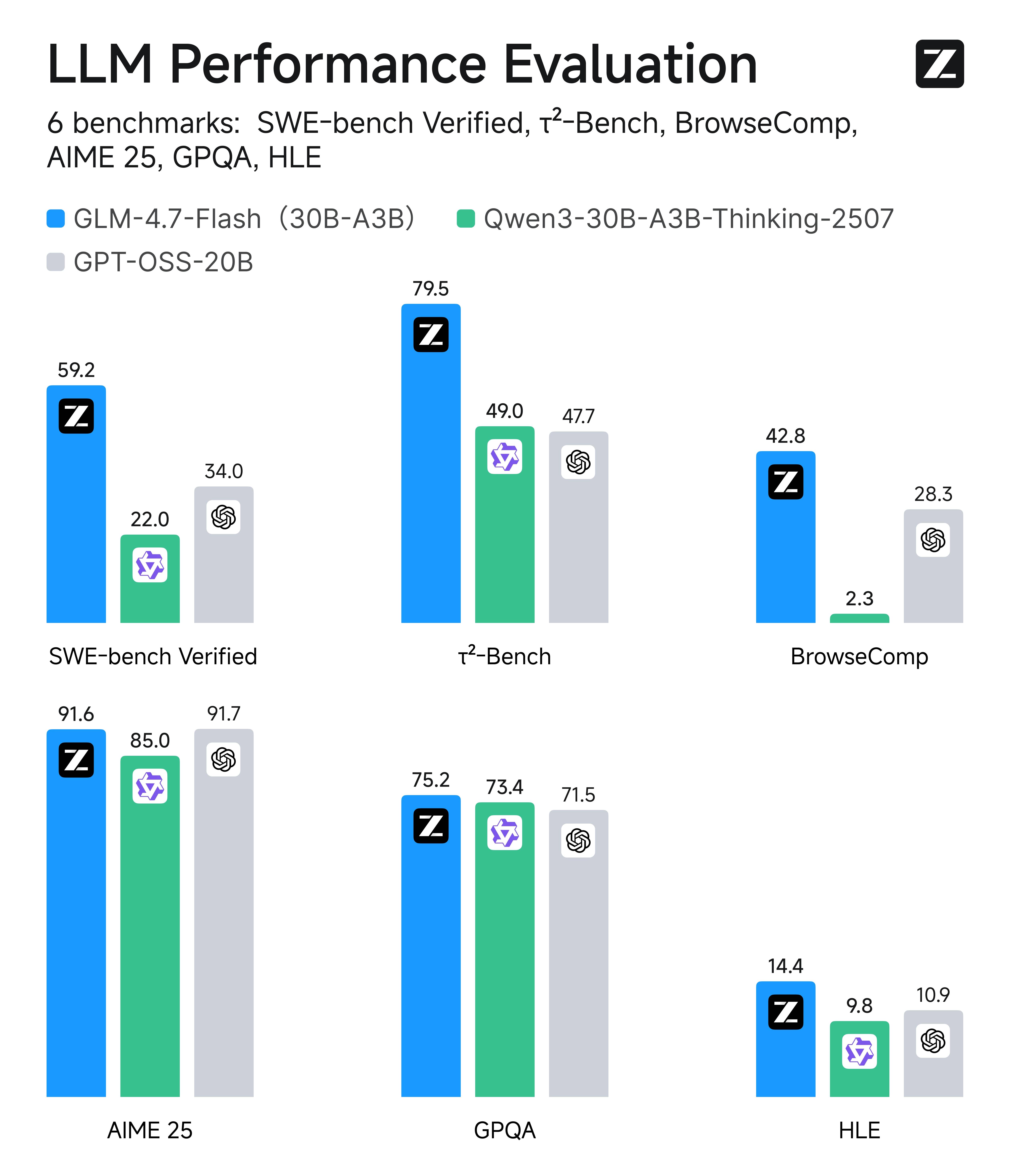
    在SWE-bench Verified、τ²-Bench等主流基准测试中，GLM-4.7-Flash 的综合表现在相同尺寸模型系列中取得开源SOTA分数。另外，相比于同尺寸模型，GLM-4.7-Flash同样具有出色的前端和后端开发能力。

    在内部的编程实测中，GLM-4.7-Flash在前后端任务上表现出色。在编程场景之外，我们也推荐大家在中文写作、翻译、长文本、情感/角色扮演等通用场景中体验GLM-4.7-Flash。
    ![Description](https://cdn.bigmodel.cn/markdown/176886970126120260120-084119.jpeg?attname=20260120-084119.jpeg)
  </Step>
</Steps>

## 使用资源

<CardGroup cols={2}>
  <Card title="体验中心" href="https://bigmodel.cn/trialcenter/modeltrial/text?modelCode=glm-4.7-flash">
    快速测试模型在业务场景上的效果
  </Card>

  <Card title="接口文档" href="/api-reference/%E6%A8%A1%E5%9E%8B-api/%E5%AF%B9%E8%AF%9D%E8%A1%A5%E5%85%A8">
    API 调用方式
  </Card>
</CardGroup>

## 调用示例

以下是完整的调用示例，帮助您快速上手 GLM-4.7-Flash 模型。

<Tabs>
  <Tab title="cURL">
    **基础调用**

    ```bash theme={null}
    curl -X POST "https://open.bigmodel.cn/api/paas/v4/chat/completions" \
        -H "Content-Type: application/json" \
        -H "Authorization: Bearer YOUR_API_KEY" \
        -d '{
            "model": "glm-4.7-flash",
            "messages": [
                {
                    "role": "user",
                    "content": "作为一名营销专家，请为我的产品创作一个吸引人的口号"
                },
                {
                    "role": "assistant",
                    "content": "当然，要创作一个吸引人的口号，请告诉我一些关于您产品的信息"
                },
                {
                    "role": "user",
                    "content": "智谱开放平台"
                }
            ],
            "thinking": {
                "type": "enabled"
            },
            "max_tokens": 65536,
            "temperature": 1.0
        }'
    ```

    **流式调用**

    ```bash theme={null}
    curl -X POST "https://open.bigmodel.cn/api/paas/v4/chat/completions" \
        -H "Content-Type: application/json" \
        -H "Authorization: Bearer YOUR_API_KEY" \
        -d '{
            "model": "glm-4.7-flash",
            "messages": [
                {
                    "role": "user",
                    "content": "作为一名营销专家，请为我的产品创作一个吸引人的口号"
                },
                {
                    "role": "assistant",
                    "content": "当然，要创作一个吸引人的口号，请告诉我一些关于您产品的信息"
                },
                {
                    "role": "user",
                    "content": "智谱开放平台"
                }
            ],
            "thinking": {
                "type": "enabled"
            },
            "stream": true,
            "max_tokens": 65536,
            "temperature": 1.0
        }'
    ```
  </Tab>

  <Tab title="Python">
    **安装 SDK**

    ```bash theme={null}
    # 安装最新版本
    pip install zai-sdk
    # 或指定版本
    pip install zai-sdk==0.2.3
    ```

    **验证安装**

    ```python theme={null}
    import zai
    print(zai.__version__)
    ```

    **基础调用**

    ```python theme={null}
    from zai import ZhipuAiClient

    client = ZhipuAiClient(api_key="YOUR_API_KEY")  # 请填写您自己的 API Key

    response = client.chat.completions.create(
        model="glm-4.7-flash",
        messages=[
            {"role": "user", "content": "作为一名营销专家，请为我的产品创作一个吸引人的口号"},
            {"role": "assistant", "content": "当然，要创作一个吸引人的口号，请告诉我一些关于您产品的信息"},
            {"role": "user", "content": "智谱开放平台"}
        ],
        thinking={
            "type": "enabled",    # 启用深度思考模式
        },
        max_tokens=65536,          # 最大输出 tokens
        temperature=1.0           # 控制输出的随机性
    )

    # 获取完整回复
    print(response.choices[0].message)
    ```

    **流式调用**

    ```python theme={null}
    from zai import ZhipuAiClient

    client = ZhipuAiClient(api_key="YOUR_API_KEY")  # 请填写您自己的 API Key

    response = client.chat.completions.create(
        model="glm-4.7-flash",
        messages=[
            {"role": "user", "content": "作为一名营销专家，请为我的产品创作一个吸引人的口号"},
            {"role": "assistant", "content": "当然，要创作一个吸引人的口号，请告诉我一些关于您产品的信息"},
            {"role": "user", "content": "智谱开放平台"}
            ],
        thinking={
            "type": "enabled",    # 启用深度思考模式
        },
        stream=True,              # 启用流式输出
        max_tokens=65536,          # 最大输出tokens
        temperature=1.0           # 控制输出的随机性
    )

    # 流式获取回复
    for chunk in response:
        if chunk.choices[0].delta.reasoning_content:
            print(chunk.choices[0].delta.reasoning_content, end='', flush=True)

        if chunk.choices[0].delta.content:
            print(chunk.choices[0].delta.content, end='', flush=True)
    ```
  </Tab>

  <Tab title="Java">
    **安装 SDK**

    **Maven**

    ```xml theme={null}
    <dependency>
        <groupId>ai.z.openapi</groupId>
        <artifactId>zai-sdk</artifactId>
        <version>0.3.5</version>
    </dependency>
    ```

    **Gradle (Groovy)**

    ```groovy theme={null}
    implementation 'ai.z.openapi:zai-sdk:0.3.5'
    ```

    **基础调用**

    ```java theme={null}
    import ai.z.openapi.ZhipuAiClient;
    import ai.z.openapi.service.model.ChatCompletionCreateParams;
    import ai.z.openapi.service.model.ChatCompletionResponse;
    import ai.z.openapi.service.model.ChatMessage;
    import ai.z.openapi.service.model.ChatMessageRole;
    import ai.z.openapi.service.model.ChatThinking;
    import java.util.Arrays;

    public class BasicChat {
        public static void main(String[] args) {
            // 初始化客户端
            ZhipuAiClient client = ZhipuAiClient.builder().ofZHIPU()
                .apiKey("YOUR_API_KEY")
                .build();

            // 创建聊天完成请求
            ChatCompletionCreateParams request = ChatCompletionCreateParams.builder()
                .model("glm-4.7-flash")
                .messages(Arrays.asList(
                    ChatMessage.builder()
                        .role(ChatMessageRole.USER.value())
                        .content("作为一名营销专家，请为我的产品创作一个吸引人的口号")
                        .build(),
                    ChatMessage.builder()
                        .role(ChatMessageRole.ASSISTANT.value())
                        .content("当然，要创作一个吸引人的口号，请告诉我一些关于您产品的信息")
                        .build(),
                    ChatMessage.builder()
                        .role(ChatMessageRole.USER.value())
                        .content("智谱开放平台")
                        .build()
                ))
                .thinking(ChatThinking.builder().type("enabled").build())
                .maxTokens(65536)
                .temperature(1.0f)
                .build();

            // 发送请求
            ChatCompletionResponse response = client.chat().createChatCompletion(request);

            // 获取回复
            if (response.isSuccess()) {
                Object reply = response.getData().getChoices().get(0).getMessage();
                System.out.println("AI 回复: " + reply);
            } else {
                System.err.println("错误: " + response.getMsg());
            }
        }
    }
    ```

    **流式调用**

    ```java theme={null}
    import ai.z.openapi.ZhipuAiClient;
    import ai.z.openapi.service.model.ChatCompletionCreateParams;
    import ai.z.openapi.service.model.ChatCompletionResponse;
    import ai.z.openapi.service.model.ChatMessage;
    import ai.z.openapi.service.model.ChatMessageRole;
    import ai.z.openapi.service.model.ChatThinking;
    import ai.z.openapi.service.model.Delta;
    import java.util.Arrays;

    public class StreamingChat {
        public static void main(String[] args) {
            // 初始化客户端
            ZhipuAiClient client = ZhipuAiClient.builder().ofZHIPU()
                .apiKey("YOUR_API_KEY")
                .build();

            // 创建流式聊天完成请求
            ChatCompletionCreateParams request = ChatCompletionCreateParams.builder()
                .model("glm-4.7-flash")
                .messages(Arrays.asList(
                    ChatMessage.builder()
                        .role(ChatMessageRole.USER.value())
                        .content("作为一名营销专家，请为我的产品创作一个吸引人的口号")
                        .build(),
                    ChatMessage.builder()
                        .role(ChatMessageRole.ASSISTANT.value())
                        .content("当然，要创作一个吸引人的口号，请告诉我一些关于您产品的信息")
                        .build(),
                    ChatMessage.builder()
                        .role(ChatMessageRole.USER.value())
                        .content("智谱开放平台")
                        .build()
                ))
                .thinking(ChatThinking.builder().type("enabled").build())
                .stream(true)  // 启用流式输出
                .maxTokens(65536)
                .temperature(1.0f)
                .build();

            ChatCompletionResponse response = client.chat().createChatCompletion(request);

            if (response.isSuccess()) {
                response.getFlowable().subscribe(
                    // Process streaming message data
                    data -> {
                        if (data.getChoices() != null && !data.getChoices().isEmpty()) {
                            Delta delta = data.getChoices().get(0).getDelta();
                            System.out.print(delta + "\n");
                        }
                    },
                    // Process streaming response error
                    error -> System.err.println("\nStream error: " + error.getMessage()),
                    // Process streaming response completion event
                    () -> System.out.println("\nStreaming response completed")
                );
            } else {
                System.err.println("Error: " + response.getMsg());
            }
        }
    }
    ```
  </Tab>

  <Tab title="Python(旧)">
    **更新 SDK 至 2.1.5.20250726**

    ```bash theme={null}
    # 安装最新版本
    pip install zhipuai

    # 或指定版本
    pip install zhipuai==2.1.5.20250726
    ```

    **基础调用**

    ```python theme={null}
    from zhipuai import ZhipuAI

    client = ZhipuAI(api_key="YOUR_API_KEY")  # 请填写您自己的 API Key

    response = client.chat.completions.create(
        model="glm-4.7-flash",
        messages=[
            {"role": "user", "content": "作为一名营销专家，请为我的产品创作一个吸引人的口号"},
            {"role": "assistant", "content": "当然，要创作一个吸引人的口号，请告诉我一些关于您产品的信息"},
            {"role": "user", "content": "智谱开放平台"}
        ],
        thinking={
            "type": "enabled",
        },
        max_tokens=65536,
        temperature=1.0
    )

    # 获取完整回复
    print(response.choices[0].message)
    ```

    **流式调用**

    ```python theme={null}
    from zhipuai import ZhipuAI

    client = ZhipuAI(api_key="YOUR_API_KEY")  # 请填写您自己的 API Key

    response = client.chat.completions.create(
        model="glm-4.7-flash",
        messages=[
            {"role": "user", "content": "作为一名营销专家，请为我的产品创作一个吸引人的口号"},
            {"role": "assistant", "content": "当然，要创作一个吸引人的口号，请告诉我一些关于您产品的信息"},
            {"role": "user", "content": "智谱开放平台"}
        ],
        thinking={
            "type": "enabled",
        },
        stream=True,              # 启用流式输出
        max_tokens=65536,
        temperature=1.0
        )

    # 流式获取回复
    for chunk in response:
        if chunk.choices[0].delta.reasoning_content:
            print(chunk.choices[0].delta.reasoning_content, end='', flush=True)

        if chunk.choices[0].delta.content:
            print(chunk.choices[0].delta.content, end='', flush=True)
    ```
  </Tab>
</Tabs>
