> ## Documentation Index
> Fetch the complete documentation index at: https://docs.bigmodel.cn/llms.txt
> Use this file to discover all available pages before exploring further.
# GLM-4.5
## 概览
GLM-4.5 和 GLM-4.5-Air 是专为智能体应用打造的基础模型。GLM-4.5 和 GLM-4.5-Air 均使用了混合专家(Mixture-of-Experts)架构。GLM-4.5 总参数达 3550 亿,激活参数为 320 亿; GLM-4.5-Air 采用更精简的设计,总参数为 1060 亿,激活参数为 120 亿。
GLM-4.5 和 GLM-4.5-Air 使用了相似的训练流程:首先在 15 万亿令牌的通用数据上进行了预训练。然后在代码、推理、智能体等领域的数据上进行了针对性训练,并将上下文长度扩展到 128K,最后通过强化学习进一步增强了模型的推理、代码与智能体能力。
GLM-4.5 和 GLM-4.5-Air 在工具调用、网页浏览、软件工程、前端编程领域进行了优化,可以接入 Claude Code、Roo Code 等代码智能体中使用,也可以通过工具调用接口支持任意的智能体应用。
GLM-4.5 和 GLM-4.5-Air 均采用混合推理模式,提供两种模式:用于复杂推理和工具使用的思考模式,以及用于即时响应的非思考模式。可通过 thinking.type 参数启用或关闭(支持 enabled 和 disabled 两种设置),默认开启动态思考功能。
}>
文本
}>
文本
}>
128K
}>
96K
## GLM-4.5 系列模型
GLM-4.5、GLM-4.5-X 模型即将下线,建议选择最新旗舰文本模型 [GLM-4.7](/cn/guide/models/text/glm-4.7)。
GLM
GLM-4.5
我们强大的推理模型,3550 亿参数
AirX
GLM-4.5-AirX
轻量级 强性能 极速响应
## 能力支持
}>
启用深度思考模式,提供更深层次的推理分析
}>
支持实时流式响应,提升用户交互体验
}>
强大的工具调用能力,支持多种外部工具集成
}>
智能缓存机制,优化长对话性能
}>
支持 JSON 等结构化格式输出,便于系统集成
}>
可灵活调用外部 MCP 工具与数据源,扩展应用场景
## 详细介绍
### 总览
衡量 AGI 的第一性原理,是在不损失原有能力的前提下融合更多通用智能能力,GLM-4.5 是我们对此理念的首次完整呈现。GLM-4.5 融合更多复杂推理、代码和智能体等多种通用能力并有幸取得技术突破,**首次在单个模型中实现将推理、编码和 Agent 能力原生融合,以满足 Agent 应用的复杂需求。**
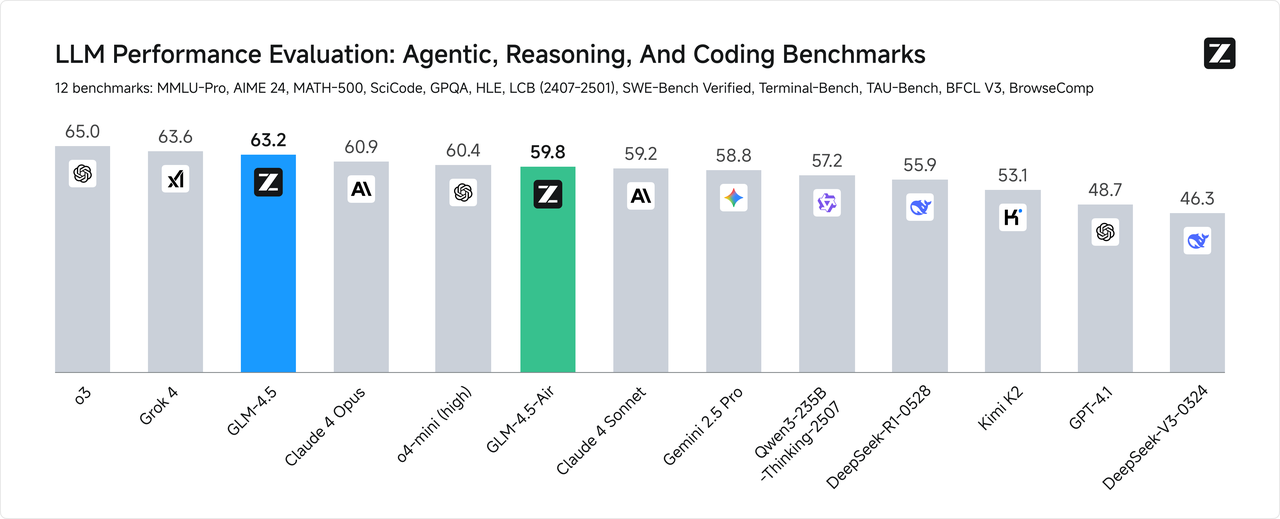
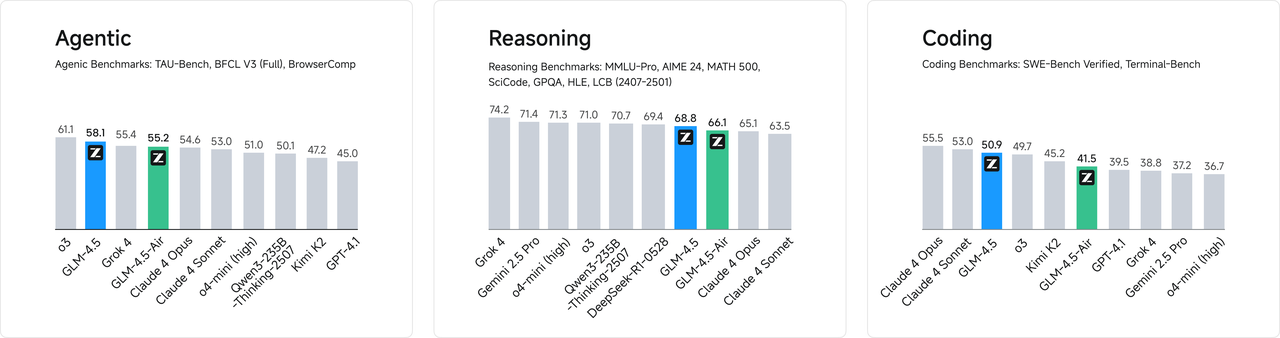
为综合衡量模型的通用能力,我们选择了最具有代表性的12 个评测基准,包括MMLU Pro、AIME24、MATH 500、SciCode、GPQA 、HLE、LiveCodeBench、SWE-Bench、Terminal-bench、TAU-Bench、BFCL v3和BrowseComp。**综合平均分,GLM-4.5 取得了全球模型第三。**
### 更高的参数效率
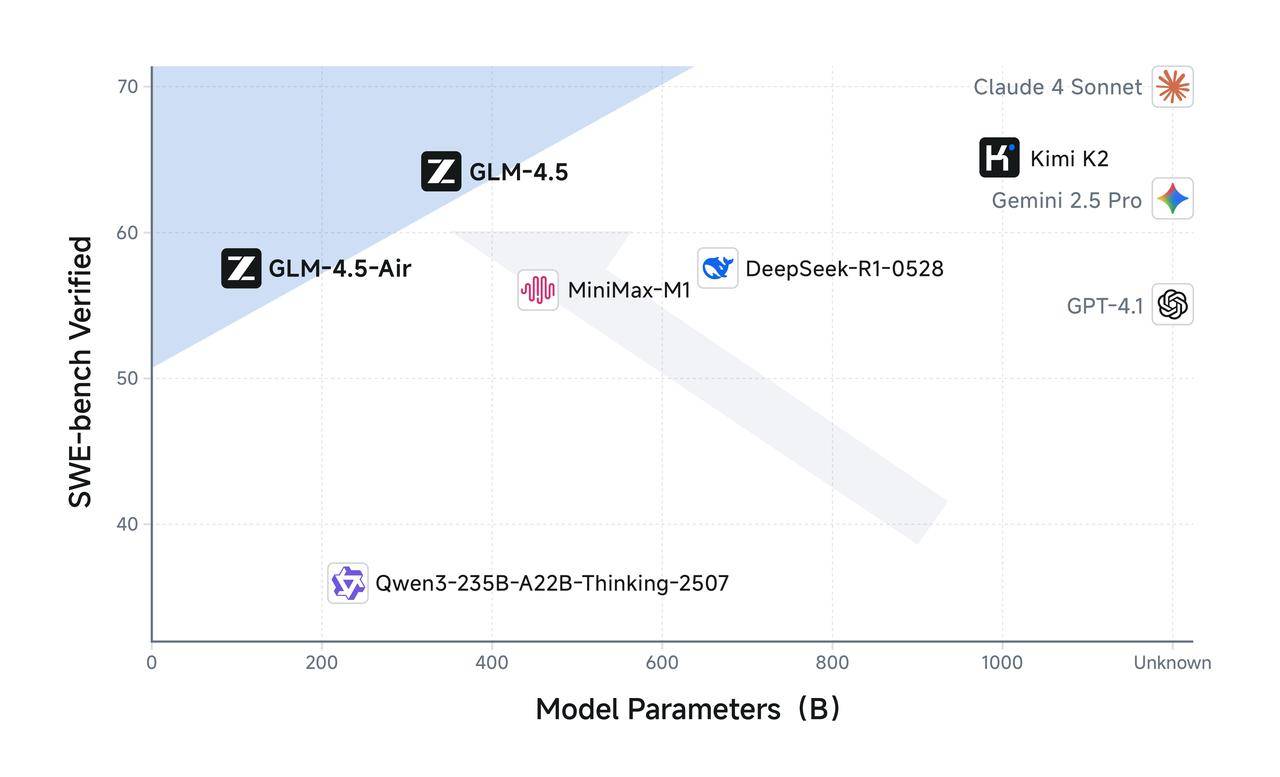
GLM-4.5 参数量为 DeepSeek-R1 的 1/2、Kimi-K2 的 1/3,但同样在多项标准基准测试中表现得更为出色,这得益于GLM模型的更高参数效率。值得注意的是,GLM-4.5-Air 以 **106B 总参数 / 12B 激活参数**实现了重要突破,在 Artificial Analysis 等推理基准上超越 Gemini 2.5 Flash、Qwen3-235B、Claude 4 Opus 等模型,性能位列国产前三。
在 SWE-Bench Verified 等图谱中,GLM-4.5 系列位于**性能/参数比帕累托前沿**。
### 低成本、高速度
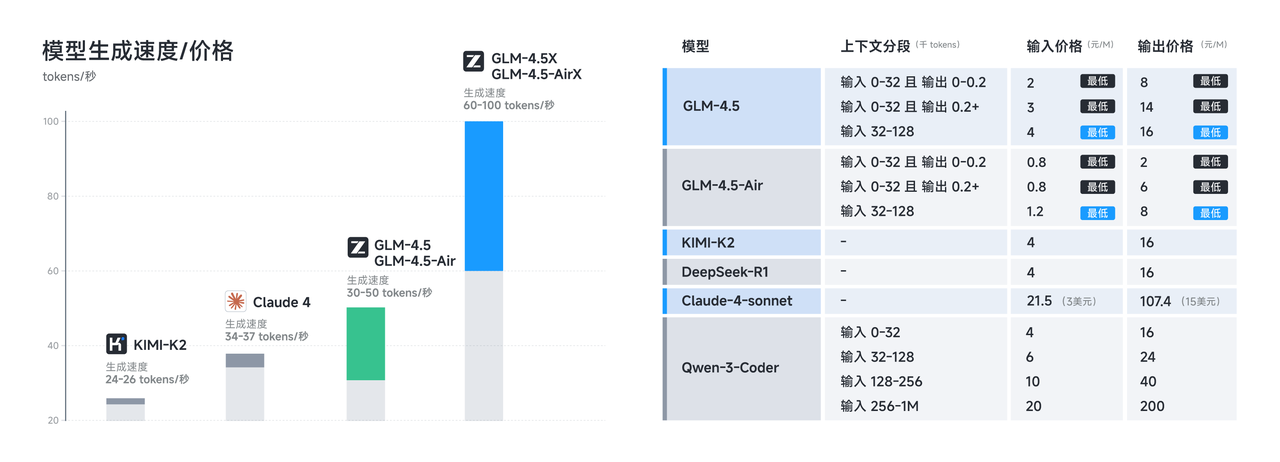
在性能优化之外,**GLM-4.5 系列也在成本和效率上实现突破**,由此带来远低于主流模型定价:API 调用价格低至**输入 0.8 元/百万 tokens,输出 2 元/百万 tokens**
同时,**高速版本实测生成速度超过 100 tokens/秒**,支持低延迟、高并发的实际部署需求,兼顾成本效益与交互体验。
### 真实体验
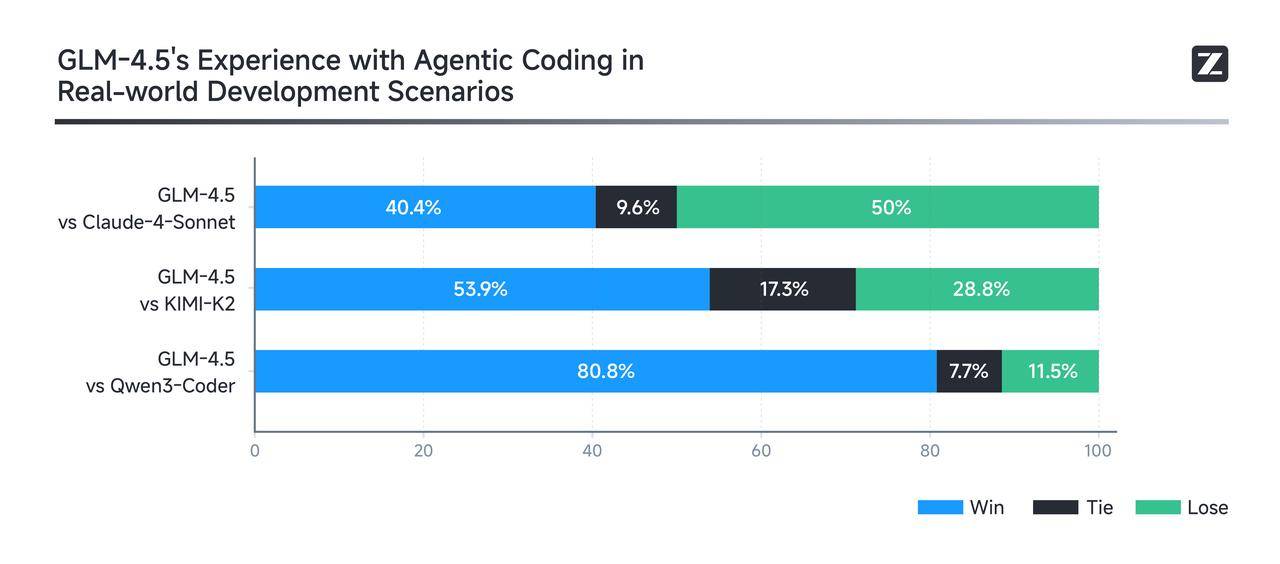
真实场景表现比榜单更重要。为了评测GLM-4.5在真实场景Agent Coding中的效果,我们接入Claude Code与Claude-4-Sonnet、Kimi-K2、Qwen3-Coder进行对比测试。测试采用52 个编程开发任务,涵盖六大开发领域,在独立容器环境中进行多轮交互测试。
实测结果显示(如下图),GLM-4.5 相对其他开源模型展现出强劲竞争优势,特别在工具调用可靠性和任务完成度方面表现突出。GLM-4.5 相比 Claude-4-Sonnet 仍有提升空间,在大部分场景中可以实现平替的效果。为确保评测透明度,我们公布了[52道题目及Agent轨迹](https://huggingface.co/datasets/zai-org/CC-Bench-trajectories),供业界验证复现。
## 推荐场景
**Tips:**
1. 点击“体验一下”会跳转至体验中心,建议先看完使用指南再体验哦~
2. 体验过程会消耗模型 tokens,如遇体验失败,可通过 [链接](https://bigmodel.cn/special_area) 抢购特价资源包。
**核心能力**:**代码能力**——>智能代码生成|实时代码补全|自动化Bug 修复
1. 覆盖 Python、JavaScript、Java 等主流语言
2. 基于自然语言指令生成结构清晰、可扩展的高质量代码
3. 聚焦真实开发需求,避免模板化输出
**使用案例**:1 小时完成重构级任务,5 分钟生成完整产品原型
**核心能力**:**agent 能力**——>任务自主规划|多工具协同调用|动态环境交互
1. 自动拆解复杂任务,生成清晰的执行步骤规划
2. 灵活调用开发工具,一站式完成编码、调试、验证全流程
3. 基于实时反馈动态调整策略,快速适配任务变更,持续优化执行路径
**使用案例**:在多模块协同开发项目中,交付周期缩短40%,人力投入减少约30%
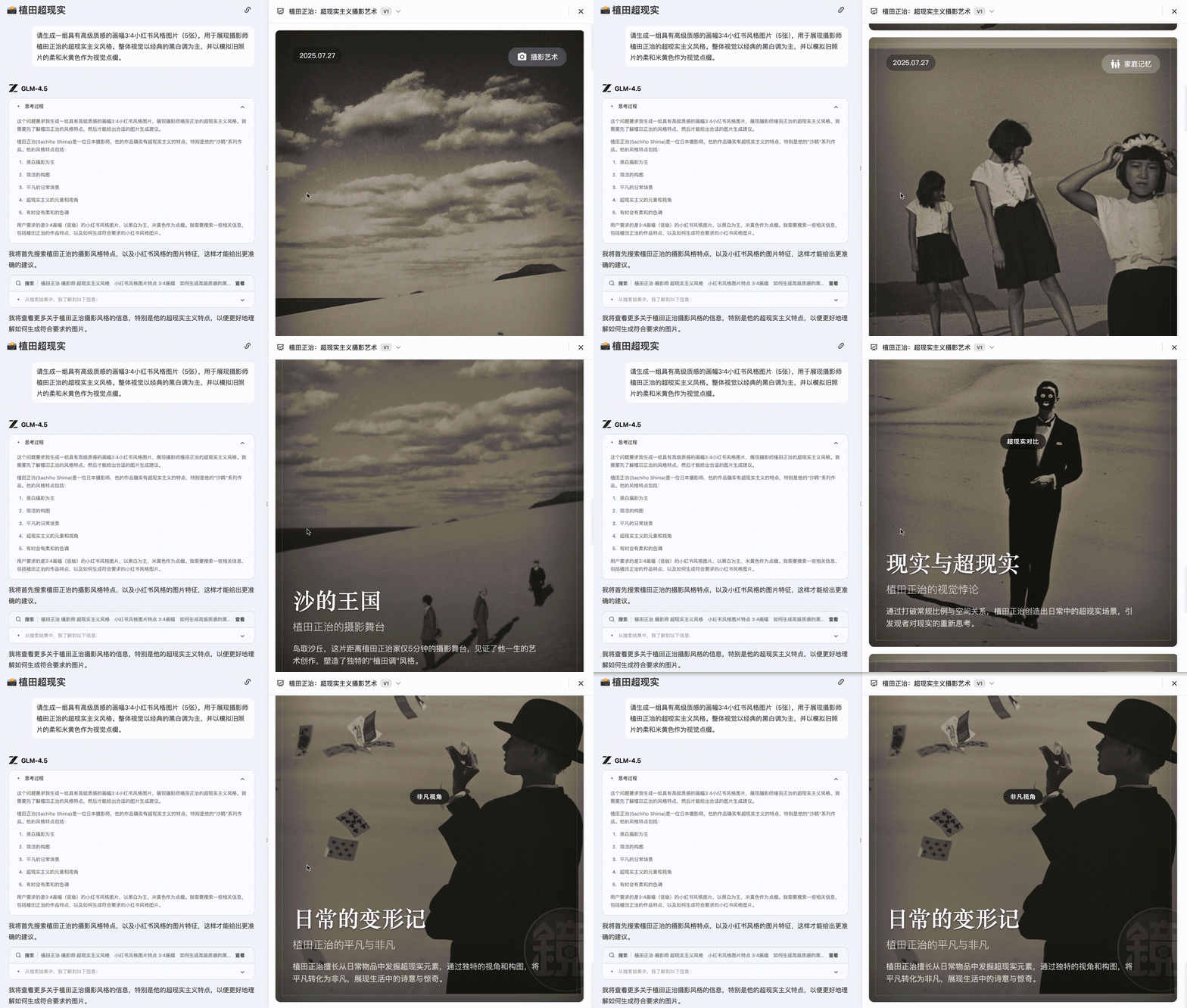
**核心能力**:**PPT 制作**——>逻辑清晰、内容完整、页面呈现
* 主题内容展开:支持基于一个标题或中心思想生成多页 PPT 内容段落
* 逻辑结构组织:自动将内容划分为导语、主体、总结等模块,语义分布合理
* 页面布局提示:可配合使用模板系统,建议内容呈现方式
**使用案例**:适用于办公自动化系统、AI 演示工具及其它效率类产品
**PPT 生成效果**:
 **核心能力**:**模型推理能力**——>精准指令解析|多轮逻辑推理|领域知识融合
1. 深度理解自然语言指令,提取关键意图并转化为可执行任务
2. 支持复杂逻辑链条的多轮推理,高效处理跨步骤、多变量的复合型问题场景
3. 融合领域专业知识和上下文信息,提升推理结果的准确性和稳定性
**使用案例**:在复杂业务流程中,准确率提升60%,推理效率提升70%
[**体验一下**](https://www.bigmodel.cn/trialcenter/modeltrial/text?modelCode=glm-4.5\&q=%e4%bb%8b%e7%bb%8d%e2%80%9c%e6%b8%85%e9%86%92%e6%a2%a6%e2%80%9d%e7%9a%84%e6%a6%82%e5%bf%b5%e4%bb%a5%e5%8f%8a%e5%ae%83%e6%98%af%e5%a6%82%e4%bd%95%e5%b7%a5%e4%bd%9c%e7%9a%84):介绍“清醒梦”的概念以及它是如何工作的。
**核心能力**:**翻译能力**——>上下文一致性强 |风格准确|处理长篇文段优秀
1. 长篇复杂语句翻译:保持语义连贯与结构准确,适用于政策、学术类材料处理。
2. 风格保持及迁移:能够在翻译过程中保留原文语气或调整为目标语言常用表达风格
3. 小语种及非正式语境支持:覆盖多种语言,同时具备一定的社交文本翻译能力
**使用案例**:用于出版社作品翻译、出海内容本地化、跨境客服、社交媒体平台等场景
[**体验一下**](https://www.bigmodel.cn/trialcenter/modeltrial/text?modelCode=glm-4.5\&q=%e5%b0%86%e4%bb%a5%e4%b8%8b%e8%8b%b1%e6%96%87%e7%bf%bb%e8%af%91%e4%b8%ba%e4%b8%ad%e6%96%87%ef%bc%8c%e6%97%a0%e9%9c%80%e6%b3%a8%e9%87%8a%ef%bc%8c%e4%bb%85%e8%be%93%e5%87%ba%e7%bf%bb%e8%af%91%e5%90%8e%e7%9a%84%e6%96%87%e6%9c%ac%ef%bc%9aHe+smiled+understandingly%e2%80%94much+more+than+understandingly.+It+was+one+of+those+rare+smiles+with+a+quality+of+eternal+reassurance+in+it%2c+that+you+may+come+across+four+or+five+times+in+life.):将以下英文翻译为中文,无需注释,仅输出翻译后的文本:He smiled understandingly—much more than understandingly. It was one of those rare smiles with a quality of eternal reassurance in it, that you may come across four or five times in life.
**核心能力**:**创意写作**——>表达自然|情绪丰富|结构完整
* 根据设定的主题、角色或世界观生成连贯、有起承转合的文学性文本
* 可根据受众定位、产品特征生成富有情感感染力的文案内容
* 短视频、新媒体脚本:支持符合抖音、小红书等平台风格的轻内容生产,结合情绪调控和叙事节奏
**使用案例**:适合部署于内容创作平台、营销工具链或 AI 写作助手中,提升内容生产效率与个性化程度
[**体验一下**](https://www.bigmodel.cn/trialcenter/modeltrial/text?modelCode=glm-4.5\&q=%e5%b8%ae%e6%88%91%e4%b8%ba%e6%88%91%e7%9a%84%e9%be%99%e4%b8%8e%e5%9c%b0%e4%b8%8b%e5%9f%8e%e8%a7%92%e8%89%b2%e5%86%99%e4%b8%80%e4%b8%aa%e7%ae%80%e7%9f%ad%e7%9a%84%e8%83%8c%e6%99%af%e6%95%85%e4%ba%8b%ef%bc%9a%e4%b8%80%e4%b8%aa%e7%ac%a8%e6%8b%99%e7%9a%84%e5%b7%ab%e5%b8%88):帮我为我的龙与地下城角色写一个简短的背景故事:一个笨拙的巫师
**核心能力**:**拟人化表达**——>语气自然、情绪表达准确、角色行为一致
* 角色扮演对话系统:保持设定角色在多轮对话中的语气风格与行为一致性
* 情感文案生成:表达方式富有温度,适合打造“有人味”的品牌或用户陪伴式产品
* 虚拟形象内容创作:支持生成符合虚拟主播、人设IP的语料,如社交发言、粉丝互动等
**使用案例**:适合应用于虚拟人、社交 AI、品牌人格化运营等场景
[**体验一下**](https://www.bigmodel.cn/trialcenter/modeltrial/text?modelCode=glm-4.5\&q=%e4%bb%a5%e4%b8%80%e5%8f%aa%e7%8b%97%e7%9a%84%e5%8f%a3%e5%90%bb%e5%86%99%e4%b8%80%e6%ae%b5%e6%97%a5%e8%ae%b0%ef%bc%8c%e4%bb%8a%e5%a4%a9%e5%ae%83%e5%9c%a8%e5%85%ac%e5%9b%ad%e6%95%a3%e6%ad%a5%ef%bc%8c%e8%bf%98%e8%bf%bd%e4%ba%86%e4%b8%80%e5%8f%aa%e6%9d%be%e9%bc%a0):以一只狗的口吻写一段日记,今天它在公园散步,还追了一只松鼠。
## 使用资源
快速测试模型在业务场景上的效果
API 调用方式
## 调用示例
### 思考模式
GLM 4.5 提供了“深度思考模式”,用户可以通过设置 `thinking.type` 参数来启用或关闭该模式。该参数支持两种取值:`enabled`(动态)和 `disabled` (禁用)。默认情况下开启动态思考功能。
* 简单任务(无需思考):对于不需要复杂推理的简单请求(例如事实检索或分类),无需思考。
* 智谱的成立时间。
* 翻译 I love you 这句英语成中文。
* 中等任务(默认/需要一定程度的思考):许多常见请求都需要一定程度的分步处理或更深入的理解。GLM-4.5系列模型可以灵活运用思考能力来处理以下任务。
* 为什么木星拥有较多的卫星,而土星却比木星的卫星少得多?
* 从北京去上海,对比乘坐飞机和动车的优劣势。
* 困难任务(最大思维能力):对于真正复杂的挑战,例如解决复杂的数学问题,联网问题,编码问题,这类任务要求模型充分发挥推理和规划能力,通常需要经过许多内部步骤才能提供答案。
* 详细解释 MoE 模型中不同专家是如何配合的。
* 根据上证指数的近一周的波动情况和时政信息,预测我是否应该购入股票指数 ETF,为什么?
### 示例代码
以下是完整的调用示例,帮助您快速上手 GLM-4.5 模型。
**基础调用**
```bash theme={null}
curl -X POST "https://open.bigmodel.cn/api/paas/v4/chat/completions" \
-H "Content-Type: application/json" \
-H "Authorization: Bearer YOUR_API_KEY" \
-d '{
"model": "glm-4.5",
"messages": [
{
"role": "user",
"content": "作为一名营销专家,请为我的产品创作一个吸引人的口号"
},
{
"role": "assistant",
"content": "当然,要创作一个吸引人的口号,请告诉我一些关于您产品的信息"
},
{
"role": "user",
"content": "智谱开放平台"
}
],
"thinking": {
"type": "enabled"
},
"max_tokens": 4096,
"temperature": 0.6
}'
```
**流式调用**
```bash theme={null}
curl -X POST "https://open.bigmodel.cn/api/paas/v4/chat/completions" \
-H "Content-Type: application/json" \
-H "Authorization: Bearer YOUR_API_KEY" \
-d '{
"model": "glm-4.5",
"messages": [
{
"role": "user",
"content": "作为一名营销专家,请为我的产品创作一个吸引人的口号"
},
{
"role": "assistant",
"content": "当然,要创作一个吸引人的口号,请告诉我一些关于您产品的信息"
},
{
"role": "user",
"content": "智谱开放平台"
}
],
"thinking": {
"type": "enabled"
},
"stream": true,
"max_tokens": 4096,
"temperature": 0.6
}'
```
**安装 SDK**
```bash theme={null}
# 安装最新版本
pip install zai-sdk
# 或指定版本
pip install zai-sdk==0.2.3
```
**验证安装**
```python theme={null}
import zai
print(zai.__version__)
```
**基础调用**
```python theme={null}
from zai import ZhipuAiClient
client = ZhipuAiClient(api_key="YOUR_API_KEY") # 请填写您自己的 API Key
response = client.chat.completions.create(
model="glm-4.5",
messages=[
{"role": "user", "content": "作为一名营销专家,请为我的产品创作一个吸引人的口号"},
{"role": "assistant", "content": "当然,要创作一个吸引人的口号,请告诉我一些关于您产品的信息"},
{"role": "user", "content": "智谱开放平台"}
],
thinking={
"type": "enabled", # 启用深度思考模式
},
max_tokens=4096, # 最大输出 tokens
temperature=0.6 # 控制输出的随机性
)
# 获取完整回复
print(response.choices[0].message)
```
**流式调用**
```python theme={null}
from zai import ZhipuAiClient
client = ZhipuAiClient(api_key="YOUR_API_KEY") # 请填写您自己的 API Key
response = client.chat.completions.create(
model="glm-4.5",
messages=[
{"role": "user", "content": "作为一名营销专家,请为我的产品创作一个吸引人的口号"},
{"role": "assistant", "content": "当然,要创作一个吸引人的口号,请告诉我一些关于您产品的信息"},
{"role": "user", "content": "智谱开放平台"}
],
thinking={
"type": "enabled", # 启用深度思考模式
},
stream=True, # 启用流式输出
max_tokens=4096, # 最大输出tokens
temperature=0.6 # 控制输出的随机性
)
# 流式获取回复
for chunk in response:
if chunk.choices[0].delta.reasoning_content:
print(chunk.choices[0].delta.reasoning_content, end='', flush=True)
if chunk.choices[0].delta.content:
print(chunk.choices[0].delta.content, end='', flush=True)
```
**安装 SDK**
**Maven**
```xml theme={null}
ai.z.openapi
zai-sdk
0.3.5
```
**Gradle (Groovy)**
```groovy theme={null}
implementation 'ai.z.openapi:zai-sdk:0.3.5'
```
**基础调用**
```java theme={null}
import ai.z.openapi.ZhipuAiClient;
import ai.z.openapi.service.model.ChatCompletionCreateParams;
import ai.z.openapi.service.model.ChatCompletionResponse;
import ai.z.openapi.service.model.ChatMessage;
import ai.z.openapi.service.model.ChatMessageRole;
import ai.z.openapi.service.model.ChatThinking;
import java.util.Arrays;
public class BasicChat {
public static void main(String[] args) {
// 初始化客户端
ZhipuAiClient client = ZhipuAiClient.builder().ofZHIPU()
.apiKey("YOUR_API_KEY")
.build();
// 创建聊天完成请求
ChatCompletionCreateParams request = ChatCompletionCreateParams.builder()
.model("glm-4.5")
.messages(Arrays.asList(
ChatMessage.builder()
.role(ChatMessageRole.USER.value())
.content("作为一名营销专家,请为我的产品创作一个吸引人的口号")
.build(),
ChatMessage.builder()
.role(ChatMessageRole.ASSISTANT.value())
.content("当然,要创作一个吸引人的口号,请告诉我一些关于您产品的信息")
.build(),
ChatMessage.builder()
.role(ChatMessageRole.USER.value())
.content("智谱开放平台")
.build()
))
.thinking(ChatThinking.builder().type("enabled").build())
.maxTokens(4096)
.temperature(0.6f)
.build();
// 发送请求
ChatCompletionResponse response = client.chat().createChatCompletion(request);
// 获取回复
if (response.isSuccess()) {
Object reply = response.getData().getChoices().get(0).getMessage();
System.out.println("AI 回复: " + reply);
} else {
System.err.println("错误: " + response.getMsg());
}
}
}
```
**流式调用**
```java theme={null}
import ai.z.openapi.ZhipuAiClient;
import ai.z.openapi.service.model.ChatCompletionCreateParams;
import ai.z.openapi.service.model.ChatCompletionResponse;
import ai.z.openapi.service.model.ChatMessage;
import ai.z.openapi.service.model.ChatMessageRole;
import ai.z.openapi.service.model.ChatThinking;
import ai.z.openapi.service.model.Delta;
import java.util.Arrays;
public class StreamingChat {
public static void main(String[] args) {
// 初始化客户端
ZhipuAiClient client = ZhipuAiClient.builder().ofZHIPU()
.apiKey("YOUR_API_KEY")
.build();
// 创建流式聊天完成请求
ChatCompletionCreateParams request = ChatCompletionCreateParams.builder()
.model("glm-4.5")
.messages(Arrays.asList(
ChatMessage.builder()
.role(ChatMessageRole.USER.value())
.content("作为一名营销专家,请为我的产品创作一个吸引人的口号")
.build(),
ChatMessage.builder()
.role(ChatMessageRole.ASSISTANT.value())
.content("当然,要创作一个吸引人的口号,请告诉我一些关于您产品的信息")
.build(),
ChatMessage.builder()
.role(ChatMessageRole.USER.value())
.content("智谱开放平台")
.build()
))
.thinking(ChatThinking.builder().type("enabled").build())
.stream(true) // 启用流式输出
.maxTokens(4096)
.temperature(0.6f)
.build();
ChatCompletionResponse response = client.chat().createChatCompletion(request);
if (response.isSuccess()) {
response.getFlowable().subscribe(
// Process streaming message data
data -> {
if (data.getChoices() != null && !data.getChoices().isEmpty()) {
Delta delta = data.getChoices().get(0).getDelta();
System.out.print(delta + "\n");
}},
// Process streaming response error
error -> System.err.println("\nStream error: " + error.getMessage()),
// Process streaming response completion event
() -> System.out.println("\nStreaming response completed")
);
} else {
System.err.println("Error: " + response.getMsg());
}
}
}
```
**更新 SDK 至 2.1.5.20250726**
```bash theme={null}
# 安装最新版本
pip install zhipuai
# 或指定版本
pip install zhipuai==2.1.5.20250726
```
**基础调用**
```python theme={null}
from zhipuai import ZhipuAI
client = ZhipuAI(api_key="YOUR_API_KEY") # 请填写您自己的 API Key
response = client.chat.completions.create(
model="glm-4.5",
messages=[
{"role": "user", "content": "作为一名营销专家,请为我的产品创作一个吸引人的口号"},
{"role": "assistant", "content": "当然,要创作一个吸引人的口号,请告诉我一些关于您产品的信息"},
{"role": "user", "content": "智谱开放平台"}
],
thinking={
"type": "enabled",
},
max_tokens=4096,
temperature=0.6
)
# 获取完整回复
print(response.choices[0].message)
```
**流式调用**
```python theme={null}
from zhipuai import ZhipuAI
client = ZhipuAI(api_key="YOUR_API_KEY") # 请填写您自己的 API Key
response = client.chat.completions.create(
model="glm-4.5",
messages=[
{"role": "user", "content": "作为一名营销专家,请为我的产品创作一个吸引人的口号"},
{"role": "assistant", "content": "当然,要创作一个吸引人的口号,请告诉我一些关于您产品的信息"},
{"role": "user", "content": "智谱开放平台"}
],
thinking={
"type": "enabled",
},
stream=True, # 启用流式输出
max_tokens=4096,
temperature=0.6
)
# 流式获取回复
for chunk in response:
if chunk.choices[0].delta.reasoning_content:
print(chunk.choices[0].delta.reasoning_content, end='', flush=True)
if chunk.choices[0].delta.content:
print(chunk.choices[0].delta.content, end='', flush=True)
```
**核心能力**:**模型推理能力**——>精准指令解析|多轮逻辑推理|领域知识融合
1. 深度理解自然语言指令,提取关键意图并转化为可执行任务
2. 支持复杂逻辑链条的多轮推理,高效处理跨步骤、多变量的复合型问题场景
3. 融合领域专业知识和上下文信息,提升推理结果的准确性和稳定性
**使用案例**:在复杂业务流程中,准确率提升60%,推理效率提升70%
[**体验一下**](https://www.bigmodel.cn/trialcenter/modeltrial/text?modelCode=glm-4.5\&q=%e4%bb%8b%e7%bb%8d%e2%80%9c%e6%b8%85%e9%86%92%e6%a2%a6%e2%80%9d%e7%9a%84%e6%a6%82%e5%bf%b5%e4%bb%a5%e5%8f%8a%e5%ae%83%e6%98%af%e5%a6%82%e4%bd%95%e5%b7%a5%e4%bd%9c%e7%9a%84):介绍“清醒梦”的概念以及它是如何工作的。
**核心能力**:**翻译能力**——>上下文一致性强 |风格准确|处理长篇文段优秀
1. 长篇复杂语句翻译:保持语义连贯与结构准确,适用于政策、学术类材料处理。
2. 风格保持及迁移:能够在翻译过程中保留原文语气或调整为目标语言常用表达风格
3. 小语种及非正式语境支持:覆盖多种语言,同时具备一定的社交文本翻译能力
**使用案例**:用于出版社作品翻译、出海内容本地化、跨境客服、社交媒体平台等场景
[**体验一下**](https://www.bigmodel.cn/trialcenter/modeltrial/text?modelCode=glm-4.5\&q=%e5%b0%86%e4%bb%a5%e4%b8%8b%e8%8b%b1%e6%96%87%e7%bf%bb%e8%af%91%e4%b8%ba%e4%b8%ad%e6%96%87%ef%bc%8c%e6%97%a0%e9%9c%80%e6%b3%a8%e9%87%8a%ef%bc%8c%e4%bb%85%e8%be%93%e5%87%ba%e7%bf%bb%e8%af%91%e5%90%8e%e7%9a%84%e6%96%87%e6%9c%ac%ef%bc%9aHe+smiled+understandingly%e2%80%94much+more+than+understandingly.+It+was+one+of+those+rare+smiles+with+a+quality+of+eternal+reassurance+in+it%2c+that+you+may+come+across+four+or+five+times+in+life.):将以下英文翻译为中文,无需注释,仅输出翻译后的文本:He smiled understandingly—much more than understandingly. It was one of those rare smiles with a quality of eternal reassurance in it, that you may come across four or five times in life.
**核心能力**:**创意写作**——>表达自然|情绪丰富|结构完整
* 根据设定的主题、角色或世界观生成连贯、有起承转合的文学性文本
* 可根据受众定位、产品特征生成富有情感感染力的文案内容
* 短视频、新媒体脚本:支持符合抖音、小红书等平台风格的轻内容生产,结合情绪调控和叙事节奏
**使用案例**:适合部署于内容创作平台、营销工具链或 AI 写作助手中,提升内容生产效率与个性化程度
[**体验一下**](https://www.bigmodel.cn/trialcenter/modeltrial/text?modelCode=glm-4.5\&q=%e5%b8%ae%e6%88%91%e4%b8%ba%e6%88%91%e7%9a%84%e9%be%99%e4%b8%8e%e5%9c%b0%e4%b8%8b%e5%9f%8e%e8%a7%92%e8%89%b2%e5%86%99%e4%b8%80%e4%b8%aa%e7%ae%80%e7%9f%ad%e7%9a%84%e8%83%8c%e6%99%af%e6%95%85%e4%ba%8b%ef%bc%9a%e4%b8%80%e4%b8%aa%e7%ac%a8%e6%8b%99%e7%9a%84%e5%b7%ab%e5%b8%88):帮我为我的龙与地下城角色写一个简短的背景故事:一个笨拙的巫师
**核心能力**:**拟人化表达**——>语气自然、情绪表达准确、角色行为一致
* 角色扮演对话系统:保持设定角色在多轮对话中的语气风格与行为一致性
* 情感文案生成:表达方式富有温度,适合打造“有人味”的品牌或用户陪伴式产品
* 虚拟形象内容创作:支持生成符合虚拟主播、人设IP的语料,如社交发言、粉丝互动等
**使用案例**:适合应用于虚拟人、社交 AI、品牌人格化运营等场景
[**体验一下**](https://www.bigmodel.cn/trialcenter/modeltrial/text?modelCode=glm-4.5\&q=%e4%bb%a5%e4%b8%80%e5%8f%aa%e7%8b%97%e7%9a%84%e5%8f%a3%e5%90%bb%e5%86%99%e4%b8%80%e6%ae%b5%e6%97%a5%e8%ae%b0%ef%bc%8c%e4%bb%8a%e5%a4%a9%e5%ae%83%e5%9c%a8%e5%85%ac%e5%9b%ad%e6%95%a3%e6%ad%a5%ef%bc%8c%e8%bf%98%e8%bf%bd%e4%ba%86%e4%b8%80%e5%8f%aa%e6%9d%be%e9%bc%a0):以一只狗的口吻写一段日记,今天它在公园散步,还追了一只松鼠。
## 使用资源
快速测试模型在业务场景上的效果
API 调用方式
## 调用示例
### 思考模式
GLM 4.5 提供了“深度思考模式”,用户可以通过设置 `thinking.type` 参数来启用或关闭该模式。该参数支持两种取值:`enabled`(动态)和 `disabled` (禁用)。默认情况下开启动态思考功能。
* 简单任务(无需思考):对于不需要复杂推理的简单请求(例如事实检索或分类),无需思考。
* 智谱的成立时间。
* 翻译 I love you 这句英语成中文。
* 中等任务(默认/需要一定程度的思考):许多常见请求都需要一定程度的分步处理或更深入的理解。GLM-4.5系列模型可以灵活运用思考能力来处理以下任务。
* 为什么木星拥有较多的卫星,而土星却比木星的卫星少得多?
* 从北京去上海,对比乘坐飞机和动车的优劣势。
* 困难任务(最大思维能力):对于真正复杂的挑战,例如解决复杂的数学问题,联网问题,编码问题,这类任务要求模型充分发挥推理和规划能力,通常需要经过许多内部步骤才能提供答案。
* 详细解释 MoE 模型中不同专家是如何配合的。
* 根据上证指数的近一周的波动情况和时政信息,预测我是否应该购入股票指数 ETF,为什么?
### 示例代码
以下是完整的调用示例,帮助您快速上手 GLM-4.5 模型。
**基础调用**
```bash theme={null}
curl -X POST "https://open.bigmodel.cn/api/paas/v4/chat/completions" \
-H "Content-Type: application/json" \
-H "Authorization: Bearer YOUR_API_KEY" \
-d '{
"model": "glm-4.5",
"messages": [
{
"role": "user",
"content": "作为一名营销专家,请为我的产品创作一个吸引人的口号"
},
{
"role": "assistant",
"content": "当然,要创作一个吸引人的口号,请告诉我一些关于您产品的信息"
},
{
"role": "user",
"content": "智谱开放平台"
}
],
"thinking": {
"type": "enabled"
},
"max_tokens": 4096,
"temperature": 0.6
}'
```
**流式调用**
```bash theme={null}
curl -X POST "https://open.bigmodel.cn/api/paas/v4/chat/completions" \
-H "Content-Type: application/json" \
-H "Authorization: Bearer YOUR_API_KEY" \
-d '{
"model": "glm-4.5",
"messages": [
{
"role": "user",
"content": "作为一名营销专家,请为我的产品创作一个吸引人的口号"
},
{
"role": "assistant",
"content": "当然,要创作一个吸引人的口号,请告诉我一些关于您产品的信息"
},
{
"role": "user",
"content": "智谱开放平台"
}
],
"thinking": {
"type": "enabled"
},
"stream": true,
"max_tokens": 4096,
"temperature": 0.6
}'
```
**安装 SDK**
```bash theme={null}
# 安装最新版本
pip install zai-sdk
# 或指定版本
pip install zai-sdk==0.2.3
```
**验证安装**
```python theme={null}
import zai
print(zai.__version__)
```
**基础调用**
```python theme={null}
from zai import ZhipuAiClient
client = ZhipuAiClient(api_key="YOUR_API_KEY") # 请填写您自己的 API Key
response = client.chat.completions.create(
model="glm-4.5",
messages=[
{"role": "user", "content": "作为一名营销专家,请为我的产品创作一个吸引人的口号"},
{"role": "assistant", "content": "当然,要创作一个吸引人的口号,请告诉我一些关于您产品的信息"},
{"role": "user", "content": "智谱开放平台"}
],
thinking={
"type": "enabled", # 启用深度思考模式
},
max_tokens=4096, # 最大输出 tokens
temperature=0.6 # 控制输出的随机性
)
# 获取完整回复
print(response.choices[0].message)
```
**流式调用**
```python theme={null}
from zai import ZhipuAiClient
client = ZhipuAiClient(api_key="YOUR_API_KEY") # 请填写您自己的 API Key
response = client.chat.completions.create(
model="glm-4.5",
messages=[
{"role": "user", "content": "作为一名营销专家,请为我的产品创作一个吸引人的口号"},
{"role": "assistant", "content": "当然,要创作一个吸引人的口号,请告诉我一些关于您产品的信息"},
{"role": "user", "content": "智谱开放平台"}
],
thinking={
"type": "enabled", # 启用深度思考模式
},
stream=True, # 启用流式输出
max_tokens=4096, # 最大输出tokens
temperature=0.6 # 控制输出的随机性
)
# 流式获取回复
for chunk in response:
if chunk.choices[0].delta.reasoning_content:
print(chunk.choices[0].delta.reasoning_content, end='', flush=True)
if chunk.choices[0].delta.content:
print(chunk.choices[0].delta.content, end='', flush=True)
```
**安装 SDK**
**Maven**
```xml theme={null}
ai.z.openapi
zai-sdk
0.3.5
```
**Gradle (Groovy)**
```groovy theme={null}
implementation 'ai.z.openapi:zai-sdk:0.3.5'
```
**基础调用**
```java theme={null}
import ai.z.openapi.ZhipuAiClient;
import ai.z.openapi.service.model.ChatCompletionCreateParams;
import ai.z.openapi.service.model.ChatCompletionResponse;
import ai.z.openapi.service.model.ChatMessage;
import ai.z.openapi.service.model.ChatMessageRole;
import ai.z.openapi.service.model.ChatThinking;
import java.util.Arrays;
public class BasicChat {
public static void main(String[] args) {
// 初始化客户端
ZhipuAiClient client = ZhipuAiClient.builder().ofZHIPU()
.apiKey("YOUR_API_KEY")
.build();
// 创建聊天完成请求
ChatCompletionCreateParams request = ChatCompletionCreateParams.builder()
.model("glm-4.5")
.messages(Arrays.asList(
ChatMessage.builder()
.role(ChatMessageRole.USER.value())
.content("作为一名营销专家,请为我的产品创作一个吸引人的口号")
.build(),
ChatMessage.builder()
.role(ChatMessageRole.ASSISTANT.value())
.content("当然,要创作一个吸引人的口号,请告诉我一些关于您产品的信息")
.build(),
ChatMessage.builder()
.role(ChatMessageRole.USER.value())
.content("智谱开放平台")
.build()
))
.thinking(ChatThinking.builder().type("enabled").build())
.maxTokens(4096)
.temperature(0.6f)
.build();
// 发送请求
ChatCompletionResponse response = client.chat().createChatCompletion(request);
// 获取回复
if (response.isSuccess()) {
Object reply = response.getData().getChoices().get(0).getMessage();
System.out.println("AI 回复: " + reply);
} else {
System.err.println("错误: " + response.getMsg());
}
}
}
```
**流式调用**
```java theme={null}
import ai.z.openapi.ZhipuAiClient;
import ai.z.openapi.service.model.ChatCompletionCreateParams;
import ai.z.openapi.service.model.ChatCompletionResponse;
import ai.z.openapi.service.model.ChatMessage;
import ai.z.openapi.service.model.ChatMessageRole;
import ai.z.openapi.service.model.ChatThinking;
import ai.z.openapi.service.model.Delta;
import java.util.Arrays;
public class StreamingChat {
public static void main(String[] args) {
// 初始化客户端
ZhipuAiClient client = ZhipuAiClient.builder().ofZHIPU()
.apiKey("YOUR_API_KEY")
.build();
// 创建流式聊天完成请求
ChatCompletionCreateParams request = ChatCompletionCreateParams.builder()
.model("glm-4.5")
.messages(Arrays.asList(
ChatMessage.builder()
.role(ChatMessageRole.USER.value())
.content("作为一名营销专家,请为我的产品创作一个吸引人的口号")
.build(),
ChatMessage.builder()
.role(ChatMessageRole.ASSISTANT.value())
.content("当然,要创作一个吸引人的口号,请告诉我一些关于您产品的信息")
.build(),
ChatMessage.builder()
.role(ChatMessageRole.USER.value())
.content("智谱开放平台")
.build()
))
.thinking(ChatThinking.builder().type("enabled").build())
.stream(true) // 启用流式输出
.maxTokens(4096)
.temperature(0.6f)
.build();
ChatCompletionResponse response = client.chat().createChatCompletion(request);
if (response.isSuccess()) {
response.getFlowable().subscribe(
// Process streaming message data
data -> {
if (data.getChoices() != null && !data.getChoices().isEmpty()) {
Delta delta = data.getChoices().get(0).getDelta();
System.out.print(delta + "\n");
}},
// Process streaming response error
error -> System.err.println("\nStream error: " + error.getMessage()),
// Process streaming response completion event
() -> System.out.println("\nStreaming response completed")
);
} else {
System.err.println("Error: " + response.getMsg());
}
}
}
```
**更新 SDK 至 2.1.5.20250726**
```bash theme={null}
# 安装最新版本
pip install zhipuai
# 或指定版本
pip install zhipuai==2.1.5.20250726
```
**基础调用**
```python theme={null}
from zhipuai import ZhipuAI
client = ZhipuAI(api_key="YOUR_API_KEY") # 请填写您自己的 API Key
response = client.chat.completions.create(
model="glm-4.5",
messages=[
{"role": "user", "content": "作为一名营销专家,请为我的产品创作一个吸引人的口号"},
{"role": "assistant", "content": "当然,要创作一个吸引人的口号,请告诉我一些关于您产品的信息"},
{"role": "user", "content": "智谱开放平台"}
],
thinking={
"type": "enabled",
},
max_tokens=4096,
temperature=0.6
)
# 获取完整回复
print(response.choices[0].message)
```
**流式调用**
```python theme={null}
from zhipuai import ZhipuAI
client = ZhipuAI(api_key="YOUR_API_KEY") # 请填写您自己的 API Key
response = client.chat.completions.create(
model="glm-4.5",
messages=[
{"role": "user", "content": "作为一名营销专家,请为我的产品创作一个吸引人的口号"},
{"role": "assistant", "content": "当然,要创作一个吸引人的口号,请告诉我一些关于您产品的信息"},
{"role": "user", "content": "智谱开放平台"}
],
thinking={
"type": "enabled",
},
stream=True, # 启用流式输出
max_tokens=4096,
temperature=0.6
)
# 流式获取回复
for chunk in response:
if chunk.choices[0].delta.reasoning_content:
print(chunk.choices[0].delta.reasoning_content, end='', flush=True)
if chunk.choices[0].delta.content:
print(chunk.choices[0].delta.content, end='', flush=True)
```