> ## Documentation Index
> Fetch the complete documentation index at: https://docs.bigmodel.cn/llms.txt
> Use this file to discover all available pages before exploring further.
# GLM-4
## 概览
GLM-4 系列包含 Plus、Air-250414、AirX、FlashX-250414、Flash-250414 这五个模型。
1. GLM-4-Plus 语言模型是智谱 BigModel 开放平台的高智能模型,在语言理解、逻辑推理、指令遵循、长文本处理等方面性能表现优异。
2. GLM-4-Air-250414 为基座语言模型。该模型能快速执行复杂任务,在工具调用、联网搜索、代码等智能体任务上的能力得到大大加强。GLM-4-AirX 为该模型的高速版。
3. GLM-4-FlashX-250414 具有超快推理速度、更强并发保障和极致性价比,在实时网页检索、长上下文处理、多语言支持等方面表现出色,是免费语言模型 GLM-4-Flash 的增强版本。
}>
高性能
}>
5 元 / 百万 Tokens
}>
文本
}>
文本
}>
128K
}>
4K
}>
高性价比
}>
0.5 元 / 百万 Tokens
}>
文本
}>
文本
}>
128K
}>
16K
}>
极速推理
}>
10 元 / 百万 Tokens
}>
文本
}>
文本
}>
8K
}>
4K
}>
高速低价
}>
0.1 元 / 百万 Tokens
}>
文本
}>
文本
}>
128K
}>
16K
}>
免费版
}>
/
}>
文本
}>
文本
}>
128K
}>
16K
## 能力支持
}>
支持实时流式响应,提升用户交互体验
}>
强大的工具调用能力,支持多种外部工具集成
}>
智能缓存机制,优化长对话性能
}>
支持 JSON 等结构化格式输出,便于系统集成
}>
可灵活调用外部 MCP 工具与数据源,扩展应用场景
## 推荐场景
除了多语种翻译,还能对多语言混杂、语气、黑话、俚语、表情符号、专用术语等特殊文本准确处理,同时兼顾文化差异。
基于语义理解对复杂异构数据进行高精度自动分类与标签化;根据业务目标设计多维度评估指标方案;最后通过模型验证自动化校验指标结果可靠性。
对海量文本进行理解和解析,精准提取项目编号、金额等结构化字段,平均准确率达93%以上;同时结合业务专家知识提炼的提示词,完成复杂条款的语义推理与分类。
快速生成多样化、风格统一且极具吸引力的高质量文案,涵盖社交媒体推文、广告标语、产品详情页、营销邮件、活动策划核心描述等多种需求。(推荐与[搜索工具](/cn/guide/tools/web-search)结合,获取当下热点、爆梗、流行趋势等)
快速分析海量最新行业数据、政策文件与市场动态,识别潜在风险点,自动符合需求的风险评估报告,高效完成风险等级划分与应对策略制定。(推荐与[搜索工具](/cn/guide/tools/web-search)结合,获取实时行业动态、政策趋势、数据情况等)
遵循旅行偏好、预算要求、时间规划等用户指令,结合交通、天气、机酒费用等信息,规划覆盖交通接驳、食宿安排、景点推荐等个性化行程方案。(推荐与[搜索工具](/cn/guide/tools/web-search)结合,获取实时天气、交通状况及费用等,更准确合理地进行规划)
## 使用资源
快速测试模型在业务场景上的效果
API 调用方式
## 详细介绍
} titleSize="h3">
GLM-4-Plus 使用了大量模型辅助构造高质量合成数据以提升模型性能,利用PPO有效提升模型推理(数学、代码算法题等)表现,更好反映人类偏好。在与 OpenAI GPT-4o 的对比测试中,GLM-4-Plus 已经可以在大多数任务上做到逼近,甚至在某些任务上实现了超越。
| 模型 | AlignBench | MMLU | MATH | GPQA | LCB | NCB | IFEval |
| :--------------------------- | :--------: | :--: | :--: | :----: | :----: | :--: | :----: |
| Claude 3.5 Sonnet | 80.7 | 88.3 | 71.1 | \*56.4 | 49.8 | 53.1 | 80.6 |
| Llama 3.1 405B | 60.7 | 88.6 | 73.8 | \*50.1 | \*39.4 | 50 | 83.9 |
| Gemini 1.5Pro | 74.7 | 85.9 | 67.7 | 46.2 | 33.6 | 42.3 | 74.4 |
| GPT-4o | 83.8 | 88.7 | 76.6 | \*51.0 | \*45.5 | 52.3 | 81.9 |
| GLM-4-Plus | 83.2 | 86.8 | 74.2 | 50.7 | \*45.8 | 50.4 | 79.5 |
| GLM-4-Plus/GPT-4o | 99% | 98% | 97% | 99% | 101% | 96% | 97% |
| GLM-4-Plus/Claude 3.5 Sonnet | 103% | 98% | 104% | 85% | 92% | 95% | 99% |
> LCB (LiveCodeBench)、NCB (NaturalCodeBench)、\* represents reproduced results 在发布时期的 SuperBench 大模型评测中,GLM-4-Plus 位列世界前三,打破此前国外模型垄断前三甲的局面。
长文本处理方面,GLM-4-Plus 通过更精准的长短文本数据混合策略,显著增强了长文本的推理效果,在长文本理解和处理上获得显著提升,极大地优化了在企业落地场景传入过多 prompt 时导致的效果下降问题。
}>
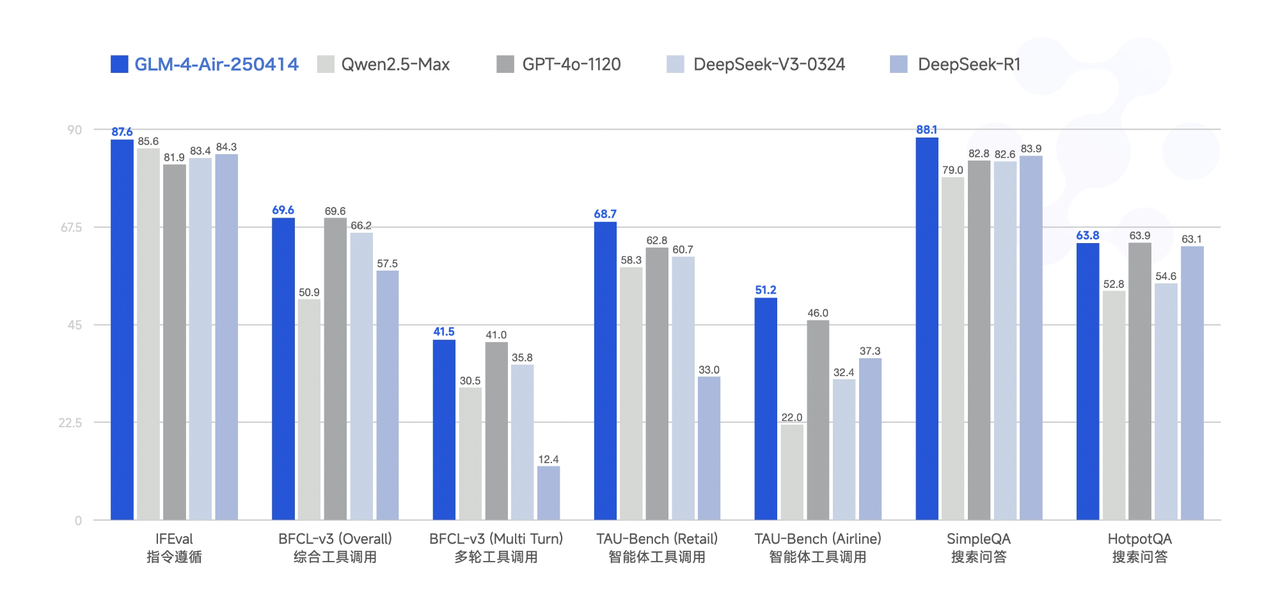
GLM-4-Air-250414 模型利用 15T 高质量数据进行预训练,特别纳入了丰富的推理类合成数据,为后续的强化学习扩展奠定了基础。在后训练阶段,除了进行面向对话场景的人类偏好对齐,我们还通过拒绝采样和强化学习等技术,重点增强了模型在指令遵循、工程代码生成、函数调用等任务上的表现,以强化智能体任务所需的原子能力。
该模型性能可比肩更大参数量的国内外主流模型,部分 Benchmark 指标已接近甚至超越 GPT-4o、DeepSeek-V3-0324(671B)等更大模型的水平。
 }>
GLM-4-AirX 专为低延时、高并发场景设计,利用 15T 高质量数据进行预训练,特别纳入了丰富的推理类合成数据,为后续的强化学习扩展奠定了基础。在后训练阶段,除了进行面向对话场景的人类偏好对齐,我们还通过拒绝采样和强化学习等技术,重点增强了模型在指令遵循、工程代码生成、函数调用等任务上的表现,以强化智能体任务所需的原子能力。
该模型在保障与 GLM-4-Air-250414 的同等性能外,还进行了模型基础组件的技术迭代,推理环节中包含了prefill和decoder的自回归输出两个阶段,使得 GLM-4-AirX 获得更快推理速度和更强大的推理能力。
}>
* 模型具备 128K 上下文,单次提示词可以处理的文本长度相当于 300 页书籍。这样的能力使得 GLM-4-Flash -250414 能够更好地理解和处理长文本内容,适用于需要深入分析上下文的场景。
* 模型能够在毫秒级时间内完成复杂逻辑处理,无论是实时响应用户的多轮对话请求,还是快速解析海量文本数据,都能实现 “即输即答” 的流畅体验。
* GLM-4-Flash-250414 拥有强大的多语言支持能力,能够支持多达 26 种语言。这为全球用户提供了多语言交互服务,拓宽了模型的应用范围。
* 支持外部工具调用,通过网络搜索获取信息,以增强语言模型输出的质量和时效性。
## 调用示例
以下是一个完整的调用示例,以 GLM-4-Plus 模型为例。
**基础调用**
```bash theme={null}
curl -X POST "https://open.bigmodel.cn/api/paas/v4/chat/completions" \
-H "Authorization: Bearer your-api-key" \
-H "Content-Type: application/json" \
-d '{
"model": "glm-4-plus",
"messages": [
{
"role": "system",
"content": "你是一个乐于解答各种问题的助手,你的任务是为用户提供专业、准确、有见地的建议。"
},
{
"role": "user",
"content": "你好,请介绍一下自己"
}
],
"max_tokens": 4096,
"temperature": 0.7
}'
```
**流式调用**
```bash theme={null}
curl -X POST "https://open.bigmodel.cn/api/paas/v4/chat/completions" \
-H "Authorization: Bearer your-api-key" \
-H "Content-Type: application/json" \
-d '{
"model": "glm-4-plus",
"messages": [
{
"role": "system",
"content": "你是一个乐于解答各种问题的助手,你的任务是为用户提供专业、准确、有见地的建议。"
},
{
"role": "user",
"content": "请详细介绍一下人工智能的发展历程"
}
],
"max_tokens": 4096,
"temperature": 0.7,
"stream": true
}'
```
**安装 SDK**
```bash theme={null}
# 安装最新版本
pip install zai-sdk
# 或指定版本
pip install zai-sdk==0.2.3
```
**验证安装**
```python theme={null}
import zai
print(zai.__version__)
```
**基础调用**
```python theme={null}
from zai import ZhipuAiClient
# 初始化客户端
client = ZhipuAiClient(api_key="your-api-key")
# 创建聊天完成请求
response = client.chat.completions.create(
model="glm-4-plus",
messages=[
{"role": "system", "content": "你是一个乐于解答各种问题的助手,你的任务是为用户提供专业、准确、有见地的建议。"},
{"role": "user", "content": "你好,请介绍一下自己"}
],
max_tokens=4096,
temperature=0.7
)
# 获取回复
print(response.choices[0].message.content)
```
**流式调用**
```python theme={null}
from zai import ZhipuAiClient
# 初始化客户端
client = ZhipuAiClient(api_key="your-api-key")
# 创建流式聊天完成请求
stream = client.chat.completions.create(
model="glm-4-plus",
messages=[
{"role": "system", "content": "你是一个乐于解答各种问题的助手,你的任务是为用户提供专业、准确、有见地的建议。"},
{"role": "user", "content": "请详细介绍一下人工智能的发展历程"}
],
max_tokens=4096,
temperature=0.7,
stream=True
)
# 处理流式响应
for chunk in stream:
if chunk.choices[0].delta.content:
print(chunk.choices[0].delta.content, end="")
```
**安装 SDK**
**Maven**
```xml theme={null}
ai.z.openapi
zai-sdk
0.3.5
```
**Gradle (Groovy)**
```groovy theme={null}
implementation 'ai.z.openapi:zai-sdk:0.3.5'
```
**基础调用**
```java theme={null}
import ai.z.openapi.ZhipuAiClient;
import ai.z.openapi.service.model.ChatCompletionCreateParams;
import ai.z.openapi.service.model.ChatCompletionResponse;
import ai.z.openapi.service.model.ChatMessage;
import ai.z.openapi.service.model.ChatMessageRole;
import java.util.Arrays;
public class BasicChat {
public static void main(String[] args) {
// 初始化客户端
ZhipuAiClient client = ZhipuAiClient.builder().ofZHIPU()
.apiKey("your-api-key")
.build();
// 创建聊天完成请求
ChatCompletionCreateParams request = ChatCompletionCreateParams.builder()
.model("glm-4-plus")
.messages(Arrays.asList(
ChatMessage.builder()
.role(ChatMessageRole.SYSTEM.value())
.content("你是一个乐于解答各种问题的助手,你的任务是为用户提供专业、准确、有见地的建议。")
.build(),
ChatMessage.builder()
.role(ChatMessageRole.USER.value())
.content("你好,请介绍一下自己")
.build()
))
.maxTokens(4096)
.temperature(0.7f)
.build();
// 发送请求
ChatCompletionResponse response = client.chat().createChatCompletion(request);
// 获取回复
if (response.isSuccess()) {
Object reply = response.getData().getChoices().get(0).getMessage().getContent();
System.out.println("AI 回复: " + reply);
} else {
System.err.println("错误: " + response.getMsg());
}
}
}
```
**流式调用**
```java theme={null}
import ai.z.openapi.ZhipuAiClient;
import ai.z.openapi.service.model.ChatCompletionCreateParams;
import ai.z.openapi.service.model.ChatCompletionResponse;
import ai.z.openapi.service.model.ChatMessage;
import ai.z.openapi.service.model.ChatMessageRole;
import ai.z.openapi.service.model.Delta;
import java.util.Arrays;
public class StreamingChat {
public static void main(String[] args) {
// 初始化客户端
ZhipuAiClient client = ZhipuAiClient.builder().ofZHIPU()
.apiKey("your-api-key")
.build();
// 创建聊天完成请求
ChatCompletionCreateParams request = ChatCompletionCreateParams.builder()
.model("glm-4-plus")
.messages(Arrays.asList(
ChatMessage.builder()
.role(ChatMessageRole.SYSTEM.value())
.content("你是一个乐于解答各种问题的助手,你的任务是为用户提供专业、准确、有见地的建议。")
.build(),
ChatMessage.builder()
.role(ChatMessageRole.USER.value())
.content("请详细介绍一下人工智能的发展历程")
.build()
))
.maxTokens(4096)
.temperature(0.7f)
.stream(true)
.build();
ChatCompletionResponse response = client.chat().createChatCompletion(request);
if (response.isSuccess()) {
response.getFlowable().subscribe(
// Process streaming message data
data -> {
if (data.getChoices() != null && !data.getChoices().isEmpty()) {
Delta delta = data.getChoices().get(0).getDelta();
System.out.print(delta + "\n");
}},
// Process streaming response error
error -> System.err.println("\nStream error: " + error.getMessage()),
// Process streaming response completion event
() -> System.out.println("\nStreaming response completed")
);
} else {
System.err.println("Error: " + response.getMsg());
}
}
}
```
**基础调用**
```python theme={null}
from zhipuai import ZhipuAI
client = ZhipuAI(api_key="your-api-key") # 填写您自己的 APIKey
response = client.chat.completions.create(
model="glm-4-plus", # 填写需要调用的模型编码
messages=[
{"role": "system", "content": "你是一个乐于解答各种问题的助手,你的任务是为用户提供专业、准确、有见地的建议。"},
{"role": "user", "content": "农夫需要把狼、羊和白菜都带过河,但每次只能带一样物品,而且狼和羊不能单独相处,羊和白菜也不能单独相处,问农夫该如何过河。"}
],
max_tokens=4096,
temperature=0.7
)
print(response.choices[0].message)
```
**流式调用**
```python theme={null}
from zhipuai import ZhipuAI
client = ZhipuAI(api_key="your-api-key") # 填写您自己的APIKey
response = client.chat.completions.create(
model="glm-4-plus", # 填写需要调用的模型编码
messages=[
{"role": "system", "content": "你是一个乐于解答各种问题的助手,你的任务是为用户提供专业、准确、有见地的建议。"},
{"role": "user", "content": "请详细介绍一下人工智能的发展历程"}
],
max_tokens=4096,
temperature=0.7,
stream=True
)
# 处理流式响应
for chunk in response:
if chunk.choices[0].delta.content:
print(chunk.choices[0].delta.content, end="")
```
## 用户并发权益
API 调用会受到速率限制,当前我们限制的维度是请求并发数量(在途请求任务数量)。不同等级的用户并发保障如下。
| V0 | V1 | V2 | V3 |
| :- | :-- | :-- | :-- |
| 50 | 100 | 300 | 500 |
| V0 | V1 | V2 | V3 |
| :- | :- | :- | :- |
| 30 | 40 | 50 | 60 |
| V0 | V1 | V2 | V3 |
| :- | :- | :- | :- |
| 5 | 30 | 40 | 50 |
| V0 | V1 | V2 | V3 |
| :-- | :-- | :-- | :-- |
| 100 | 150 | 200 | 300 |
| V0 | V1 | V2 | V3 |
| :-- | :--- | :--- | :--- |
| 200 | 1000 | 2000 | 3000 |
}>
GLM-4-AirX 专为低延时、高并发场景设计,利用 15T 高质量数据进行预训练,特别纳入了丰富的推理类合成数据,为后续的强化学习扩展奠定了基础。在后训练阶段,除了进行面向对话场景的人类偏好对齐,我们还通过拒绝采样和强化学习等技术,重点增强了模型在指令遵循、工程代码生成、函数调用等任务上的表现,以强化智能体任务所需的原子能力。
该模型在保障与 GLM-4-Air-250414 的同等性能外,还进行了模型基础组件的技术迭代,推理环节中包含了prefill和decoder的自回归输出两个阶段,使得 GLM-4-AirX 获得更快推理速度和更强大的推理能力。
}>
* 模型具备 128K 上下文,单次提示词可以处理的文本长度相当于 300 页书籍。这样的能力使得 GLM-4-Flash -250414 能够更好地理解和处理长文本内容,适用于需要深入分析上下文的场景。
* 模型能够在毫秒级时间内完成复杂逻辑处理,无论是实时响应用户的多轮对话请求,还是快速解析海量文本数据,都能实现 “即输即答” 的流畅体验。
* GLM-4-Flash-250414 拥有强大的多语言支持能力,能够支持多达 26 种语言。这为全球用户提供了多语言交互服务,拓宽了模型的应用范围。
* 支持外部工具调用,通过网络搜索获取信息,以增强语言模型输出的质量和时效性。
## 调用示例
以下是一个完整的调用示例,以 GLM-4-Plus 模型为例。
**基础调用**
```bash theme={null}
curl -X POST "https://open.bigmodel.cn/api/paas/v4/chat/completions" \
-H "Authorization: Bearer your-api-key" \
-H "Content-Type: application/json" \
-d '{
"model": "glm-4-plus",
"messages": [
{
"role": "system",
"content": "你是一个乐于解答各种问题的助手,你的任务是为用户提供专业、准确、有见地的建议。"
},
{
"role": "user",
"content": "你好,请介绍一下自己"
}
],
"max_tokens": 4096,
"temperature": 0.7
}'
```
**流式调用**
```bash theme={null}
curl -X POST "https://open.bigmodel.cn/api/paas/v4/chat/completions" \
-H "Authorization: Bearer your-api-key" \
-H "Content-Type: application/json" \
-d '{
"model": "glm-4-plus",
"messages": [
{
"role": "system",
"content": "你是一个乐于解答各种问题的助手,你的任务是为用户提供专业、准确、有见地的建议。"
},
{
"role": "user",
"content": "请详细介绍一下人工智能的发展历程"
}
],
"max_tokens": 4096,
"temperature": 0.7,
"stream": true
}'
```
**安装 SDK**
```bash theme={null}
# 安装最新版本
pip install zai-sdk
# 或指定版本
pip install zai-sdk==0.2.3
```
**验证安装**
```python theme={null}
import zai
print(zai.__version__)
```
**基础调用**
```python theme={null}
from zai import ZhipuAiClient
# 初始化客户端
client = ZhipuAiClient(api_key="your-api-key")
# 创建聊天完成请求
response = client.chat.completions.create(
model="glm-4-plus",
messages=[
{"role": "system", "content": "你是一个乐于解答各种问题的助手,你的任务是为用户提供专业、准确、有见地的建议。"},
{"role": "user", "content": "你好,请介绍一下自己"}
],
max_tokens=4096,
temperature=0.7
)
# 获取回复
print(response.choices[0].message.content)
```
**流式调用**
```python theme={null}
from zai import ZhipuAiClient
# 初始化客户端
client = ZhipuAiClient(api_key="your-api-key")
# 创建流式聊天完成请求
stream = client.chat.completions.create(
model="glm-4-plus",
messages=[
{"role": "system", "content": "你是一个乐于解答各种问题的助手,你的任务是为用户提供专业、准确、有见地的建议。"},
{"role": "user", "content": "请详细介绍一下人工智能的发展历程"}
],
max_tokens=4096,
temperature=0.7,
stream=True
)
# 处理流式响应
for chunk in stream:
if chunk.choices[0].delta.content:
print(chunk.choices[0].delta.content, end="")
```
**安装 SDK**
**Maven**
```xml theme={null}
ai.z.openapi
zai-sdk
0.3.5
```
**Gradle (Groovy)**
```groovy theme={null}
implementation 'ai.z.openapi:zai-sdk:0.3.5'
```
**基础调用**
```java theme={null}
import ai.z.openapi.ZhipuAiClient;
import ai.z.openapi.service.model.ChatCompletionCreateParams;
import ai.z.openapi.service.model.ChatCompletionResponse;
import ai.z.openapi.service.model.ChatMessage;
import ai.z.openapi.service.model.ChatMessageRole;
import java.util.Arrays;
public class BasicChat {
public static void main(String[] args) {
// 初始化客户端
ZhipuAiClient client = ZhipuAiClient.builder().ofZHIPU()
.apiKey("your-api-key")
.build();
// 创建聊天完成请求
ChatCompletionCreateParams request = ChatCompletionCreateParams.builder()
.model("glm-4-plus")
.messages(Arrays.asList(
ChatMessage.builder()
.role(ChatMessageRole.SYSTEM.value())
.content("你是一个乐于解答各种问题的助手,你的任务是为用户提供专业、准确、有见地的建议。")
.build(),
ChatMessage.builder()
.role(ChatMessageRole.USER.value())
.content("你好,请介绍一下自己")
.build()
))
.maxTokens(4096)
.temperature(0.7f)
.build();
// 发送请求
ChatCompletionResponse response = client.chat().createChatCompletion(request);
// 获取回复
if (response.isSuccess()) {
Object reply = response.getData().getChoices().get(0).getMessage().getContent();
System.out.println("AI 回复: " + reply);
} else {
System.err.println("错误: " + response.getMsg());
}
}
}
```
**流式调用**
```java theme={null}
import ai.z.openapi.ZhipuAiClient;
import ai.z.openapi.service.model.ChatCompletionCreateParams;
import ai.z.openapi.service.model.ChatCompletionResponse;
import ai.z.openapi.service.model.ChatMessage;
import ai.z.openapi.service.model.ChatMessageRole;
import ai.z.openapi.service.model.Delta;
import java.util.Arrays;
public class StreamingChat {
public static void main(String[] args) {
// 初始化客户端
ZhipuAiClient client = ZhipuAiClient.builder().ofZHIPU()
.apiKey("your-api-key")
.build();
// 创建聊天完成请求
ChatCompletionCreateParams request = ChatCompletionCreateParams.builder()
.model("glm-4-plus")
.messages(Arrays.asList(
ChatMessage.builder()
.role(ChatMessageRole.SYSTEM.value())
.content("你是一个乐于解答各种问题的助手,你的任务是为用户提供专业、准确、有见地的建议。")
.build(),
ChatMessage.builder()
.role(ChatMessageRole.USER.value())
.content("请详细介绍一下人工智能的发展历程")
.build()
))
.maxTokens(4096)
.temperature(0.7f)
.stream(true)
.build();
ChatCompletionResponse response = client.chat().createChatCompletion(request);
if (response.isSuccess()) {
response.getFlowable().subscribe(
// Process streaming message data
data -> {
if (data.getChoices() != null && !data.getChoices().isEmpty()) {
Delta delta = data.getChoices().get(0).getDelta();
System.out.print(delta + "\n");
}},
// Process streaming response error
error -> System.err.println("\nStream error: " + error.getMessage()),
// Process streaming response completion event
() -> System.out.println("\nStreaming response completed")
);
} else {
System.err.println("Error: " + response.getMsg());
}
}
}
```
**基础调用**
```python theme={null}
from zhipuai import ZhipuAI
client = ZhipuAI(api_key="your-api-key") # 填写您自己的 APIKey
response = client.chat.completions.create(
model="glm-4-plus", # 填写需要调用的模型编码
messages=[
{"role": "system", "content": "你是一个乐于解答各种问题的助手,你的任务是为用户提供专业、准确、有见地的建议。"},
{"role": "user", "content": "农夫需要把狼、羊和白菜都带过河,但每次只能带一样物品,而且狼和羊不能单独相处,羊和白菜也不能单独相处,问农夫该如何过河。"}
],
max_tokens=4096,
temperature=0.7
)
print(response.choices[0].message)
```
**流式调用**
```python theme={null}
from zhipuai import ZhipuAI
client = ZhipuAI(api_key="your-api-key") # 填写您自己的APIKey
response = client.chat.completions.create(
model="glm-4-plus", # 填写需要调用的模型编码
messages=[
{"role": "system", "content": "你是一个乐于解答各种问题的助手,你的任务是为用户提供专业、准确、有见地的建议。"},
{"role": "user", "content": "请详细介绍一下人工智能的发展历程"}
],
max_tokens=4096,
temperature=0.7,
stream=True
)
# 处理流式响应
for chunk in response:
if chunk.choices[0].delta.content:
print(chunk.choices[0].delta.content, end="")
```
## 用户并发权益
API 调用会受到速率限制,当前我们限制的维度是请求并发数量(在途请求任务数量)。不同等级的用户并发保障如下。
| V0 | V1 | V2 | V3 |
| :- | :-- | :-- | :-- |
| 50 | 100 | 300 | 500 |
| V0 | V1 | V2 | V3 |
| :- | :- | :- | :- |
| 30 | 40 | 50 | 60 |
| V0 | V1 | V2 | V3 |
| :- | :- | :- | :- |
| 5 | 30 | 40 | 50 |
| V0 | V1 | V2 | V3 |
| :-- | :-- | :-- | :-- |
| 100 | 150 | 200 | 300 |
| V0 | V1 | V2 | V3 |
| :-- | :--- | :--- | :--- |
| 200 | 1000 | 2000 | 3000 |