> ## Documentation Index
> Fetch the complete documentation index at: https://docs.bigmodel.cn/llms.txt
> Use this file to discover all available pages before exploring further.

# GLM-5

## 概览

**GLM-5** 是智谱的基座模型，**面向 Agentic Engineering 打造**，能够在复杂系统工程与长程 Agent 任务中提供可靠生产力。在 Coding 与 Agent 能力上，**GLM-5 取得开源 SOTA 表现**，在真实编程场景的使用体感逼近 Claude Opus 4.5，擅长复杂系统工程与长程 Agent 任务，是通用 Agent 助手的理想基座。

<CardGroup cols={3}>
  <Card title="定位" icon={<svg style={{maskImage: "url(https://mintcdn.com/zhipu-ef7018ed/6jZAOYw-eXEZh1pv/resource/icon/rocket.svg?fit=max&auto=format&n=6jZAOYw-eXEZh1pv&q=85&s=859cb435da005a3984eae8dc9f60ea7c)", WebkitMaskImage: "url(https://mintcdn.com/zhipu-ef7018ed/6jZAOYw-eXEZh1pv/resource/icon/rocket.svg?fit=max&auto=format&n=6jZAOYw-eXEZh1pv&q=85&s=859cb435da005a3984eae8dc9f60ea7c)", maskRepeat: "no-repeat", maskPosition: "center center",}} className={"h-6 w-6 bg-primary dark:bg-primary-light !m-0 shrink-0"} />}>
    基座模型
  </Card>

  <Card title="输入模态" icon={<svg style={{maskImage: "url(https://mintcdn.com/zhipu-ef7018ed/6jZAOYw-eXEZh1pv/resource/icon/arrow-down-right.svg?fit=max&auto=format&n=6jZAOYw-eXEZh1pv&q=85&s=088a58fa0b1a4048d5c6fab7841133c8)", WebkitMaskImage: "url(https://mintcdn.com/zhipu-ef7018ed/6jZAOYw-eXEZh1pv/resource/icon/arrow-down-right.svg?fit=max&auto=format&n=6jZAOYw-eXEZh1pv&q=85&s=088a58fa0b1a4048d5c6fab7841133c8)", maskRepeat: "no-repeat", maskPosition: "center center",}} className={"h-6 w-6 bg-primary dark:bg-primary-light !m-0 shrink-0"} />}>
    文本
  </Card>

  <Card title="输出模态" icon={<svg style={{maskImage: "url(https://mintcdn.com/zhipu-ef7018ed/Skp28ct-clfAIOZo/resource/icon/arrow-down-left.svg?fit=max&auto=format&n=Skp28ct-clfAIOZo&q=85&s=1ed65b58aa7a484b387f01be25d99278)", WebkitMaskImage: "url(https://mintcdn.com/zhipu-ef7018ed/Skp28ct-clfAIOZo/resource/icon/arrow-down-left.svg?fit=max&auto=format&n=Skp28ct-clfAIOZo&q=85&s=1ed65b58aa7a484b387f01be25d99278)", maskRepeat: "no-repeat", maskPosition: "center center",}} className={"h-6 w-6 bg-primary dark:bg-primary-light !m-0 shrink-0"} />}>
    文本
  </Card>

  <Card title="上下文窗口" icon={<svg style={{maskImage: "url(https://mintcdn.com/zhipu-ef7018ed/Skp28ct-clfAIOZo/resource/icon/arrow-down-arrow-up.svg?fit=max&auto=format&n=Skp28ct-clfAIOZo&q=85&s=ccc051baa101b9a46d0d9bc5fad04877)", WebkitMaskImage: "url(https://mintcdn.com/zhipu-ef7018ed/Skp28ct-clfAIOZo/resource/icon/arrow-down-arrow-up.svg?fit=max&auto=format&n=Skp28ct-clfAIOZo&q=85&s=ccc051baa101b9a46d0d9bc5fad04877)", maskRepeat: "no-repeat", maskPosition: "center center",}} className={"h-6 w-6 bg-primary dark:bg-primary-light !m-0 shrink-0"} />}>
    200K
  </Card>

  <Card title="最大输出 Tokens" icon={<svg style={{maskImage: "url(https://mintcdn.com/zhipu-ef7018ed/6jZAOYw-eXEZh1pv/resource/icon/maximize.svg?fit=max&auto=format&n=6jZAOYw-eXEZh1pv&q=85&s=743c202becf04d91d943f9014a3fe67f)", WebkitMaskImage: "url(https://mintcdn.com/zhipu-ef7018ed/6jZAOYw-eXEZh1pv/resource/icon/maximize.svg?fit=max&auto=format&n=6jZAOYw-eXEZh1pv&q=85&s=743c202becf04d91d943f9014a3fe67f)", maskRepeat: "no-repeat", maskPosition: "center center",}} className={"h-6 w-6 bg-primary dark:bg-primary-light !m-0 shrink-0"} />}>
    128K
  </Card>
</CardGroup>

## 能力支持

<CardGroup cols={3}>
  <Card title="思考模式" icon={<svg style={{maskImage: "url(https://mintcdn.com/zhipu-ef7018ed/6jZAOYw-eXEZh1pv/resource/icon/brain.svg?fit=max&auto=format&n=6jZAOYw-eXEZh1pv&q=85&s=b04e181006c02a51715f85395cd9735f)", WebkitMaskImage: "url(https://mintcdn.com/zhipu-ef7018ed/6jZAOYw-eXEZh1pv/resource/icon/brain.svg?fit=max&auto=format&n=6jZAOYw-eXEZh1pv&q=85&s=b04e181006c02a51715f85395cd9735f)", maskRepeat: "no-repeat", maskPosition: "center center",}} className={"h-6 w-6 bg-primary dark:bg-primary-light !m-0 shrink-0"} />} href="/cn/guide/capabilities/thinking-mode">
    提供多种思考模式，覆盖不同任务需求
  </Card>

  <Card title="流式输出" icon={<svg style={{maskImage: "url(https://mintcdn.com/zhipu-ef7018ed/6jZAOYw-eXEZh1pv/resource/icon/maximize.svg?fit=max&auto=format&n=6jZAOYw-eXEZh1pv&q=85&s=743c202becf04d91d943f9014a3fe67f)", WebkitMaskImage: "url(https://mintcdn.com/zhipu-ef7018ed/6jZAOYw-eXEZh1pv/resource/icon/maximize.svg?fit=max&auto=format&n=6jZAOYw-eXEZh1pv&q=85&s=743c202becf04d91d943f9014a3fe67f)", maskRepeat: "no-repeat", maskPosition: "center center",}} className={"h-6 w-6 bg-primary dark:bg-primary-light !m-0 shrink-0"} />} href="/cn/guide/capabilities/streaming">
    支持实时流式响应，提升用户交互体验
  </Card>

  <Card title="Function Call" icon={<svg style={{maskImage: "url(https://mintcdn.com/zhipu-ef7018ed/6jZAOYw-eXEZh1pv/resource/icon/function.svg?fit=max&auto=format&n=6jZAOYw-eXEZh1pv&q=85&s=a597d8cdc054b4c0e39c08295f570c86)", WebkitMaskImage: "url(https://mintcdn.com/zhipu-ef7018ed/6jZAOYw-eXEZh1pv/resource/icon/function.svg?fit=max&auto=format&n=6jZAOYw-eXEZh1pv&q=85&s=a597d8cdc054b4c0e39c08295f570c86)", maskRepeat: "no-repeat", maskPosition: "center center",}} className={"h-6 w-6 bg-primary dark:bg-primary-light !m-0 shrink-0"} />} href="/cn/guide/capabilities/function-calling">
    强大的工具调用能力，支持多种外部工具集成
  </Card>

  <Card title="上下文缓存" icon={<svg style={{maskImage: "url(https://mintcdn.com/zhipu-ef7018ed/6jZAOYw-eXEZh1pv/resource/icon/database.svg?fit=max&auto=format&n=6jZAOYw-eXEZh1pv&q=85&s=93c0e1cf0ce93de9364ade5d1f49d992)", WebkitMaskImage: "url(https://mintcdn.com/zhipu-ef7018ed/6jZAOYw-eXEZh1pv/resource/icon/database.svg?fit=max&auto=format&n=6jZAOYw-eXEZh1pv&q=85&s=93c0e1cf0ce93de9364ade5d1f49d992)", maskRepeat: "no-repeat", maskPosition: "center center",}} className={"h-6 w-6 bg-primary dark:bg-primary-light !m-0 shrink-0"} />} href="/cn/guide/capabilities/cache">
    智能缓存机制，优化长对话性能
  </Card>

  <Card title="结构化输出" icon={<svg style={{maskImage: "url(https://mintcdn.com/zhipu-ef7018ed/6jZAOYw-eXEZh1pv/resource/icon/code.svg?fit=max&auto=format&n=6jZAOYw-eXEZh1pv&q=85&s=2f67130d1597ee0b68135487ec31662f)", WebkitMaskImage: "url(https://mintcdn.com/zhipu-ef7018ed/6jZAOYw-eXEZh1pv/resource/icon/code.svg?fit=max&auto=format&n=6jZAOYw-eXEZh1pv&q=85&s=2f67130d1597ee0b68135487ec31662f)", maskRepeat: "no-repeat", maskPosition: "center center",}} className={"h-6 w-6 bg-primary dark:bg-primary-light !m-0 shrink-0"} />} href="/cn/guide/capabilities/struct-output">
    支持 JSON 等结构化格式输出，便于系统集成
  </Card>

  <Card title="MCP" icon={<svg style={{maskImage: "url(https://mintcdn.com/zhipu-ef7018ed/6jZAOYw-eXEZh1pv/resource/icon/box.svg?fit=max&auto=format&n=6jZAOYw-eXEZh1pv&q=85&s=e306f71ed712216941329f8a99ee858a)", WebkitMaskImage: "url(https://mintcdn.com/zhipu-ef7018ed/6jZAOYw-eXEZh1pv/resource/icon/box.svg?fit=max&auto=format&n=6jZAOYw-eXEZh1pv&q=85&s=e306f71ed712216941329f8a99ee858a)", maskRepeat: "no-repeat", maskPosition: "center center",}} className={"h-6 w-6 bg-primary dark:bg-primary-light !m-0 shrink-0"} />}>
    可灵活调用外部 MCP 工具与数据源，扩展应用场景
  </Card>

  <Card title="GLM in Excel" icon={<svg style={{maskImage: "url(https://mintcdn.com/zhipu-ef7018ed/6jZAOYw-eXEZh1pv/resource/icon/table.svg?fit=max&auto=format&n=6jZAOYw-eXEZh1pv&q=85&s=5c0f6469f3367f96a4192ada3c1aaaf4)", WebkitMaskImage: "url(https://mintcdn.com/zhipu-ef7018ed/6jZAOYw-eXEZh1pv/resource/icon/table.svg?fit=max&auto=format&n=6jZAOYw-eXEZh1pv&q=85&s=5c0f6469f3367f96a4192ada3c1aaaf4)", maskRepeat: "no-repeat", maskPosition: "center center",}} className={"h-6 w-6 bg-primary dark:bg-primary-light !m-0 shrink-0"} />} href="/cn/guide/tools/glm-in-excel">
    适配 Excel 官方的 AI 插件，能深度赋能表格工作流
  </Card>
</CardGroup>

## 推荐场景

<AccordionGroup>
  <Accordion title="Agentic Coding">
    能基于自然语言自动生成可运行代码，覆盖前后端与数据处理等开发环节，显著缩短从需求到产物的迭代周期。
  </Accordion>

  <Accordion title="智能体任务">
    具备自主决策与工具调用能力，可在模糊复杂目标下完成从理解、规划到执行与自检的全流程智能体任务，实现“一句话输入到完整交付物”。
  </Accordion>

  <Accordion title="办公场景">
    通过强大的长程规划与记忆能力，能够稳定完成跨阶段、多步骤、强逻辑关联的复杂办公任务，确保指令遵循度与目标一致性。
  </Accordion>

  <Accordion title="角色扮演（RolePlay）">
    能精准理解并持续保持角色设定，在叙事、情绪和逻辑上保持一致，实现自然、可演进的高沉浸式角色扮演体验。
  </Accordion>

  <Accordion title="剧本 / 分镜脚本生成 ">
    在长文本一致性与复杂人物塑造上大幅增强，可稳定输出可直接进入制作流程的高质量剧本内容。
  </Accordion>

  <Accordion title="翻译">
    能将正式文本准确转换为符合目标语言表达习惯的专业译文，实现语义、术语与表达的全面对齐。
  </Accordion>

  <Accordion title="文本数据提取">
    可从合同、公告、财报等复杂文本中精准抽取关键字段与逻辑关系，将原始内容稳定转化为可分析的结构化数据，助力企业数据治理与自动化。
  </Accordion>

  <Accordion title="信息质检">
    能精准识别客服工单等复杂文本中的关键信息并自动完成质检与风险识别，大幅提升运营效率。
  </Accordion>
</AccordionGroup>

## 详细介绍

<Steps>
  <Step title="更大基座，更强智能" stepNumber={1} titleSize="h3">
    GLM-5 全新基座为从“写代码”到“写工程”的能力演进提供了坚实基础：

    * **参数规模扩展**：从 355B（激活 32B）扩展至 744B（激活 40B），预训练数据从 23T 提升至 28.5T，更大规模的预训练算力显著提升了模型的通用智能水平

    * **异步强化学习**：构建全新的 “Slime” 框架，支持更大模型规模及更复杂的强化学习任务，提升强化学习后训练流程效率；提出异步智能体强化学习算法，使模型能够持续从长程交互中学习，充分激发预训练模型的潜力

    * **稀疏注意力机制**：首次集成 DeepSeek Sparse Attention，在维持长文本效果无损的同时，大幅降低模型部署成本，提升 Token Efficiency
  </Step>

  <Step title="Coding 能力：对齐 Claude Opus 4.5" stepNumber={2} titleSize="h3">
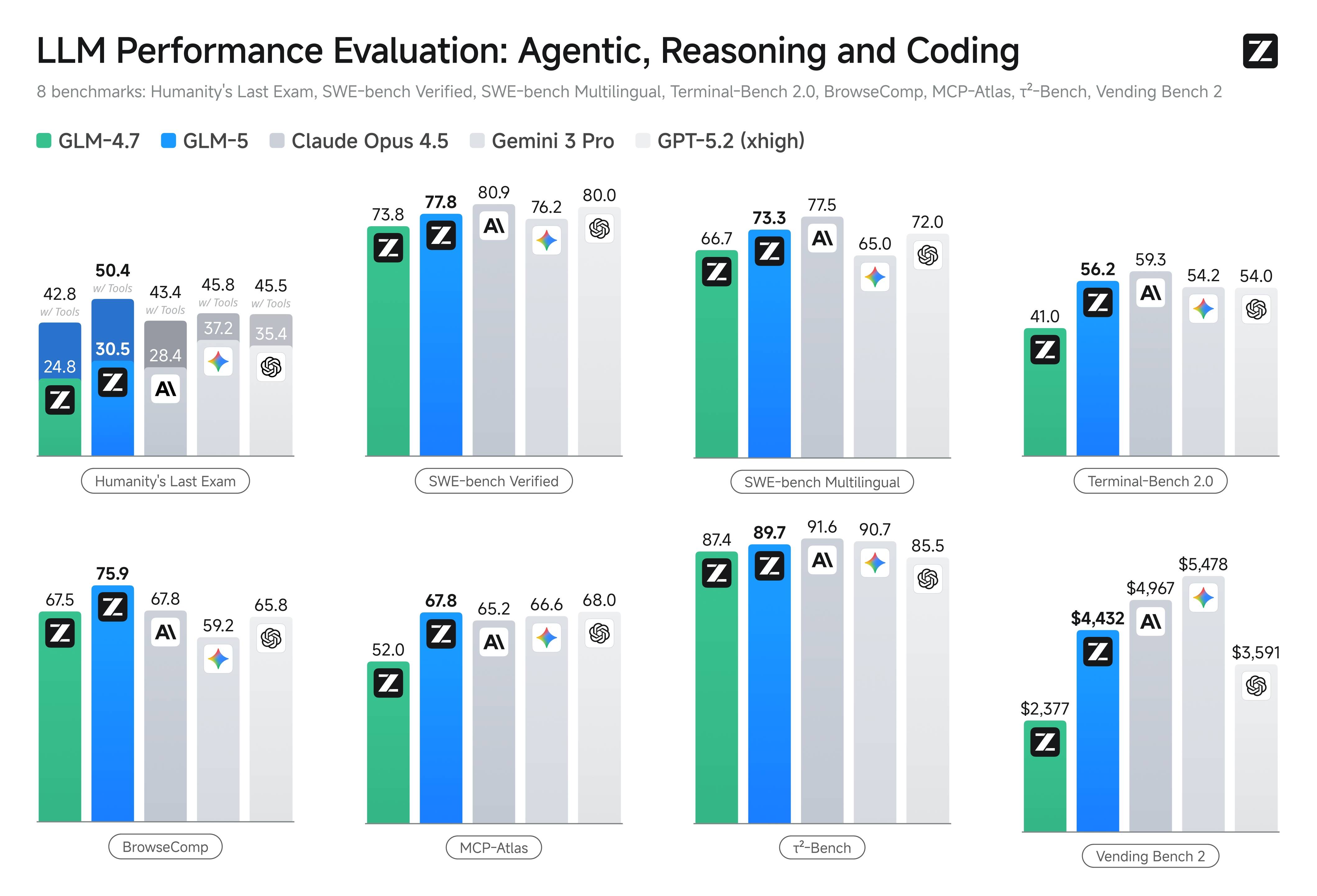
    GLM-5 在编程能力上实现了对 Claude Opus 4.5 的对齐，**在业内公认的主流基准测试中取得开源模型最高分数**。在 SWE-bench-Verified 和 Terminal Bench 2.0 中分别获得 77.8 和 56.2 的开源模型最高分数，性能表现超过 Gemini 3.0 Pro。

    ![Description](https://cdn.bigmodel.cn/markdown/177083028071620260212-011355.jpeg?attname=20260212-011355.jpeg)

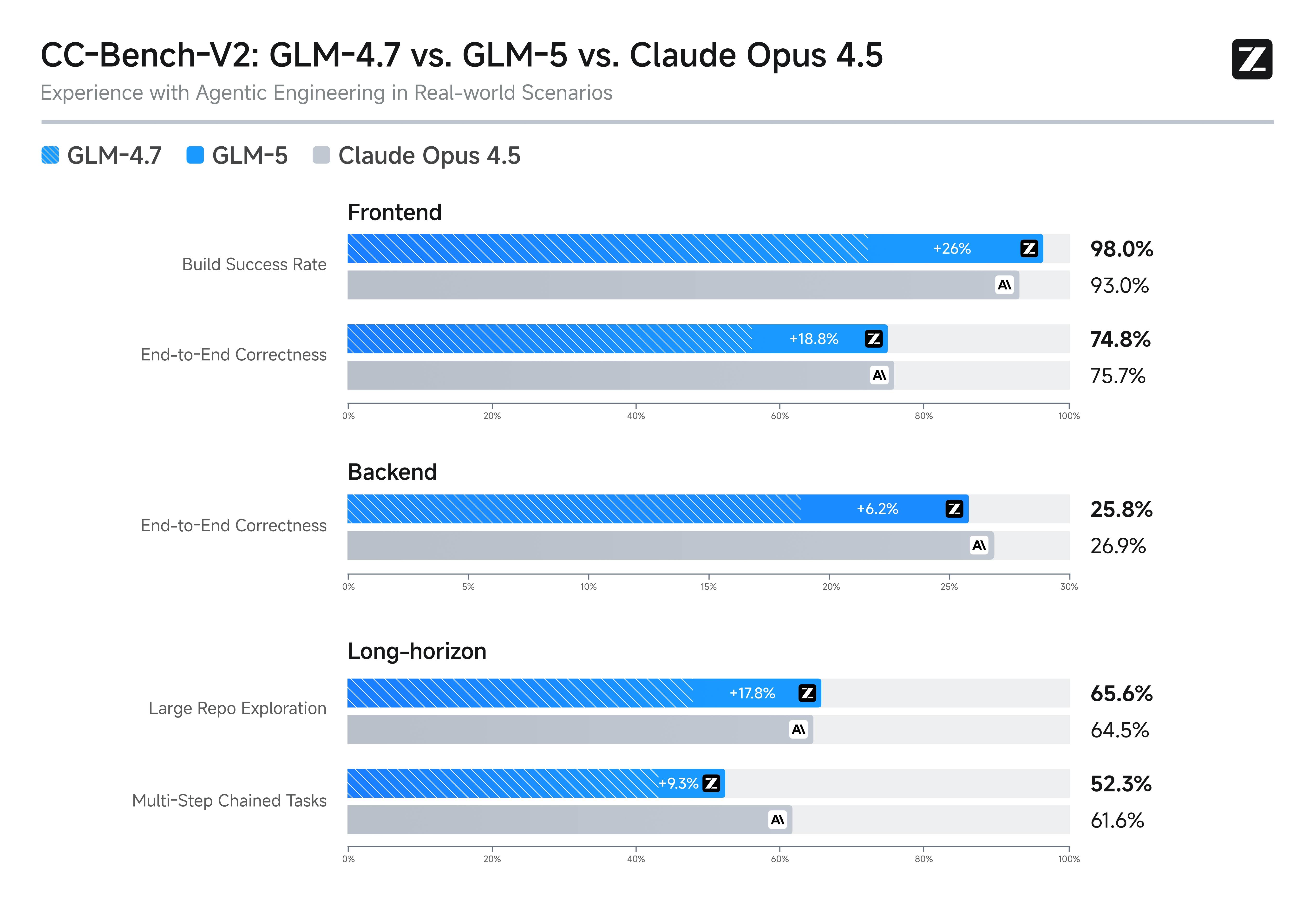
    在内部 Claude Code 评估集合中，GLM-5 在前端、后端、长程任务等编程开发任务上显著超越 GLM-4.7，能够以极少的人工干预自主完成 Agentic 长程规划与执行、后端重构和深度调试等系统工程任务，使用体验逼近 Opus 4.5。

    ![Description](https://cdn.bigmodel.cn/markdown/177082439894420260211-233935.jpeg?attname=20260211-233935.jpeg)
  </Step>

  <Step title="Agent 能力：SOTA级长程任务执行" stepNumber={3} titleSize="h3">
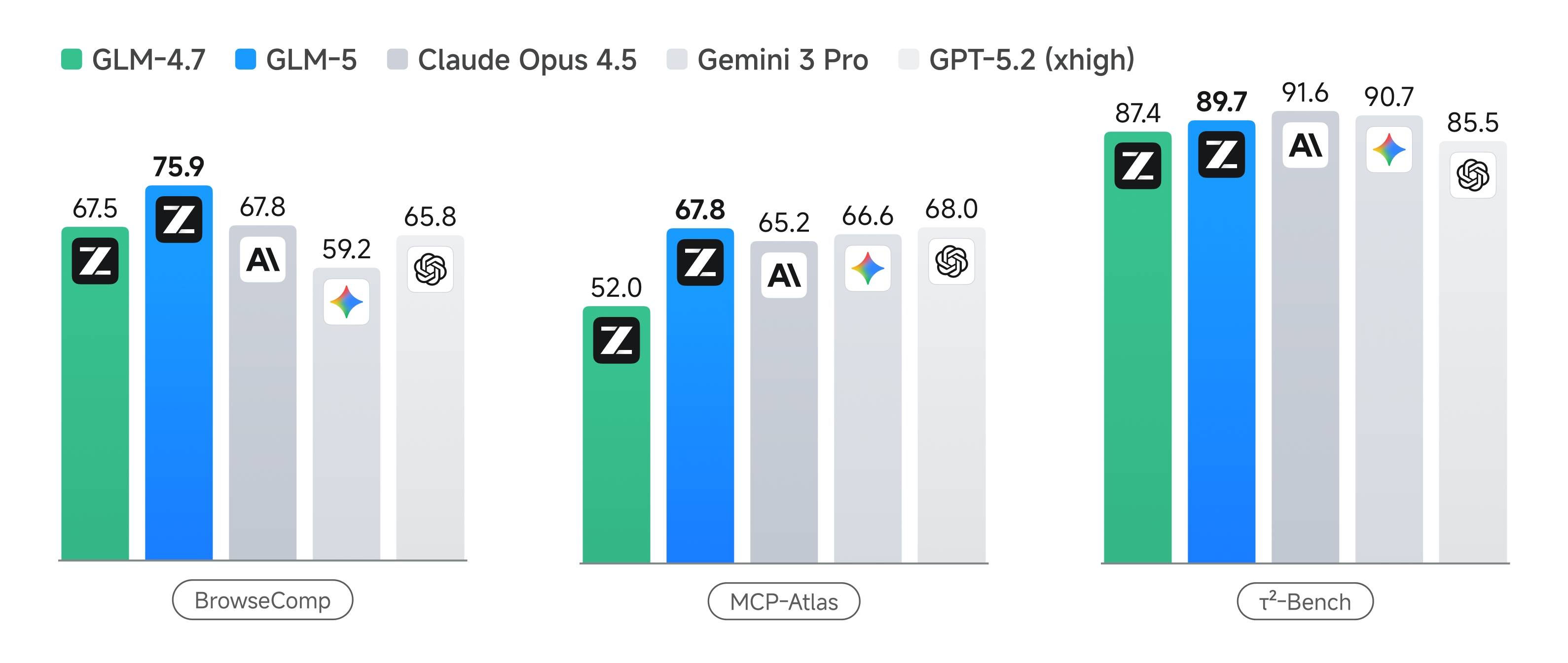
    GLM-5 在 Agent 能力上实现开源 SOTA，在多个评测基准中取得开源第一。在 BrowseComp（联网检索与信息理解）、MCP-Atlas（工具调用和多步骤任务执行）和 τ²-Bench（复杂多工具场景下的规划和执行）均取得最高表现。

    ![Description](https://cdn.bigmodel.cn/markdown/177083065584320260212-012319.jpeg?attname=20260212-012319.jpeg)

    这些能力是 Agentic Engineering 的核心：模型不仅要能写代码、完成工程，还要能在长程任务中保持目标一致性、进行资源管理、处理多步骤依赖关系，成为真正的 Agentic Ready 基座模型。
  </Step>
</Steps>

## 使用资源

<CardGroup cols={2}>
  <Card title="体验中心" href="https://bigmodel.cn/trialcenter/modeltrial/text?modelCode=glm-5">
    快速测试模型在业务场景上的效果
  </Card>

  <Card title="接口文档" href="/api-reference/%E6%A8%A1%E5%9E%8B-api/%E5%AF%B9%E8%AF%9D%E8%A1%A5%E5%85%A8">
    API 调用方式
  </Card>
</CardGroup>

## 调用示例

以下是完整的调用示例，帮助您快速上手 GLM-5 模型。

<Tabs>
  <Tab title="cURL">
    **基础调用**

    ```bash theme={null}
    curl -X POST "https://open.bigmodel.cn/api/paas/v4/chat/completions" \
    -H "Content-Type: application/json" \
    -H "Authorization: Bearer your-api-key" \
    -d '{
        "model": "glm-5",
        "messages": [
            {
                "role": "user",
                "content": "作为一名营销专家，请为我的产品创作一个吸引人的口号"
            },
            {
                "role": "assistant",
                "content": "当然，要创作一个吸引人的口号，请告诉我一些关于您产品的信息"
            },
            {
                "role": "user",
                "content": "智谱AI 开放平台"
            }
        ],
        "thinking": {
            "type": "enabled"
        },
        "max_tokens": 65536,
        "temperature": 1.0
    }'
    ```

    **流式调用**

    ```bash theme={null}
    curl -X POST "https://open.bigmodel.cn/api/paas/v4/chat/completions" \
    -H "Content-Type: application/json" \
    -H "Authorization: Bearer your-api-key" \
    -d '{
        "model": "glm-5",
        "messages": [
            {
                "role": "user",
                "content": "作为一名营销专家，请为我的产品创作一个吸引人的口号"
            },
            {
                "role": "assistant",
                "content": "当然，要创作一个吸引人的口号，请告诉我一些关于您产品的信息"
            },
            {
                "role": "user",
                "content": "智谱开放平台"
            }
        ],
        "thinking": {
            "type": "enabled"
        },
        "stream": true,
        "max_tokens": 65536,
        "temperature": 1.0
    }'
    ```
  </Tab>

  <Tab title="Python">
    **安装 SDK**

    ```bash theme={null}
    # 安装最新版本
    pip install zai-sdk
    # 或指定版本
    pip install zai-sdk==0.2.3
    ```

    **验证安装**

    ```python theme={null}
    import zai
    print(zai.__version__)
    ```

    **基础调用**

    ```python theme={null}
    from zai import ZhipuAiClient

    client = ZhipuAiClient(api_key="your-api-key")  # 请填写您自己的 API Key

    response = client.chat.completions.create(
        model="glm-5",
        messages=[
            {"role": "user", "content": "作为一名营销专家，请为我的产品创作一个吸引人的口号"},
            {"role": "assistant", "content": "当然，要创作一个吸引人的口号，请告诉我一些关于您产品的信息"},
            {"role": "user", "content": "智谱开放平台"}
        ],
        thinking={
            "type": "enabled",    # 启用深度思考模式
        },
        max_tokens=65536,          # 最大输出 tokens
        temperature=1.0           # 控制输出的随机性
    )

    # 获取完整回复
    print(response.choices[0].message)
    ```

    **流式调用**

    ```python theme={null}
    from zai import ZhipuAiClient

    client = ZhipuAiClient(api_key="your-api-key")  # 请填写您自己的 API Key

    response = client.chat.completions.create(
        model="glm-5",
        messages=[
            {"role": "user", "content": "作为一名营销专家，请为我的产品创作一个吸引人的口号"},
            {"role": "assistant", "content": "当然，要创作一个吸引人的口号，请告诉我一些关于您产品的信息"},
            {"role": "user", "content": "智谱开放平台"}
        ],
        thinking={
            "type": "enabled",    # 启用深度思考模式
        },
        stream=True,              # 启用流式输出
        max_tokens=65536,          # 最大输出tokens
        temperature=1.0           # 控制输出的随机性
    )

    # 流式获取回复
    for chunk in response:
        if chunk.choices[0].delta.reasoning_content:
            print(chunk.choices[0].delta.reasoning_content, end='', flush=True)

        if chunk.choices[0].delta.content:
            print(chunk.choices[0].delta.content, end='', flush=True)
    ```
  </Tab>

  <Tab title="Java">
    **安装 SDK**

    **Maven**

    ```xml theme={null}
    <dependency>
        <groupId>ai.z.openapi</groupId>
        <artifactId>zai-sdk</artifactId>
        <version>0.3.5</version>
    </dependency>
    ```

    **Gradle (Groovy)**

    ```groovy theme={null}
    implementation 'ai.z.openapi:zai-sdk:0.3.5'
    ```

    **基础调用**

    ```java theme={null}
    import ai.z.openapi.ZhipuAiClient;
    import ai.z.openapi.service.model.ChatCompletionCreateParams;
    import ai.z.openapi.service.model.ChatCompletionResponse;
    import ai.z.openapi.service.model.ChatMessage;
    import ai.z.openapi.service.model.ChatMessageRole;
    import ai.z.openapi.service.model.ChatThinking;
    import java.util.Arrays;

    public class BasicChat {
        public static void main(String[] args) {
            // 初始化客户端
            ZhipuAiClient client = ZhipuAiClient.builder().ofZHIPU()
                .apiKey("your-api-key")
                .build();

            // 创建聊天完成请求
            ChatCompletionCreateParams request = ChatCompletionCreateParams.builder()
                .model("glm-5")
                .messages(Arrays.asList(
                    ChatMessage.builder()
                        .role(ChatMessageRole.USER.value())
                        .content("作为一名营销专家，请为我的产品创作一个吸引人的口号")
                        .build(),
                    ChatMessage.builder()
                        .role(ChatMessageRole.ASSISTANT.value())
                        .content("当然，要创作一个吸引人的口号，请告诉我一些关于您产品的信息")
                        .build(),
                    ChatMessage.builder()
                        .role(ChatMessageRole.USER.value())
                        .content("智谱开放平台")
                        .build()
                ))
                .thinking(ChatThinking.builder().type("enabled").build())
                .maxTokens(65536)
                .temperature(1.0f)
                .build();

            // 发送请求
            ChatCompletionResponse response = client.chat().createChatCompletion(request);

            // 获取回复
            if (response.isSuccess()) {
                Object reply = response.getData().getChoices().get(0).getMessage();
                System.out.println("AI 回复: " + reply);
            } else {
                System.err.println("错误: " + response.getMsg());
            }
        }
    }
    ```

    **流式调用**

    ```java theme={null}
    import ai.z.openapi.ZhipuAiClient;
    import ai.z.openapi.service.model.ChatCompletionCreateParams;
    import ai.z.openapi.service.model.ChatCompletionResponse;
    import ai.z.openapi.service.model.ChatMessage;
    import ai.z.openapi.service.model.ChatMessageRole;
    import ai.z.openapi.service.model.ChatThinking;
    import ai.z.openapi.service.model.Delta;
    import java.util.Arrays;

    public class StreamingChat {
        public static void main(String[] args) {
            // 初始化客户端
            ZhipuAiClient client = ZhipuAiClient.builder().ofZHIPU()
                .apiKey("your-api-key")
                .build();

            // 创建流式聊天完成请求
            ChatCompletionCreateParams request = ChatCompletionCreateParams.builder()
                .model("glm-5")
                .messages(Arrays.asList(
                    ChatMessage.builder()
                        .role(ChatMessageRole.USER.value())
                        .content("作为一名营销专家，请为我的产品创作一个吸引人的口号")
                        .build(),
                    ChatMessage.builder()
                        .role(ChatMessageRole.ASSISTANT.value())
                        .content("当然，要创作一个吸引人的口号，请告诉我一些关于您产品的信息")
                        .build(),
                    ChatMessage.builder()
                        .role(ChatMessageRole.USER.value())
                        .content("智谱开放平台")
                        .build()
                ))
                .thinking(ChatThinking.builder().type("enabled").build())
                .stream(true)  // 启用流式输出
                .maxTokens(65536)
                .temperature(1.0f)
                .build();

            ChatCompletionResponse response = client.chat().createChatCompletion(request);

            if (response.isSuccess()) {
                response.getFlowable().subscribe(
                    // Process streaming message data
                    data -> {
                        if (data.getChoices() != null && !data.getChoices().isEmpty()) {
                            Delta delta = data.getChoices().get(0).getDelta();
                            System.out.print(delta + "\n");
                        }
                    },
                    // Process streaming response error
                    error -> System.err.println("\nStream error: " + error.getMessage()),
                    // Process streaming response completion event
                    () -> System.out.println("\nStreaming response completed")
                );
            } else {
                System.err.println("Error: " + response.getMsg());
            }
        }
    }
    ```
  </Tab>

  <Tab title="Python(旧)">
    **更新 SDK 至 2.1.5.20250726**

    ```bash theme={null}
    # 安装最新版本
    pip install zhipuai

    # 或指定版本
    pip install zhipuai==2.1.5.20250726
    ```

    **基础调用**

    ```python theme={null}
    from zhipuai import ZhipuAI

    client = ZhipuAI(api_key="your-api-key")  # 请填写您自己的 API Key

    response = client.chat.completions.create(
        model="glm-5",
        messages=[
            {"role": "user", "content": "作为一名营销专家，请为我的产品创作一个吸引人的口号"},
            {"role": "assistant", "content": "当然，要创作一个吸引人的口号，请告诉我一些关于您产品的信息"},
            {"role": "user", "content": "智谱开放平台"}
        ],
        thinking={
            "type": "enabled",
        },
        max_tokens=65536,
        temperature=1.0
    )

    # 获取完整回复
    print(response.choices[0].message)
    ```

    **流式调用**

    ```python theme={null}
    from zhipuai import ZhipuAI

    client = ZhipuAI(api_key="your-api-key")  # 请填写您自己的 API Key

    response = client.chat.completions.create(
        model="glm-5",
        messages=[
            {"role": "user", "content": "作为一名营销专家，请为我的产品创作一个吸引人的口号"},
            {"role": "assistant", "content": "当然，要创作一个吸引人的口号，请告诉我一些关于您产品的信息"},
            {"role": "user", "content": "智谱开放平台"}
        ],
        thinking={
            "type": "enabled",
        },
        stream=True,              # 启用流式输出
        max_tokens=65536,
        temperature=1.0
    )

    # 流式获取回复
    for chunk in response:
        if chunk.choices[0].delta.reasoning_content:
            print(chunk.choices[0].delta.reasoning_content, end='', flush=True)

        if chunk.choices[0].delta.content:
            print(chunk.choices[0].delta.content, end='', flush=True)
    ```
  </Tab>
</Tabs>