> ## Documentation Index
> Fetch the complete documentation index at: https://docs.bigmodel.cn/llms.txt
> Use this file to discover all available pages before exploring further.

# CogVideoX-2

## 概览

CogVideoX-2 是智谱新一代视频生成大模型，图生视频能力大幅提升38%，在大幅度运动、画面稳定性、指令遵从、艺术风格与画面美感方面实现了显著优化。

<CardGroup cols={3}>
  <Card title="价格" icon={<svg style={{maskImage: "url(https://mintcdn.com/zhipu-ef7018ed/6jZAOYw-eXEZh1pv/resource/icon/coins.svg?fit=max&auto=format&n=6jZAOYw-eXEZh1pv&q=85&s=d140ba7189994790a79f83f5a763f59a)", WebkitMaskImage: "url(https://mintcdn.com/zhipu-ef7018ed/6jZAOYw-eXEZh1pv/resource/icon/coins.svg?fit=max&auto=format&n=6jZAOYw-eXEZh1pv&q=85&s=d140ba7189994790a79f83f5a763f59a)", maskRepeat: "no-repeat", maskPosition: "center center",}} className={"h-6 w-6 bg-primary dark:bg-primary-light !m-0 shrink-0"} />}>
    0.5 元 / 次
  </Card>

  <Card title="输入模态" icon={<svg style={{maskImage: "url(https://mintcdn.com/zhipu-ef7018ed/6jZAOYw-eXEZh1pv/resource/icon/arrow-down-right.svg?fit=max&auto=format&n=6jZAOYw-eXEZh1pv&q=85&s=088a58fa0b1a4048d5c6fab7841133c8)", WebkitMaskImage: "url(https://mintcdn.com/zhipu-ef7018ed/6jZAOYw-eXEZh1pv/resource/icon/arrow-down-right.svg?fit=max&auto=format&n=6jZAOYw-eXEZh1pv&q=85&s=088a58fa0b1a4048d5c6fab7841133c8)", maskRepeat: "no-repeat", maskPosition: "center center",}} className={"h-6 w-6 bg-primary dark:bg-primary-light !m-0 shrink-0"} />}>
    图像、文本
  </Card>

  <Card title="输出模态" icon={<svg style={{maskImage: "url(https://mintcdn.com/zhipu-ef7018ed/Skp28ct-clfAIOZo/resource/icon/arrow-down-left.svg?fit=max&auto=format&n=Skp28ct-clfAIOZo&q=85&s=1ed65b58aa7a484b387f01be25d99278)", WebkitMaskImage: "url(https://mintcdn.com/zhipu-ef7018ed/Skp28ct-clfAIOZo/resource/icon/arrow-down-left.svg?fit=max&auto=format&n=Skp28ct-clfAIOZo&q=85&s=1ed65b58aa7a484b387f01be25d99278)", maskRepeat: "no-repeat", maskPosition: "center center",}} className={"h-6 w-6 bg-primary dark:bg-primary-light !m-0 shrink-0"} />}>
    视频
  </Card>
</CardGroup>

## 推荐场景

<AccordionGroup>
  <Accordion title="短视频创意内容生成" defaultOpen="true">
    输入图文脚本或单帧画面，自动扩展为连贯的剧情短片，精准遵从风格指令，尤其适合微短剧内容量产。
  </Accordion>

  <Accordion title="二次元动画制作">
    支持将静态人物图、分镜稿转化为流畅的动态动画，精准呈现角色大幅度动作与细腻表情，输出国漫、美漫、日系等多种风格的二次元短片，满足动画工作室、同人创作的高效产能需求。
  </Accordion>

  <Accordion title="电商产品动态广告">
    根据产品图片与卖点描述，生成多角度视频展示商品，通过稳定的镜头运动与光影渲染突出商品细节，支持快速适配不同平台的视频广告尺寸。
  </Accordion>
</AccordionGroup>

## 使用资源

<CardGroup cols={2}>
  <Card title="体验中心" href="https://www.bigmodel.cn/trialcenter/modeltrial/multimodal?modelCode=cogvideox-2">
    快速测试模型在业务场景上的效果
  </Card>

  <Card title="接口文档" href="/api-reference/%E6%A8%A1%E5%9E%8B-api/%E8%A7%86%E9%A2%91%E7%94%9F%E6%88%90%E5%BC%82%E6%AD%A5">
    API 调用方式
  </Card>
</CardGroup>

## 详细介绍

<Steps>
  <Step title="支持主体进行大幅度运动" titleSize="h3">
    CogVideoX-2 在画面稳定性、动作连贯性也变得更好，由此表演细腻度和运镜丰富度同样也有大幅提升。人物和道具不再是在原画面基础上“微动”，而是能够根据提示词进行大幅度动作表演。
  </Step>

  <Step title="指令遵从能力在同类模型中保持稳定表现" stepNumber={2} titleSize="h3">
    CogVideoX-2 保持了优秀的指令遵循能力，能够理解并且忠实实现复杂prompt，更好地服务于创作者的故事需求。同时保持视频内形象主体、风格和氛围的一致性，生成的新内容与原画风格实现高度贴合，讲述故事更加完整。
  </Step>

  <Step title="驾驭多种艺术风格" stepNumber={3} titleSize="h3">
    CogVideoX-2 擅长更多元的艺术风格，包括但不限于写实风格、三维动画、二维动画，以及更多特殊艺术风格。
  </Step>
</Steps>

## 应用示例

<Tabs>
  <Tab title="文生视频">
    <table>
      <tr>
        <th className="w-[30%] p-1 font-semibold">
          Prompt
        </th>

        <th className="p-1 font-semibold">
          视频
        </th>
      </tr>

      <tr>
        <td className="flex flex-col p-1">
          比得兔（主体）开小汽车（主体描述），游走在马路上（环境描述），脸上的表情充满开心喜悦（氛围设定）
        </td>

        <td>
          <video className="m-0 p-1" src="https://aigc-files.bigmodel.cn/api/cogvideo/9a384d50-1925-11f0-baf8-2e7ccccecdb2_0.mp4" controls />
        </td>
      </tr>

      <tr>
        <td className="flex flex-col p-1">
          特写镜头（镜头描述），傍晚的微光（光线运用），一只鹦鹉站在阳台的栏杆上，鹦鹉有着紫色的羽毛和粉色的喙（主体描述），背景是都市的高楼大厦（环境描述）。
        </td>

        <td>
          <video className="m-0 p-1" src="https://aigc-files.bigmodel.cn/api/cogvideo/d2a7f00e-1926-11f0-b555-2e4a5f1d681a_0.mp4" controls />
        </td>
      </tr>
    </table>
  </Tab>

  <Tab title="图生视频">
    CogVideoX 可以将用户提供的静态图像转化为动态视频。为达到最佳效果，推荐文件格式为 PNG 或 JPEG，文件大小不超过5MB。提示词建议使用"主体（背景）+ 运动描述"的表达方式。

    <table>
      <tr>
        <th className="w-[30%] p-1 font-semibold">
          Prompt
        </th>

        <th className="p-1 font-semibold">
          视频
        </th>
      </tr>

      <tr>
        <td className="flex flex-col p-1">
          <img className="m-0 mb-1" src="https://cdn.bigmodel.cn/markdown/1737631743717c0c4920f.png?attname=c0c4920f.png" alt="Description" />

          画面中的小姑娘开心的笑了
        </td>

        <td>
          <video className="m-0 p-1" src="https://aigc-files.bigmodel.cn/api/cogvideo/ec62bde8-d97b-11ef-8bbd-beb3134d28c2_0.mp4" controls />
        </td>
      </tr>

      <tr>
        <td className="flex flex-col p-1">
          <img className="m-0 mb-1" src="https://cdn.bigmodel.cn/markdown/17376320501314f560035.png?attname=4f560035.png" alt="Description" />

          让画面整体动起来
        </td>

        <td>
          <video className="m-0 p-1" src="https://aigc-files.bigmodel.cn/api/cogvideo/ae3b33fe-d97d-11ef-953d-46b88711431a_0.mp4" controls />
        </td>
      </tr>

      <tr>
        <td className="flex flex-col p-1">
          <img className="m-0 mb-1" src="https://cdn.bigmodel.cn/markdown/1737632183664e259f8a5.png?attname=e259f8a5.png" alt="Description" />

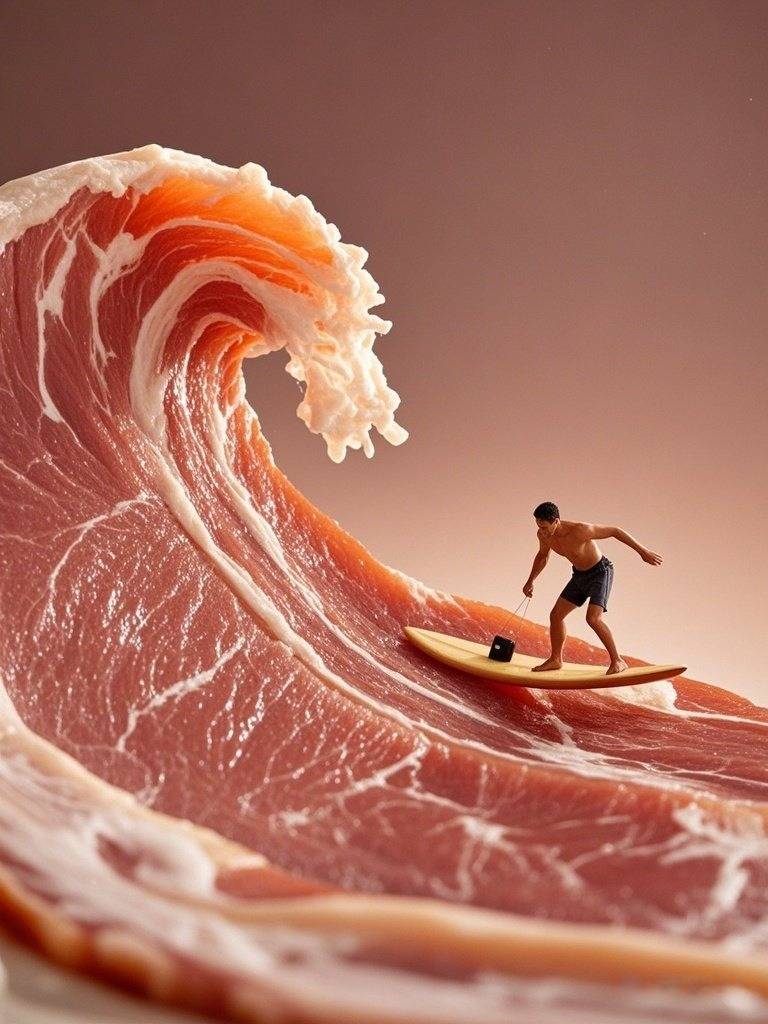
          微距镜头下，一片猪肉切片卷起巨大的海浪，一个小人物在这片"海浪"上勇敢冲浪，冲浪板激起细腻的浪花
        </td>

        <td>
          <video className="m-0 p-1" src="https://aigc-files.bigmodel.cn/api/cogvideo/257a0760-d97e-11ef-8bbd-beb3134d28c2_0.mp4" controls />
        </td>
      </tr>
    </table>
  </Tab>
</Tabs>

## 调用示例

<Tabs>
  <Tab title="Python">
    **安装 SDK**

    ```bash theme={null}
    # 安装最新版本
    pip install zai-sdk
    # 或指定版本
    pip install zai-sdk==0.2.3
    ```

    **验证安装**

    ```python theme={null}
    import zai
    print(zai.__version__)
    ```

    **调用示例**

    ```python theme={null}
    from zai import ZhipuAiClient

    client = ZhipuAiClient(api_key="YOUR_API_KEY")  # 请填写您自己的 APIKey

    response = client.videos.generations(
        model="cogvideox-2",
        prompt="一只可爱的小猫在花园里玩耍",
    )

    print(response)
    ```
  </Tab>

  <Tab title="Java">
    **安装 SDK**

    **Maven**

    ```xml theme={null}
    <dependency>
        <groupId>ai.z.openapi</groupId>
        <artifactId>zai-sdk</artifactId>
        <version>0.3.5</version>
    </dependency>
    ```

    **Gradle (Groovy)**

    ```groovy theme={null}
    implementation 'ai.z.openapi:zai-sdk:0.3.5'
    ```

    **调用示例**

    ```java theme={null}
    import ai.z.openapi.ZhipuAiClient;
    import ai.z.openapi.service.model.*;
    import ai.z.openapi.core.Constants;

    public class CogVideoX2Example {
        public static void main(String[] args) {
            String apiKey = "YOUR_API_KEY"; // 请填写您自己的APIKey
            ZhipuAiClient client = ZhipuAiClient.builder().ofZHIPU()
                .apiKey(apiKey)
                .build();
            VideoCreateParams request = VideoCreateParams.builder()
                .model("cogvideox-2")
                .prompt("一只可爱的小猫在花园里玩耍")
                .build();
            VideosResponse response = client.videos().videoGenerations(request);
            System.out.println(response.getData());
            // 等待 10 分钟 异步通过得到的任务ID 获取最终生成视频
            Thread.sleep(600000L);
            VideosResponse videosResponse = client.videos().videoGenerationsResult(response.getData().getId());
            System.out.println(videosResponse.getData().getVideoResult());
        }
    }
    ```
  </Tab>

  <Tab title="旧版 Python">
    ```python theme={null}
    import zhipuai

    client = ZhipuAI(api_key="YOUR_API_KEY")

    response = client.videos.generations(
        model="cogvideox-2",
        prompt="一只可爱的小猫在花园里玩耍",
    )

    print(response)
    ```
  </Tab>
</Tabs>

## 用户并发权益

API 调用会受到速率限制，当前我们限制的维度是请求并发数量（在途请求任务数量）。不同等级的用户并发保障如下。

| V0 | V1 | V2 | V3 |
| :- | :- | :- | :- |
| 5  | 10 | 15 | 20 |