> ## Documentation Index
> Fetch the complete documentation index at: https://docs.bigmodel.cn/llms.txt
> Use this file to discover all available pages before exploring further.

# CogVideoX-3

## 概览

CogVideoX-3 新增首尾帧生成功能，画面稳定度、清晰度大幅提升，主体大幅度运动流畅自然，指令遵循与物理真实模拟更佳，还提升了高清现实及 3D 风格场景表现。

<CardGroup cols={3}>
  <Card title="时长" icon={<svg style={{maskImage: "url(https://mintcdn.com/zhipu-ef7018ed/6jZAOYw-eXEZh1pv/resource/icon/clock.svg?fit=max&auto=format&n=6jZAOYw-eXEZh1pv&q=85&s=01942bdb6d8270b01215f52b5fe64363)", WebkitMaskImage: "url(https://mintcdn.com/zhipu-ef7018ed/6jZAOYw-eXEZh1pv/resource/icon/clock.svg?fit=max&auto=format&n=6jZAOYw-eXEZh1pv&q=85&s=01942bdb6d8270b01215f52b5fe64363)", maskRepeat: "no-repeat", maskPosition: "center center",}} className={"h-6 w-6 bg-primary dark:bg-primary-light !m-0 shrink-0"} />}>
    5s, 10s
  </Card>

  <Card title="清晰度" icon={<svg style={{maskImage: "url(https://mintcdn.com/zhipu-ef7018ed/6jZAOYw-eXEZh1pv/resource/icon/eye.svg?fit=max&auto=format&n=6jZAOYw-eXEZh1pv&q=85&s=6b122d35262105038324f60f9e09612e)", WebkitMaskImage: "url(https://mintcdn.com/zhipu-ef7018ed/6jZAOYw-eXEZh1pv/resource/icon/eye.svg?fit=max&auto=format&n=6jZAOYw-eXEZh1pv&q=85&s=6b122d35262105038324f60f9e09612e)", maskRepeat: "no-repeat", maskPosition: "center center",}} className={"h-6 w-6 bg-primary dark:bg-primary-light !m-0 shrink-0"} />}>
    支持多分辨率，最高4K
  </Card>

  <Card title="价格" icon={<svg style={{maskImage: "url(https://mintcdn.com/zhipu-ef7018ed/6jZAOYw-eXEZh1pv/resource/icon/coins.svg?fit=max&auto=format&n=6jZAOYw-eXEZh1pv&q=85&s=d140ba7189994790a79f83f5a763f59a)", WebkitMaskImage: "url(https://mintcdn.com/zhipu-ef7018ed/6jZAOYw-eXEZh1pv/resource/icon/coins.svg?fit=max&auto=format&n=6jZAOYw-eXEZh1pv&q=85&s=d140ba7189994790a79f83f5a763f59a)", maskRepeat: "no-repeat", maskPosition: "center center",}} className={"h-6 w-6 bg-primary dark:bg-primary-light !m-0 shrink-0"} />}>
    1 元 / 次
  </Card>

  <Card title="输入模态" icon={<svg style={{maskImage: "url(https://mintcdn.com/zhipu-ef7018ed/6jZAOYw-eXEZh1pv/resource/icon/arrow-down-right.svg?fit=max&auto=format&n=6jZAOYw-eXEZh1pv&q=85&s=088a58fa0b1a4048d5c6fab7841133c8)", WebkitMaskImage: "url(https://mintcdn.com/zhipu-ef7018ed/6jZAOYw-eXEZh1pv/resource/icon/arrow-down-right.svg?fit=max&auto=format&n=6jZAOYw-eXEZh1pv&q=85&s=088a58fa0b1a4048d5c6fab7841133c8)", maskRepeat: "no-repeat", maskPosition: "center center",}} className={"h-6 w-6 bg-primary dark:bg-primary-light !m-0 shrink-0"} />}>
    图像、文本、首尾帧
  </Card>

  <Card title="输出模态" icon={<svg style={{maskImage: "url(https://mintcdn.com/zhipu-ef7018ed/Skp28ct-clfAIOZo/resource/icon/arrow-down-left.svg?fit=max&auto=format&n=Skp28ct-clfAIOZo&q=85&s=1ed65b58aa7a484b387f01be25d99278)", WebkitMaskImage: "url(https://mintcdn.com/zhipu-ef7018ed/Skp28ct-clfAIOZo/resource/icon/arrow-down-left.svg?fit=max&auto=format&n=Skp28ct-clfAIOZo&q=85&s=1ed65b58aa7a484b387f01be25d99278)", maskRepeat: "no-repeat", maskPosition: "center center",}} className={"h-6 w-6 bg-primary dark:bg-primary-light !m-0 shrink-0"} />}>
    视频
  </Card>
</CardGroup>

## 推荐场景

<AccordionGroup>
  <Accordion title="电商广告（营销）" defaultOpen="true">
    输入产品图或文案，快速生成多风格动态广告，支持场景切换、真实光影渲染。
  </Accordion>

  <Accordion title="文旅">
    上传景区实拍图和宣传语，一键生成沉浸式文旅短片，真实还原自然景观。
  </Accordion>

  <Accordion title="动漫">
    输入动漫角色设定图、场景草图或剧情文案，快速生成流畅的动漫短片，保留动漫独特画风与质感。
  </Accordion>

  <Accordion title="影视剧 / 短视频">
    将单帧图或文本脚本输出为画面稳、动作自然的短视频，可模拟连贯镜头运动，还原真实物理交互，覆盖现实 / 3D 风格。
  </Accordion>
</AccordionGroup>

## 使用资源

<CardGroup cols={2}>
  <Card title="体验中心" href="https://www.bigmodel.cn/trialcenter/modeltrial/multimodal?modelCode=cogvideox-3">
    快速测试模型在业务场景上的效果
  </Card>

  <Card title="接口文档" href="/api-reference/%E6%A8%A1%E5%9E%8B-api/%E8%A7%86%E9%A2%91%E7%94%9F%E6%88%90%E5%BC%82%E6%AD%A5">
    API 调用方式
  </Card>
</CardGroup>

## 详细介绍

<Steps>
  <Step title="主观清晰度大幅提升" titleSize="h3">
    CogVideoX-3 生成的视频主体清晰、画面稳定，畸形问题减少，还支持主体进行大幅度运动，让动态表现更自然流畅。

    <table>
      <tr>
        <th className="w-[30%] p-1 font-semibold">
          Prompt
        </th>

        <th className="p-1 font-semibold">
          视频
        </th>
      </tr>

      <tr>
        <td className="flex flex-col p-1">
          花瓣被风吹起，不断的旋转变成一个人
        </td>

        <td>
          <video className="m-0 p-1" src="https://cdn.bigmodel.cn/static/platform/videos/cogvideo/4.mp4" controls />
        </td>
      </tr>

      <tr>
        <td className="flex flex-col p-1">
          哪吒开心的喝了一口酒，然后展示酒的品牌
        </td>

        <td>
          <video className="m-0 p-1" src="https://cdn.bigmodel.cn/static/platform/videos/cogvideo/7.mp4" controls />
        </td>
      </tr>
    </table>
  </Step>

  <Step title="更好的指令遵循、物理真实模拟" stepNumber={2} titleSize="h3">
    深度理解文本指令意图，精准还原创意需求，无论是让角色完成特定动作，还是模拟自然物理现象，都能贴合现实逻辑呈现。

    <table>
      <tr>
        <th className="w-[30%] p-1 font-semibold">
          Prompt
        </th>

        <th className="p-1 font-semibold">
          视频
        </th>
      </tr>

      <tr>
        <td className="flex flex-col p-1">
          一双手拿着一把水果刀，在一片一片地切一个完整的红色西红柿
        </td>

        <td>
          <video className="m-0 p-1" src="https://cdn.bigmodel.cn/static/platform/videos/cogvideo/8.mp4" controls />
        </td>
      </tr>

      <tr>
        <td className="flex flex-col p-1">
          开放式办公室里，一名员工正低头玩手机，突然经理出现拍了拍他的肩膀，他吓得赶紧收起手机
        </td>

        <td>
          <video className="m-0 p-1" src="https://cdn.bigmodel.cn/static/platform/videos/cogvideo/6.mp4" controls />
        </td>
      </tr>
    </table>
  </Step>

  <Step title="高清现实风格场景、3D 风格场景表现提升" stepNumber={3} titleSize="h3">
    面对现实风格，可打造如实拍般的高清质感；切换 3D 风格时，可精准塑造立体形态与场景氛围，轻松驾驭多种风格。

    <table>
      <tr>
        <th className="w-[30%] p-1 font-semibold">
          Prompt
        </th>

        <th className="p-1 font-semibold">
          视频
        </th>
      </tr>

      <tr>
        <td className="flex flex-col p-1">
          仰拍镜头拍窦娥与天空，窦娥是被冤的中国古代女子，此时她在仰头喊。六月烈日当空时，白色大雪从天空落下，与血色痕迹碰到后散开。衣服微动，3D 粒子风。
        </td>

        <td>
          <video className="m-0 p-1" src="https://cdn.bigmodel.cn/static/platform/videos/cogvideo/3.mp4" controls />
        </td>
      </tr>

      <tr>
        <td className="flex flex-col p-1">
          一只帅气的拟人化雪豹，穿着白色的豹纹时尚大衣，超级蓬松，毛绒绒，厚实，尊贵，T 台走秀，超高清，电影质感，大片即视感，维秘秀。T 台两边坐满观众拍照。
        </td>

        <td>
          <video className="m-0 p-1" src="https://cdn.bigmodel.cn/static/platform/videos/cogvideo/5.mp4" controls />
        </td>
      </tr>
    </table>
  </Step>

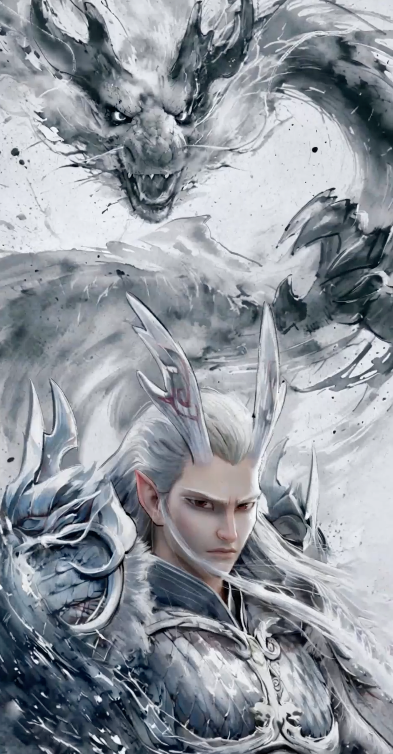
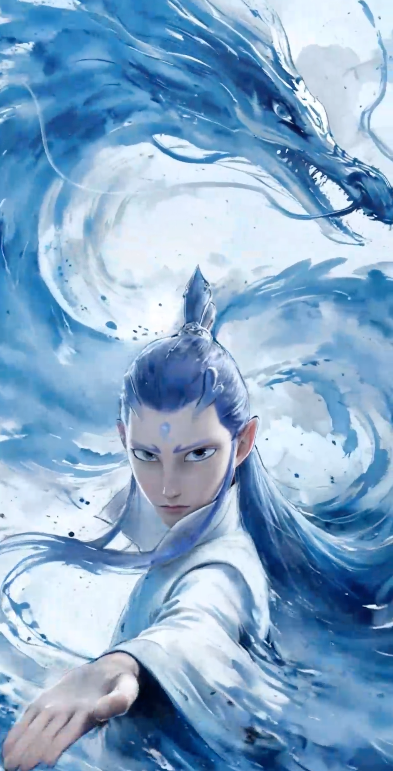
  <Step title="新增首尾帧生成功能" stepNumber={4} titleSize="h3">
    支持用户提供首帧图片和尾帧图片，即可自动生成连贯转场的视频，让静态帧自然衔接为动态叙事，串联完整创意。

    <table>
      <tr>
        <th className="w-[30%] p-1 font-semibold">
          Prompt
        </th>

        <th className="w-[20%] p-1 font-semibold">
          首帧
        </th>

        <th className="w-[20%] p-1 font-semibold">
          尾帧
        </th>

        <th className="p-1 font-semibold">
          视频
        </th>
      </tr>

      <tr>
        <td>
          龙王转成敖丙，水墨风晕染，主体转体缓缓变身，突出变身细节，旋转运镜，过渡丝滑、流畅自然
        </td>

        <td>
          <img className="m-0 mb-1" src="https://cdn.bigmodel.cn/markdown/1752547571093cogvideo2.png?attname=cogvideo2.png" alt="首帧" />
        </td>

        <td>
          <img className="m-0 mb-1" src="https://cdn.bigmodel.cn/markdown/1752547589957cogvideo3.png?attname=cogvideo3.png" alt="尾帧" />
        </td>

        <td>
          <video className="m-0 p-1" src="https://cdn.bigmodel.cn/static/platform/videos/cogvideo/1.mp4" controls />
        </td>
      </tr>

      <tr>
        <td>
          角色双手拿枪对着电脑屏幕疯狂射击，电脑燃烧爆炸变成碎片飞溅，办公室灯光闪烁
        </td>

        <td>
          <img className="m-0 mb-1" src="https://cdn.bigmodel.cn/markdown/1752547801491cogvideo4.png?attname=cogvideo4.png" alt="首帧" />
        </td>

        <td>
          <img className="m-0 mb-1" src="https://cdn.bigmodel.cn/markdown/1752547813297cogvideo5.png?attname=cogvideo5.png" alt="尾帧" />
        </td>

        <td>
          <video className="m-0 p-1" src="https://cdn.bigmodel.cn/static/platform/videos/cogvideo/2.mp4" controls />
        </td>
      </tr>
    </table>
  </Step>
</Steps>

## 调用示例

<Tabs>
  <Tab title="文生视频">
    **安装 SDK**

    ```bash theme={null}
    # 安装最新版本
    pip install zai-sdk
    # 或指定版本
    pip install zai-sdk==0.2.3
    ```

    **验证安装**

    ```python theme={null}
    import zai
    print(zai.__version__)
    ```

    **调用示例**

    ```Python theme={null}
    from zai import ZhipuAiClient
    client = ZhipuAiClient(api_key="YOUR_API_KEY")

    # Generate video
    response = client.videos.generations(
        model="cogvideox-3",
        prompt="A cat is playing with a ball.",
        quality="quality",  # Output mode, "quality" for quality priority, "speed" for speed priority
        with_audio=True, # Whether to include audio
        size="1920x1080",  # Video resolution, supports up to 4K (e.g., "3840x2160")
        fps=30,  # Frame rate, can be 30 or 60
    )
    print(response)

    # Get video result
    result = client.videos.retrieve_videos_result(id=response.id)
    print(result)
    ```
  </Tab>

  <Tab title="图生视频">
    **安装 SDK**

    ```bash theme={null}
    # 安装最新版本
    pip install zai-sdk
    # 或指定版本
    pip install zai-sdk==0.2.3
    ```

    **验证安装**

    ```python theme={null}
    import zai
    print(zai.__version__)
    ```

    **调用示例**

    ```Python theme={null}
    from zai import ZhipuAiClient

    # 初始化客户端，请填写您自己的 APIKey
    client = ZhipuAiClient(api_key="YOUR_API_KEY")

    # 定义图片的URL地址
    image_url = "https://img.iplaysoft.com/wp-content/uploads/2019/free-images/free_stock_photo.jpg"  # 替换为您的图片 URL 地址

    # 调用视频生成接口
    response = client.videos.generations(
        model="cogvideox-3",  # 使用的视频生成模型
        image_url=image_url,  # 提供的图片 URL 地址或者 Base64 编码
        prompt="让画面动起来",
        quality="quality",  # 输出模式，"quality"为质量优先，"speed"为速度优先
        with_audio=True,
        size="1920x1080",  # 视频分辨率，支持最高4K（如: "3840x2160"）
        fps=30,  # 帧率，可选为30或60
    )

    # 打印返回结果
    print(response)

    # Get video result
    result = client.videos.retrieve_videos_result(id=response.id)
    print(result)
    ```
  </Tab>

  <Tab title="首尾帧生视频">
    **安装 SDK**

    ```bash theme={null}
    # 安装最新版本
    pip install zai-sdk
    # 或指定版本
    pip install zai-sdk==0.2.3
    ```

    **验证安装**

    ```python theme={null}
    import zai
    print(zai.__version__)
    ```

    **调用示例**

    ```Python theme={null}
    from zai import ZhipuAiClient

    # 初始化客户端，请填写您自己的APIKey
    client = ZhipuAiClient(api_key="YOUR_API_KEY")

    # 定义首帧和尾帧的URL地址
    sample_first_frame = "https://cdn.bigmodel.cn/markdown/1752547801491cogvideo4.png"
    sample_last_frame = "https://cdn.bigmodel.cn/markdown/1752547813297cogvideo5.png"

    # 调用视频生成接口（假设支持 image_urls）
    response = client.videos.generations(
        model="cogvideox-3",  # 使用的视频生成模型
        image_url=[sample_first_frame, sample_last_frame],  # 传入首帧和尾帧的 URL 列表
        prompt="让画面动起来",
        quality="quality",  # 输出模式，"quality"为质量优先，"speed"为速度优先
        with_audio=True,
        size="1920x1080",  # 视频分辨率，支持最高4K（如: "3840x2160"）
        fps=30,  # 帧率，可选为30或60
    )

    # 打印返回结果
    print(response)

    # Get video result
    result = client.videos.retrieve_videos_result(id=response.id)
    print(result)
    ```
  </Tab>
</Tabs>

## 用户并发权益

API 调用会受到速率限制，当前我们限制的维度是请求并发数量（在途请求任务数量）。不同等级的用户并发保障如下。

| V0 | V1 | V2 | V3 |
| :- | :- | :- | :- |
| 5  | 10 | 15 | 20 |