> ## Documentation Index
> Fetch the complete documentation index at: https://docs.bigmodel.cn/llms.txt
> Use this file to discover all available pages before exploring further.

# GLM-4.1V-Thinking

## 概览

GLM-4.1V-Thinking 系列是 10B 尺寸性能卓越的视觉推理模型。它在图表/视频理解、前端 Coding、GUI 任务等核心能力达到全面新 SOTA，并引入思维链推理机制，显著提升模型在复杂场景中的回答精准度与可解释性。

<Tabs>
  <Tab title="GLM-4.1V-Thinking-FlashX">
    <CardGroup cols={3}>
      <Card title="定位" icon={<svg style={{maskImage: "url(https://mintcdn.com/zhipu-ef7018ed/6jZAOYw-eXEZh1pv/resource/icon/star.svg?fit=max&auto=format&n=6jZAOYw-eXEZh1pv&q=85&s=b3c8448dccf8f96abadf9a72e51b3cca)", WebkitMaskImage: "url(https://mintcdn.com/zhipu-ef7018ed/6jZAOYw-eXEZh1pv/resource/icon/star.svg?fit=max&auto=format&n=6jZAOYw-eXEZh1pv&q=85&s=b3c8448dccf8f96abadf9a72e51b3cca)", maskRepeat: "no-repeat", maskPosition: "center center",}} className={"h-6 w-6 bg-primary dark:bg-primary-light !m-0 shrink-0"} />}>
        高并发版
      </Card>

      <Card title="价格" icon={<svg style={{maskImage: "url(https://mintcdn.com/zhipu-ef7018ed/6jZAOYw-eXEZh1pv/resource/icon/coins.svg?fit=max&auto=format&n=6jZAOYw-eXEZh1pv&q=85&s=d140ba7189994790a79f83f5a763f59a)", WebkitMaskImage: "url(https://mintcdn.com/zhipu-ef7018ed/6jZAOYw-eXEZh1pv/resource/icon/coins.svg?fit=max&auto=format&n=6jZAOYw-eXEZh1pv&q=85&s=d140ba7189994790a79f83f5a763f59a)", maskRepeat: "no-repeat", maskPosition: "center center",}} className={"h-6 w-6 bg-primary dark:bg-primary-light !m-0 shrink-0"} />}>
        2 元 / 百万 Tokens
      </Card>

      <Card title="输入模态" icon={<svg style={{maskImage: "url(https://mintcdn.com/zhipu-ef7018ed/6jZAOYw-eXEZh1pv/resource/icon/arrow-down-right.svg?fit=max&auto=format&n=6jZAOYw-eXEZh1pv&q=85&s=088a58fa0b1a4048d5c6fab7841133c8)", WebkitMaskImage: "url(https://mintcdn.com/zhipu-ef7018ed/6jZAOYw-eXEZh1pv/resource/icon/arrow-down-right.svg?fit=max&auto=format&n=6jZAOYw-eXEZh1pv&q=85&s=088a58fa0b1a4048d5c6fab7841133c8)", maskRepeat: "no-repeat", maskPosition: "center center",}} className={"h-6 w-6 bg-primary dark:bg-primary-light !m-0 shrink-0"} />}>
        视频、图像、文本
      </Card>

      <Card title="输出模态" icon={<svg style={{maskImage: "url(https://mintcdn.com/zhipu-ef7018ed/Skp28ct-clfAIOZo/resource/icon/arrow-down-left.svg?fit=max&auto=format&n=Skp28ct-clfAIOZo&q=85&s=1ed65b58aa7a484b387f01be25d99278)", WebkitMaskImage: "url(https://mintcdn.com/zhipu-ef7018ed/Skp28ct-clfAIOZo/resource/icon/arrow-down-left.svg?fit=max&auto=format&n=Skp28ct-clfAIOZo&q=85&s=1ed65b58aa7a484b387f01be25d99278)", maskRepeat: "no-repeat", maskPosition: "center center",}} className={"h-6 w-6 bg-primary dark:bg-primary-light !m-0 shrink-0"} />}>
        文本
      </Card>

      <Card title="上下文窗口" icon={<svg style={{maskImage: "url(https://mintcdn.com/zhipu-ef7018ed/Skp28ct-clfAIOZo/resource/icon/arrow-down-arrow-up.svg?fit=max&auto=format&n=Skp28ct-clfAIOZo&q=85&s=ccc051baa101b9a46d0d9bc5fad04877)", WebkitMaskImage: "url(https://mintcdn.com/zhipu-ef7018ed/Skp28ct-clfAIOZo/resource/icon/arrow-down-arrow-up.svg?fit=max&auto=format&n=Skp28ct-clfAIOZo&q=85&s=ccc051baa101b9a46d0d9bc5fad04877)", maskRepeat: "no-repeat", maskPosition: "center center",}} className={"h-6 w-6 bg-primary dark:bg-primary-light !m-0 shrink-0"} />}>
        64K
      </Card>
    </CardGroup>
  </Tab>

  <Tab title="GLM-4.1V-Thinking-Flash">
    <CardGroup cols={3}>
      <Card title="定位" icon={<svg style={{maskImage: "url(https://mintcdn.com/zhipu-ef7018ed/6jZAOYw-eXEZh1pv/resource/icon/star.svg?fit=max&auto=format&n=6jZAOYw-eXEZh1pv&q=85&s=b3c8448dccf8f96abadf9a72e51b3cca)", WebkitMaskImage: "url(https://mintcdn.com/zhipu-ef7018ed/6jZAOYw-eXEZh1pv/resource/icon/star.svg?fit=max&auto=format&n=6jZAOYw-eXEZh1pv&q=85&s=b3c8448dccf8f96abadf9a72e51b3cca)", maskRepeat: "no-repeat", maskPosition: "center center",}} className={"h-6 w-6 bg-primary dark:bg-primary-light !m-0 shrink-0"} />}>
        免费版
      </Card>

      <Card title="价格" icon={<svg style={{maskImage: "url(https://mintcdn.com/zhipu-ef7018ed/6jZAOYw-eXEZh1pv/resource/icon/coins.svg?fit=max&auto=format&n=6jZAOYw-eXEZh1pv&q=85&s=d140ba7189994790a79f83f5a763f59a)", WebkitMaskImage: "url(https://mintcdn.com/zhipu-ef7018ed/6jZAOYw-eXEZh1pv/resource/icon/coins.svg?fit=max&auto=format&n=6jZAOYw-eXEZh1pv&q=85&s=d140ba7189994790a79f83f5a763f59a)", maskRepeat: "no-repeat", maskPosition: "center center",}} className={"h-6 w-6 bg-primary dark:bg-primary-light !m-0 shrink-0"} />}>
        /
      </Card>

      <Card title="输入模态" icon={<svg style={{maskImage: "url(https://mintcdn.com/zhipu-ef7018ed/6jZAOYw-eXEZh1pv/resource/icon/arrow-down-right.svg?fit=max&auto=format&n=6jZAOYw-eXEZh1pv&q=85&s=088a58fa0b1a4048d5c6fab7841133c8)", WebkitMaskImage: "url(https://mintcdn.com/zhipu-ef7018ed/6jZAOYw-eXEZh1pv/resource/icon/arrow-down-right.svg?fit=max&auto=format&n=6jZAOYw-eXEZh1pv&q=85&s=088a58fa0b1a4048d5c6fab7841133c8)", maskRepeat: "no-repeat", maskPosition: "center center",}} className={"h-6 w-6 bg-primary dark:bg-primary-light !m-0 shrink-0"} />}>
        视频、图像、文本
      </Card>

      <Card title="输出模态" icon={<svg style={{maskImage: "url(https://mintcdn.com/zhipu-ef7018ed/Skp28ct-clfAIOZo/resource/icon/arrow-down-left.svg?fit=max&auto=format&n=Skp28ct-clfAIOZo&q=85&s=1ed65b58aa7a484b387f01be25d99278)", WebkitMaskImage: "url(https://mintcdn.com/zhipu-ef7018ed/Skp28ct-clfAIOZo/resource/icon/arrow-down-left.svg?fit=max&auto=format&n=Skp28ct-clfAIOZo&q=85&s=1ed65b58aa7a484b387f01be25d99278)", maskRepeat: "no-repeat", maskPosition: "center center",}} className={"h-6 w-6 bg-primary dark:bg-primary-light !m-0 shrink-0"} />}>
        文本
      </Card>

      <Card title="上下文窗口" icon={<svg style={{maskImage: "url(https://mintcdn.com/zhipu-ef7018ed/Skp28ct-clfAIOZo/resource/icon/arrow-down-arrow-up.svg?fit=max&auto=format&n=Skp28ct-clfAIOZo&q=85&s=ccc051baa101b9a46d0d9bc5fad04877)", WebkitMaskImage: "url(https://mintcdn.com/zhipu-ef7018ed/Skp28ct-clfAIOZo/resource/icon/arrow-down-arrow-up.svg?fit=max&auto=format&n=Skp28ct-clfAIOZo&q=85&s=ccc051baa101b9a46d0d9bc5fad04877)", maskRepeat: "no-repeat", maskPosition: "center center",}} className={"h-6 w-6 bg-primary dark:bg-primary-light !m-0 shrink-0"} />}>
        64K
      </Card>
    </CardGroup>
  </Tab>
</Tabs>

<video src="https://cdn.bigmodel.cn/static/platform/videos/usage-guide/glm-4.1v-thinking.mp4" controls />

## 能力支持

<CardGroup cols={3}>
  <Card title="内置深度思考" icon={<svg style={{maskImage: "url(https://mintcdn.com/zhipu-ef7018ed/6jZAOYw-eXEZh1pv/resource/icon/brain.svg?fit=max&auto=format&n=6jZAOYw-eXEZh1pv&q=85&s=b04e181006c02a51715f85395cd9735f)", WebkitMaskImage: "url(https://mintcdn.com/zhipu-ef7018ed/6jZAOYw-eXEZh1pv/resource/icon/brain.svg?fit=max&auto=format&n=6jZAOYw-eXEZh1pv&q=85&s=b04e181006c02a51715f85395cd9735f)", maskRepeat: "no-repeat", maskPosition: "center center",}} className={"h-6 w-6 bg-primary dark:bg-primary-light !m-0 shrink-0"} />}>
    默认内置深度思考，提供更深层次的推理分析
  </Card>

  <Card title="视觉理解" icon={<svg style={{maskImage: "url(https://mintcdn.com/zhipu-ef7018ed/6jZAOYw-eXEZh1pv/resource/icon/eye.svg?fit=max&auto=format&n=6jZAOYw-eXEZh1pv&q=85&s=6b122d35262105038324f60f9e09612e)", WebkitMaskImage: "url(https://mintcdn.com/zhipu-ef7018ed/6jZAOYw-eXEZh1pv/resource/icon/eye.svg?fit=max&auto=format&n=6jZAOYw-eXEZh1pv&q=85&s=6b122d35262105038324f60f9e09612e)", maskRepeat: "no-repeat", maskPosition: "center center",}} className={"h-6 w-6 bg-primary dark:bg-primary-light !m-0 shrink-0"} />}>
    强大的视觉理解能力，支持图片，视频，文件
  </Card>

  <Card title="流式输出" href="/cn/guide/capabilities/streaming" icon={<svg style={{maskImage: "url(https://mintcdn.com/zhipu-ef7018ed/6jZAOYw-eXEZh1pv/resource/icon/maximize.svg?fit=max&auto=format&n=6jZAOYw-eXEZh1pv&q=85&s=743c202becf04d91d943f9014a3fe67f)", WebkitMaskImage: "url(https://mintcdn.com/zhipu-ef7018ed/6jZAOYw-eXEZh1pv/resource/icon/maximize.svg?fit=max&auto=format&n=6jZAOYw-eXEZh1pv&q=85&s=743c202becf04d91d943f9014a3fe67f)", maskRepeat: "no-repeat", maskPosition: "center center",}} className={"h-6 w-6 bg-primary dark:bg-primary-light !m-0 shrink-0"} />}>
    支持实时流式响应，提升用户交互体验
  </Card>
</CardGroup>

## 推荐场景

<AccordionGroup>
  <Accordion title="图文理解" defaultOpen="true">
    精准识别并综合分析图像与文本信息。
  </Accordion>

  <Accordion title="数学与科学推理">
    支持持复杂题解、多步演绎与公式理解。
  </Accordion>

  <Accordion title="视频理解">
    具备时序分析与事件逻辑建模能力。
  </Accordion>

  <Accordion title="GUI 与网页智能体任务">
    理解界面结构，辅助自动化操作。
  </Accordion>

  <Accordion title="视觉锚定与实体定位">
    语言与图像区域精准对齐，提升人机交互可控性。
  </Accordion>
</AccordionGroup>

## 使用资源

<CardGroup cols={2}>
  <Card title="体验中心" href="https://www.bigmodel.cn/trialcenter/modeltrial/multimodal?modelCode=glm-4.1v-thinking-flashx">
    快速测试模型在业务场景上的效果
  </Card>

  <Card title="接口文档" href="/api-reference/%E6%A8%A1%E5%9E%8B-api/%E5%AF%B9%E8%AF%9D%E8%A1%A5%E5%85%A8">
    API 调用方式
  </Card>
</CardGroup>

## 详细介绍

<Steps>
  <Step title="多项视觉语言任务性能 SOTA" titleSize="h3">
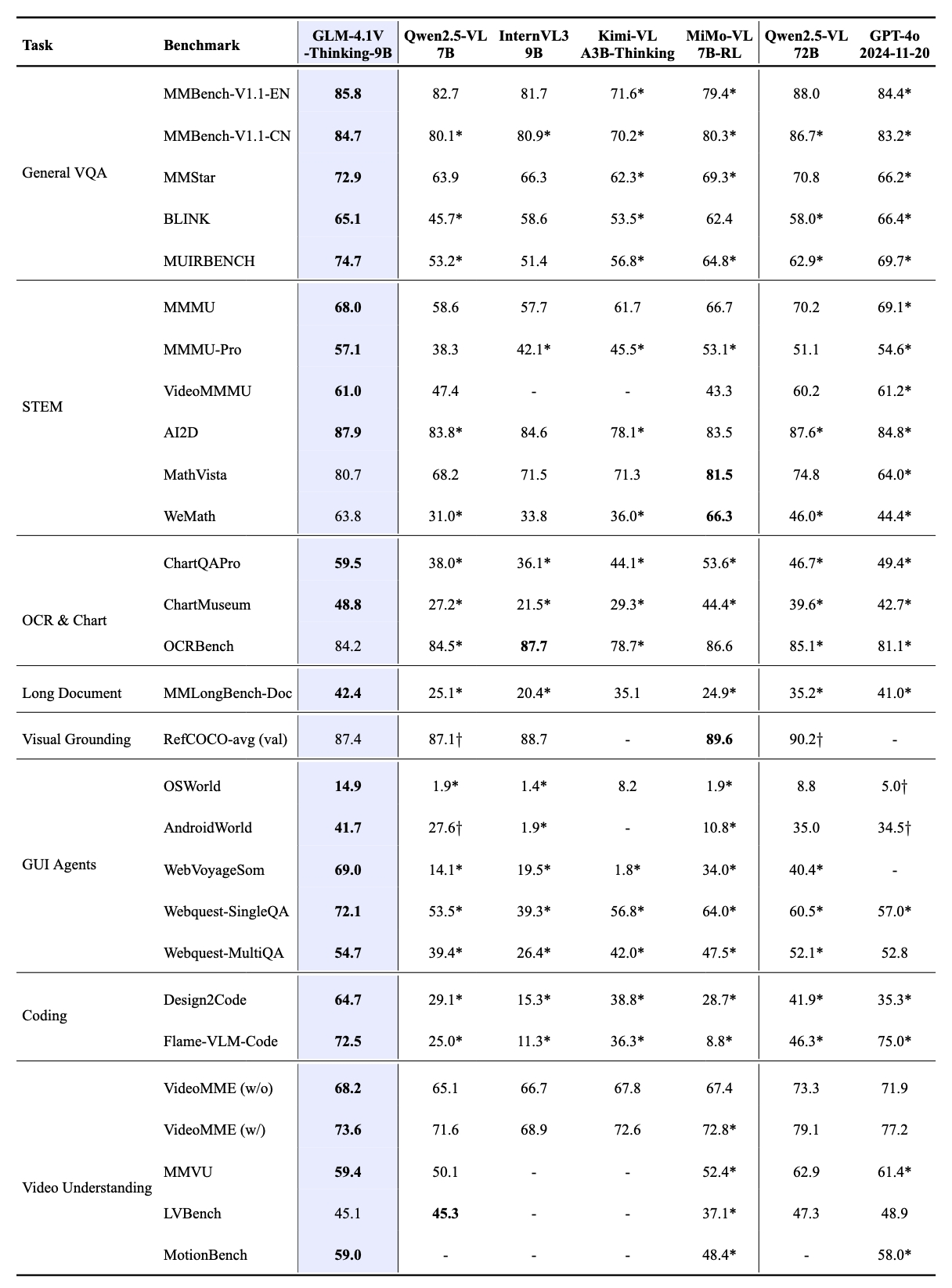
    GLM-4.1V-Thinking 模型在高效部署的同时实现了性能突破。**在 MMStar、MMMU-Pro、ChartQAPro、OSWorld 等 28 项权威评测中，以 23 项 10B 级模型优异成绩展现硬核实力，其中 18 项指标更是持平或超越 8 倍参数量的主流 VLM 模型**，充分印证小体积模型的极限性能潜能。

    ![Description](https://cdn.bigmodel.cn/markdown/1751371876183image.png?attname=image.png)

    值得注意的是，模型在推荐场景任务处理中展现出卓越的适配能力，其高度的通用性与稳健性在复杂业务场景中尤为凸显。
  </Step>

  <Step title="强大的推理能力" stepNumber={2} titleSize="h3">
    GLM-4.1V-Thinking 在 GLM-4V 架构基础上引入“**思维链推理机制**”，采用“课程采样强化学习策略”，系统性提升模型跨模态因果推理能力与稳定性补足推理能力后的 GLM-4.1V-Thinking ，在面向科学研究、教育、自主 Agent 及多模态助手等更复杂现实世界应用时，解决问题的能力更加强大。
  </Step>
</Steps>

## 应用示例

<Tabs>
  <Tab title="图片问答">
    <CardGroup cols={2}>
      <Card title="输入" icon={<svg style={{maskImage: "url(https://mintcdn.com/zhipu-ef7018ed/6jZAOYw-eXEZh1pv/resource/icon/arrow-down-right.svg?fit=max&auto=format&n=6jZAOYw-eXEZh1pv&q=85&s=088a58fa0b1a4048d5c6fab7841133c8)", WebkitMaskImage: "url(https://mintcdn.com/zhipu-ef7018ed/6jZAOYw-eXEZh1pv/resource/icon/arrow-down-right.svg?fit=max&auto=format&n=6jZAOYw-eXEZh1pv&q=85&s=088a58fa0b1a4048d5c6fab7841133c8)", maskRepeat: "no-repeat", maskPosition: "center center",}} className={"h-6 w-6 bg-primary dark:bg-primary-light !m-0 shrink-0"} />}>
        ![Description](https://cdn.bigmodel.cn/markdown/1751371892938image.png?attname=image.png)<br />请找出这张图中年度利润最高的公司，以及该公司的最大部门？
      </Card>

      <Card title="输出" icon={<svg style={{maskImage: "url(https://mintcdn.com/zhipu-ef7018ed/Skp28ct-clfAIOZo/resource/icon/arrow-down-left.svg?fit=max&auto=format&n=Skp28ct-clfAIOZo&q=85&s=1ed65b58aa7a484b387f01be25d99278)", WebkitMaskImage: "url(https://mintcdn.com/zhipu-ef7018ed/Skp28ct-clfAIOZo/resource/icon/arrow-down-left.svg?fit=max&auto=format&n=Skp28ct-clfAIOZo&q=85&s=1ed65b58aa7a484b387f01be25d99278)", maskRepeat: "no-repeat", maskPosition: "center center",}} className={"h-6 w-6 bg-primary dark:bg-primary-light !m-0 shrink-0"} />}>
        Sony has the highest annual profit at \$6.3B. For Sony, the note states, “Media is Sony’s second - largest segment after game consoles.” Thus, the largest segment is game consoles.
      </Card>
    </CardGroup>
  </Tab>

  <Tab title="学科解题">
    <CardGroup cols={2}>
      <Card title="输入" icon={<svg style={{maskImage: "url(https://mintcdn.com/zhipu-ef7018ed/6jZAOYw-eXEZh1pv/resource/icon/arrow-down-right.svg?fit=max&auto=format&n=6jZAOYw-eXEZh1pv&q=85&s=088a58fa0b1a4048d5c6fab7841133c8)", WebkitMaskImage: "url(https://mintcdn.com/zhipu-ef7018ed/6jZAOYw-eXEZh1pv/resource/icon/arrow-down-right.svg?fit=max&auto=format&n=6jZAOYw-eXEZh1pv&q=85&s=088a58fa0b1a4048d5c6fab7841133c8)", maskRepeat: "no-repeat", maskPosition: "center center",}} className={"h-6 w-6 bg-primary dark:bg-primary-light !m-0 shrink-0"} />}>
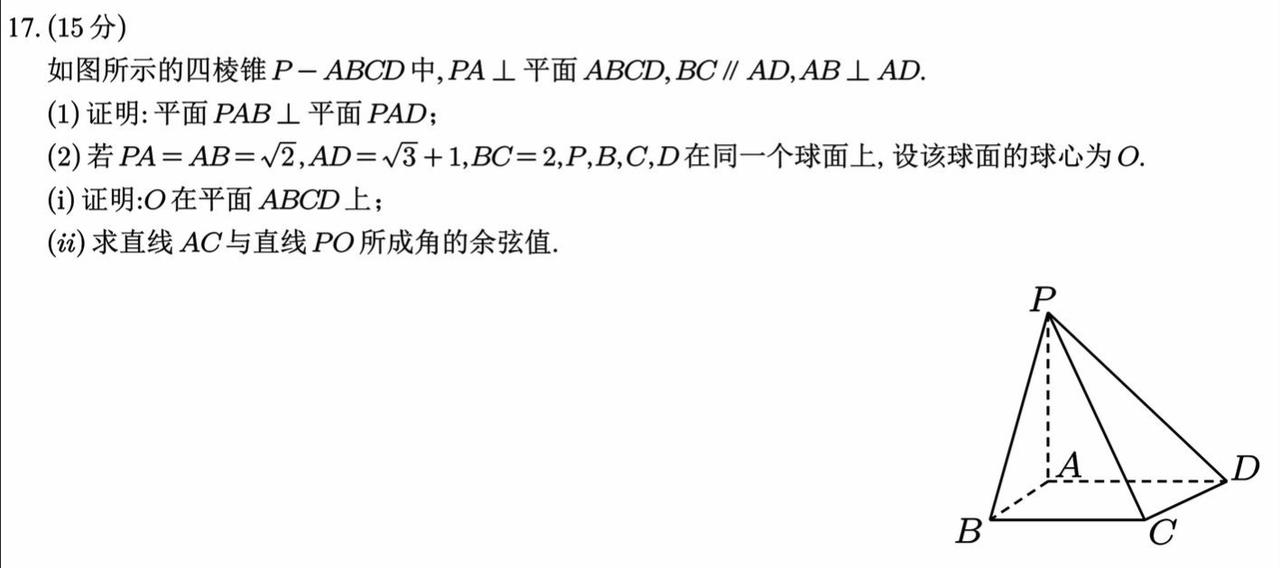
        ![Description](https://cdn.bigmodel.cn/markdown/1751371905445image.png?attname=image.png)<br />请帮我解决这个题目，给出详细过程和答案.
      </Card>

      <Card title="输出" icon={<svg style={{maskImage: "url(https://mintcdn.com/zhipu-ef7018ed/Skp28ct-clfAIOZo/resource/icon/arrow-down-left.svg?fit=max&auto=format&n=Skp28ct-clfAIOZo&q=85&s=1ed65b58aa7a484b387f01be25d99278)", WebkitMaskImage: "url(https://mintcdn.com/zhipu-ef7018ed/Skp28ct-clfAIOZo/resource/icon/arrow-down-left.svg?fit=max&auto=format&n=Skp28ct-clfAIOZo&q=85&s=1ed65b58aa7a484b387f01be25d99278)", maskRepeat: "no-repeat", maskPosition: "center center",}} className={"h-6 w-6 bg-primary dark:bg-primary-light !m-0 shrink-0"} />}>
        思考过程略.<br />已知 PA ⊥ 平面 ABCD ，故 PA ⊥ AD 且 PA ⊥ AB。又 AB ⊥ AD ，AB ⊥ AD ，且 PA 与 AB 的公共点为 A ，因此 AD ⊥平面 PAB。由于 AD ⊂ 平面 PAD，故平面 PAB **⊥** 平面 PAD。
      </Card>
    </CardGroup>
  </Tab>

  <Tab title="GUI Agent">
    <CardGroup cols={2}>
      <Card title="输入" icon={<svg style={{maskImage: "url(https://mintcdn.com/zhipu-ef7018ed/6jZAOYw-eXEZh1pv/resource/icon/arrow-down-right.svg?fit=max&auto=format&n=6jZAOYw-eXEZh1pv&q=85&s=088a58fa0b1a4048d5c6fab7841133c8)", WebkitMaskImage: "url(https://mintcdn.com/zhipu-ef7018ed/6jZAOYw-eXEZh1pv/resource/icon/arrow-down-right.svg?fit=max&auto=format&n=6jZAOYw-eXEZh1pv&q=85&s=088a58fa0b1a4048d5c6fab7841133c8)", maskRepeat: "no-repeat", maskPosition: "center center",}} className={"h-6 w-6 bg-primary dark:bg-primary-light !m-0 shrink-0"} />}>
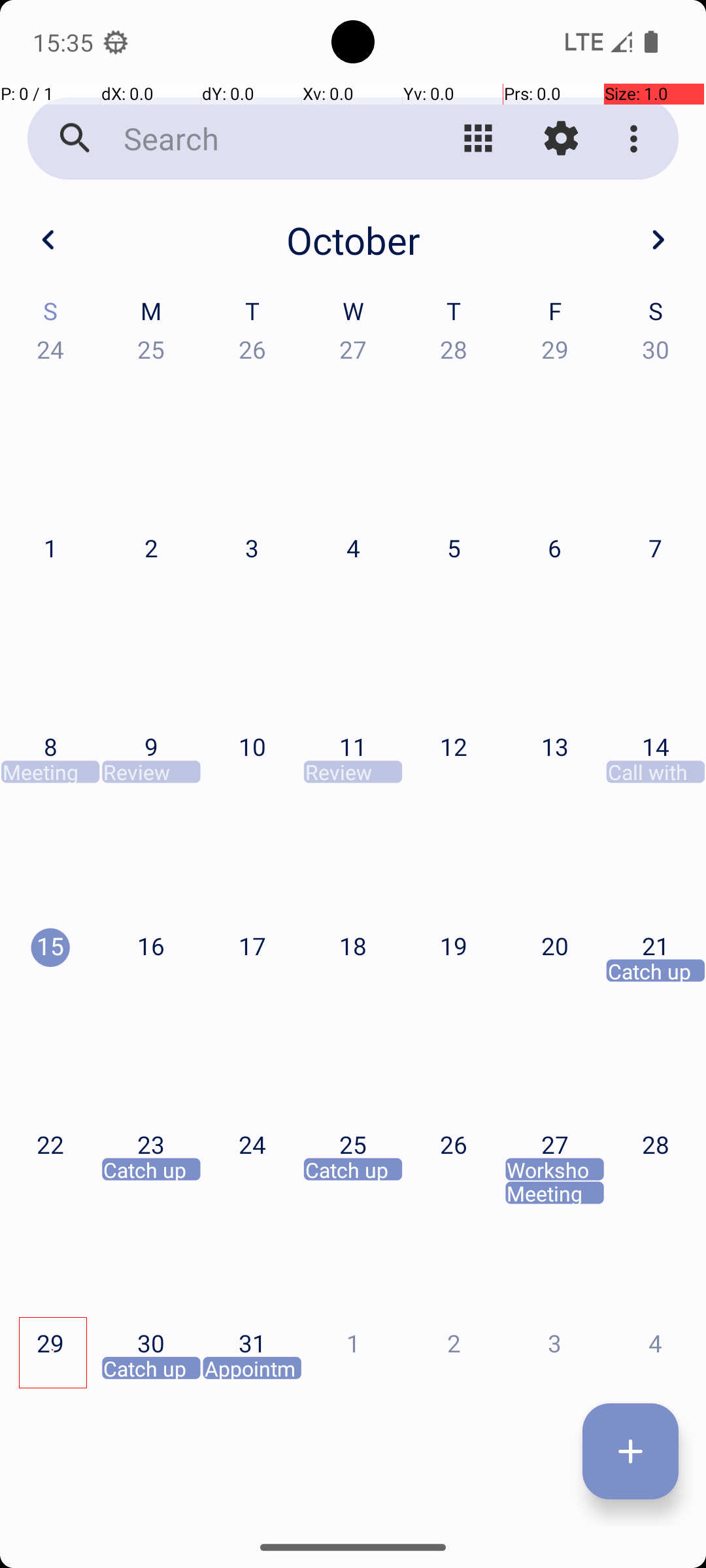
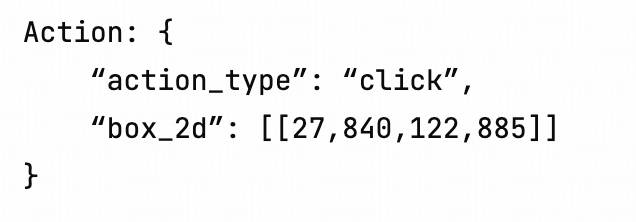
        ![Description](https://cdn.bigmodel.cn/markdown/1751371916542image.png?attname=image.png)<br />在APP中，帮我创建一个两周后3点与史密斯博士的会议
      </Card>

      <Card title="输出" icon={<svg style={{maskImage: "url(https://mintcdn.com/zhipu-ef7018ed/Skp28ct-clfAIOZo/resource/icon/arrow-down-left.svg?fit=max&auto=format&n=Skp28ct-clfAIOZo&q=85&s=1ed65b58aa7a484b387f01be25d99278)", WebkitMaskImage: "url(https://mintcdn.com/zhipu-ef7018ed/Skp28ct-clfAIOZo/resource/icon/arrow-down-left.svg?fit=max&auto=format&n=Skp28ct-clfAIOZo&q=85&s=1ed65b58aa7a484b387f01be25d99278)", maskRepeat: "no-repeat", maskPosition: "center center",}} className={"h-6 w-6 bg-primary dark:bg-primary-light !m-0 shrink-0"} />}>
        ![Description](https://cdn.bigmodel.cn/markdown/175282595604320250718-160538.jpeg?attname=20250718-160538.jpeg)
      </Card>
    </CardGroup>
  </Tab>

  <Tab title="前端网页Coding">
    <CardGroup cols={2}>
      <Card title="输入" icon={<svg style={{maskImage: "url(https://mintcdn.com/zhipu-ef7018ed/6jZAOYw-eXEZh1pv/resource/icon/arrow-down-right.svg?fit=max&auto=format&n=6jZAOYw-eXEZh1pv&q=85&s=088a58fa0b1a4048d5c6fab7841133c8)", WebkitMaskImage: "url(https://mintcdn.com/zhipu-ef7018ed/6jZAOYw-eXEZh1pv/resource/icon/arrow-down-right.svg?fit=max&auto=format&n=6jZAOYw-eXEZh1pv&q=85&s=088a58fa0b1a4048d5c6fab7841133c8)", maskRepeat: "no-repeat", maskPosition: "center center",}} className={"h-6 w-6 bg-primary dark:bg-primary-light !m-0 shrink-0"} />}>
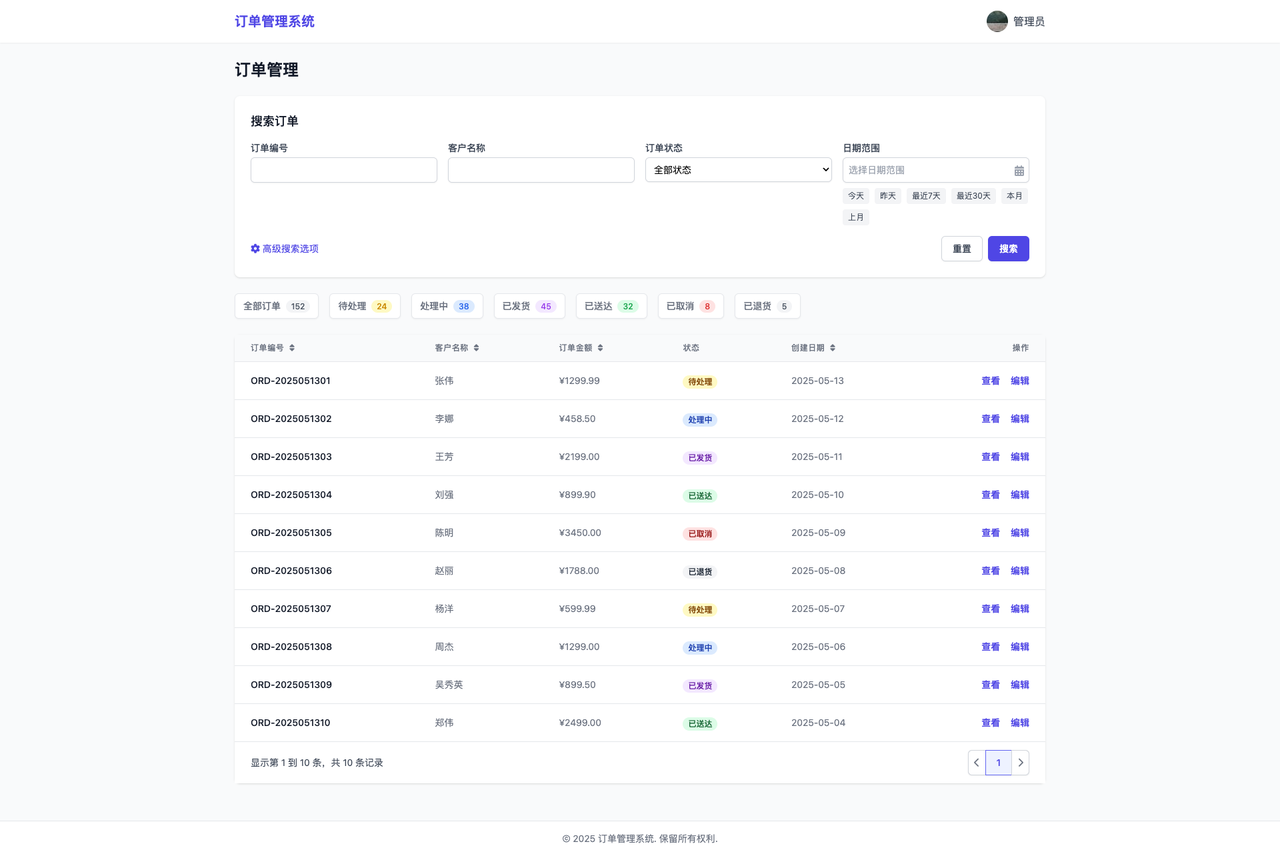
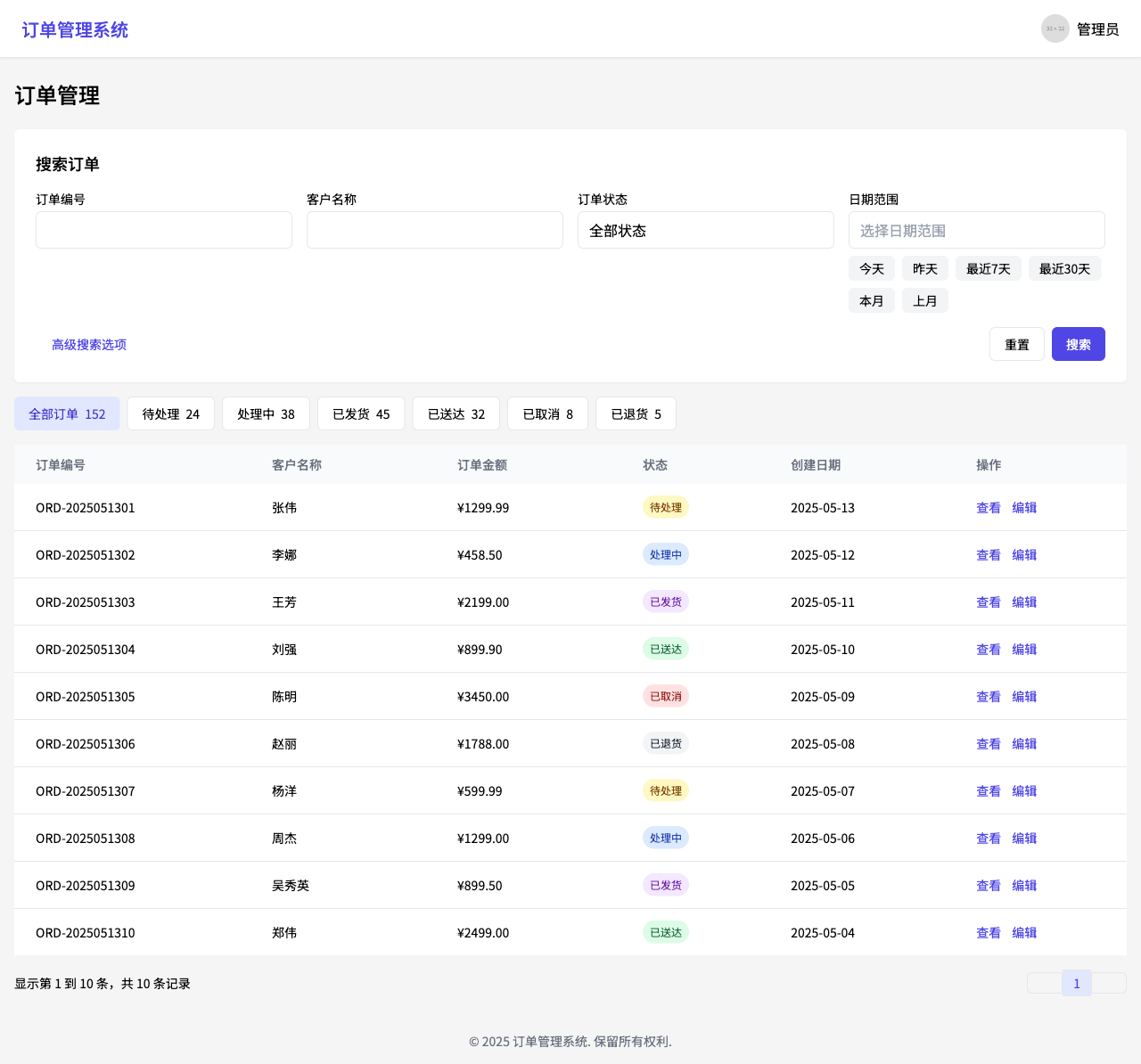
        ![Description](https://cdn.bigmodel.cn/markdown/1751371942040image.png?attname=image.png)<br />请构建一个与输入图片相似的网页并将其转换为 React 代码。
      </Card>

      <Card title="输出" icon={<svg style={{maskImage: "url(https://mintcdn.com/zhipu-ef7018ed/Skp28ct-clfAIOZo/resource/icon/arrow-down-left.svg?fit=max&auto=format&n=Skp28ct-clfAIOZo&q=85&s=1ed65b58aa7a484b387f01be25d99278)", WebkitMaskImage: "url(https://mintcdn.com/zhipu-ef7018ed/Skp28ct-clfAIOZo/resource/icon/arrow-down-left.svg?fit=max&auto=format&n=Skp28ct-clfAIOZo&q=85&s=1ed65b58aa7a484b387f01be25d99278)", maskRepeat: "no-repeat", maskPosition: "center center",}} className={"h-6 w-6 bg-primary dark:bg-primary-light !m-0 shrink-0"} />}>
        生成的React代码后渲染的网页界面截图：<br />![Description](https://cdn.bigmodel.cn/markdown/1751381809888image.png?attname=image.png)
      </Card>
    </CardGroup>
  </Tab>
</Tabs>

## 调用示例

<Tabs>
  <Tab title="Python">
    **安装 SDK**

    ```bash theme={null}
    # 安装最新版本
    pip install zai-sdk
    # 或指定版本
    pip install zai-sdk==0.2.3
    ```

    **验证安装**

    ```python theme={null}
    import zai
    print(zai.__version__)
    ```

    **调用示例**

    ```python theme={null}
    from zai import ZhipuAiClient
    client = ZhipuAiClient(api_key="YOUR_API_KEY")  # 请填写您自己的 APIKey
    response = client.chat.completions.create(
        model="glm-4.1v-thinking-flashx",  # 请填写您要调用的模型名称
        messages=[
            {
                "role": "user",
                "content": [
                    {"type": "text", "text": "请帮我解决这个题目，给出详细过程和答案"},
                    {"type": "image_url", "image_url": {"url": "https://img.iplaysoft.com/wp-content/uploads/2019/free-images/free_stock_photo.jpg"}}
                ]
            }
        ]
    )
    print(response.choices[0].message.content)
    ```
  </Tab>

  <Tab title="Java">
    **安装 SDK**

    **Maven**

    ```xml theme={null}
    <dependency>
        <groupId>ai.z.openapi</groupId>
        <artifactId>zai-sdk</artifactId>
        <version>0.3.5</version>
    </dependency>
    ```

    **Gradle (Groovy)**

    ```groovy theme={null}
    implementation 'ai.z.openapi:zai-sdk:0.3.5'
    ```

    **调用示例**

    ```java theme={null}
    import ai.z.openapi.ZhipuAiClient;
    import ai.z.openapi.service.model.*;
    import ai.z.openapi.core.Constants;
    import java.util.Arrays;

    public class GLM41VThinkingExample {
    public static void main(String[] args) {
        String apiKey = "YOUR_API_KEY"; // 请填写您自己的APIKey
        ZhipuAiClient client = ZhipuAiClient.builder().ofZHIPU()
            .apiKey(apiKey)
            .build();
        
        ChatCompletionCreateParams request = ChatCompletionCreateParams.builder()
            .model("glm-4.1v-thinking-flashx")
            .messages(Arrays.asList(
                ChatMessage.builder()
                    .role(ChatMessageRole.USER.value())
                    .content(Arrays.asList(
                        MessageContent.builder()
                            .type("text")
                            .text("描述下这张图片")
                            .build(),
                        MessageContent.builder()
                            .type("image_url")
                            .imageUrl(ImageUrl.builder()
                            .url("https://aigc-files.bigmodel.cn/api/cogview/20250723213827da171a419b9b4906_0.png")
                            .build())
                        .build()))
                    .build()
            ))
            .build();
        
        ChatCompletionResponse response = client.chat().createChatCompletion(request);
        
        if (response.isSuccess()) {
            Object reply = response.getData().getChoices().get(0).getMessage().getContent();
            System.out.println(reply);
        } else {
            System.err.println("错误: " + response.getMsg());
        }
    }
    }
    ```
  </Tab>

  <Tab title="Python（旧）">
    ```Python theme={null}
    from zhipuai import ZhipuAI

    client = ZhipuAI(api_key="YOUR_API_KEY")  # 填写您自己的APIKey

    response = client.chat.completions.create(
        model="glm-4.1v-thinking-flashx",  # 填写需要调用的模型名称
        messages=[
            {
                "role": "user",
                "content": [
                    {
                        "type": "text",
                        "text": "请帮我解决这个题目，给出详细过程和答案"
                    },
                    {
                        "type": "image_url",
                        "image_url": {
                            "url": "传入图片的 url 地址"
                        }
                    }
                ]
            }
        ]
    )

    print(response.choices[0].message)
    ```
  </Tab>
</Tabs>

<Tip>
  请注意，GLM-4.1V-Thinking 模型支持图片和文本的多模态输入，您可以在 messages 中同时包含文本和图片。
</Tip>

## 用户并发权益

API 调用会受到速率限制，当前我们限制的维度是请求并发数量（在途请求任务数量）。不同等级的用户并发保障如下。

| 模型版本                     | V0 | V1 | V2 | V3  |
| :----------------------- | :- | :- | :- | :-- |
| GLM-4.1V-Thinking-Flash  | 5  | 10 | 15 | 20  |
| GLM-4.1V-Thinking-FlashX | 30 | 50 | 80 | 100 |