> ## Documentation Index
> Fetch the complete documentation index at: https://docs.bigmodel.cn/llms.txt
> Use this file to discover all available pages before exploring further.

# GLM-5V-Turbo

## 概览

GLM-5V-Turbo 是智谱首个**多模态 Coding 基座模型**，面向**视觉编程**任务打造。能够原生处理图片、视频、文本等多模态输入，同时擅长长程规划、复杂编程和动作执行；**深度适配 Agent 工作流**，能够与 Claude Code、OpenClaw 等 Agent 深度协同，完成"看懂环境→规划动作→执行任务"的完整闭环。

<CardGroup cols={3}>
  <Card title="定位" icon={<svg style={{maskImage: "url(https://mintcdn.com/zhipu-ef7018ed/6jZAOYw-eXEZh1pv/resource/icon/star.svg?fit=max&auto=format&n=6jZAOYw-eXEZh1pv&q=85&s=b3c8448dccf8f96abadf9a72e51b3cca)", WebkitMaskImage: "url(https://mintcdn.com/zhipu-ef7018ed/6jZAOYw-eXEZh1pv/resource/icon/star.svg?fit=max&auto=format&n=6jZAOYw-eXEZh1pv&q=85&s=b3c8448dccf8f96abadf9a72e51b3cca)", maskRepeat: "no-repeat", maskPosition: "center center",}} className={"h-6 w-6 bg-primary dark:bg-primary-light !m-0 shrink-0"} />}>
    多模态 Coding 基座
  </Card>

  <Card title="输入模态" icon={<svg style={{maskImage: "url(https://mintcdn.com/zhipu-ef7018ed/6jZAOYw-eXEZh1pv/resource/icon/arrow-down-right.svg?fit=max&auto=format&n=6jZAOYw-eXEZh1pv&q=85&s=088a58fa0b1a4048d5c6fab7841133c8)", WebkitMaskImage: "url(https://mintcdn.com/zhipu-ef7018ed/6jZAOYw-eXEZh1pv/resource/icon/arrow-down-right.svg?fit=max&auto=format&n=6jZAOYw-eXEZh1pv&q=85&s=088a58fa0b1a4048d5c6fab7841133c8)", maskRepeat: "no-repeat", maskPosition: "center center",}} className={"h-6 w-6 bg-primary dark:bg-primary-light !m-0 shrink-0"} />}>
    视频、图像、文本、文件
  </Card>

  <Card title="输出模态" icon={<svg style={{maskImage: "url(https://mintcdn.com/zhipu-ef7018ed/Skp28ct-clfAIOZo/resource/icon/arrow-down-left.svg?fit=max&auto=format&n=Skp28ct-clfAIOZo&q=85&s=1ed65b58aa7a484b387f01be25d99278)", WebkitMaskImage: "url(https://mintcdn.com/zhipu-ef7018ed/Skp28ct-clfAIOZo/resource/icon/arrow-down-left.svg?fit=max&auto=format&n=Skp28ct-clfAIOZo&q=85&s=1ed65b58aa7a484b387f01be25d99278)", maskRepeat: "no-repeat", maskPosition: "center center",}} className={"h-6 w-6 bg-primary dark:bg-primary-light !m-0 shrink-0"} />}>
    文本
  </Card>

  <Card title="上下文窗口" icon={<svg style={{maskImage: "url(https://mintcdn.com/zhipu-ef7018ed/Skp28ct-clfAIOZo/resource/icon/arrow-down-arrow-up.svg?fit=max&auto=format&n=Skp28ct-clfAIOZo&q=85&s=ccc051baa101b9a46d0d9bc5fad04877)", WebkitMaskImage: "url(https://mintcdn.com/zhipu-ef7018ed/Skp28ct-clfAIOZo/resource/icon/arrow-down-arrow-up.svg?fit=max&auto=format&n=Skp28ct-clfAIOZo&q=85&s=ccc051baa101b9a46d0d9bc5fad04877)", maskRepeat: "no-repeat", maskPosition: "center center",}} className={"h-6 w-6 bg-primary dark:bg-primary-light !m-0 shrink-0"} />}>
    200K
  </Card>

  <Card title="最大输出 Tokens" icon={<svg style={{maskImage: "url(https://mintcdn.com/zhipu-ef7018ed/6jZAOYw-eXEZh1pv/resource/icon/maximize.svg?fit=max&auto=format&n=6jZAOYw-eXEZh1pv&q=85&s=743c202becf04d91d943f9014a3fe67f)", WebkitMaskImage: "url(https://mintcdn.com/zhipu-ef7018ed/6jZAOYw-eXEZh1pv/resource/icon/maximize.svg?fit=max&auto=format&n=6jZAOYw-eXEZh1pv&q=85&s=743c202becf04d91d943f9014a3fe67f)", maskRepeat: "no-repeat", maskPosition: "center center",}} className={"h-6 w-6 bg-primary dark:bg-primary-light !m-0 shrink-0"} />}>
    128K
  </Card>
</CardGroup>

<Tip>
  GLM-5V-Turbo 价格详情请前往[价格界面](https://open.bigmodel.cn/pricing)
</Tip>

## 能力支持

<CardGroup cols={3}>
  <Card title="深度思考" href="/cn/guide/capabilities/thinking" icon={<svg style={{maskImage: "url(https://mintcdn.com/zhipu-ef7018ed/6jZAOYw-eXEZh1pv/resource/icon/brain.svg?fit=max&auto=format&n=6jZAOYw-eXEZh1pv&q=85&s=b04e181006c02a51715f85395cd9735f)", WebkitMaskImage: "url(https://mintcdn.com/zhipu-ef7018ed/6jZAOYw-eXEZh1pv/resource/icon/brain.svg?fit=max&auto=format&n=6jZAOYw-eXEZh1pv&q=85&s=b04e181006c02a51715f85395cd9735f)", maskRepeat: "no-repeat", maskPosition: "center center",}} className={"h-6 w-6 bg-primary dark:bg-primary-light !m-0 shrink-0"} />}>
    支持开启或关闭思考模式，可灵活开关深层推理分析
  </Card>

  <Card title="视觉理解" icon={<svg style={{maskImage: "url(https://mintcdn.com/zhipu-ef7018ed/6jZAOYw-eXEZh1pv/resource/icon/eye.svg?fit=max&auto=format&n=6jZAOYw-eXEZh1pv&q=85&s=6b122d35262105038324f60f9e09612e)", WebkitMaskImage: "url(https://mintcdn.com/zhipu-ef7018ed/6jZAOYw-eXEZh1pv/resource/icon/eye.svg?fit=max&auto=format&n=6jZAOYw-eXEZh1pv&q=85&s=6b122d35262105038324f60f9e09612e)", maskRepeat: "no-repeat", maskPosition: "center center",}} className={"h-6 w-6 bg-primary dark:bg-primary-light !m-0 shrink-0"} />}>
    强大的视觉理解能力，支持图片，视频，文件
  </Card>

  <Card title="流式输出" href="/cn/guide/capabilities/streaming" icon={<svg style={{maskImage: "url(https://mintcdn.com/zhipu-ef7018ed/6jZAOYw-eXEZh1pv/resource/icon/maximize.svg?fit=max&auto=format&n=6jZAOYw-eXEZh1pv&q=85&s=743c202becf04d91d943f9014a3fe67f)", WebkitMaskImage: "url(https://mintcdn.com/zhipu-ef7018ed/6jZAOYw-eXEZh1pv/resource/icon/maximize.svg?fit=max&auto=format&n=6jZAOYw-eXEZh1pv&q=85&s=743c202becf04d91d943f9014a3fe67f)", maskRepeat: "no-repeat", maskPosition: "center center",}} className={"h-6 w-6 bg-primary dark:bg-primary-light !m-0 shrink-0"} />}>
    支持实时流式响应，提升用户交互体验
  </Card>

  <Card title="Function Call" href="/cn/guide/capabilities/function-calling" icon={<svg style={{maskImage: "url(https://mintcdn.com/zhipu-ef7018ed/6jZAOYw-eXEZh1pv/resource/icon/function.svg?fit=max&auto=format&n=6jZAOYw-eXEZh1pv&q=85&s=a597d8cdc054b4c0e39c08295f570c86)", WebkitMaskImage: "url(https://mintcdn.com/zhipu-ef7018ed/6jZAOYw-eXEZh1pv/resource/icon/function.svg?fit=max&auto=format&n=6jZAOYw-eXEZh1pv&q=85&s=a597d8cdc054b4c0e39c08295f570c86)", maskRepeat: "no-repeat", maskPosition: "center center",}} className={"h-6 w-6 bg-primary dark:bg-primary-light !m-0 shrink-0"} />}>
    强大的工具调用能力，支持多种外部工具集成
  </Card>

  <Card title="上下文缓存" href="/cn/guide/capabilities/cache" icon={<svg style={{maskImage: "url(https://mintcdn.com/zhipu-ef7018ed/6jZAOYw-eXEZh1pv/resource/icon/database.svg?fit=max&auto=format&n=6jZAOYw-eXEZh1pv&q=85&s=93c0e1cf0ce93de9364ade5d1f49d992)", WebkitMaskImage: "url(https://mintcdn.com/zhipu-ef7018ed/6jZAOYw-eXEZh1pv/resource/icon/database.svg?fit=max&auto=format&n=6jZAOYw-eXEZh1pv&q=85&s=93c0e1cf0ce93de9364ade5d1f49d992)", maskRepeat: "no-repeat", maskPosition: "center center",}} className={"h-6 w-6 bg-primary dark:bg-primary-light !m-0 shrink-0"} />}>
    智能缓存机制，优化长对话性能
  </Card>
</CardGroup>

## 推荐场景

<AccordionGroup>
  <Accordion title="前端复刻">
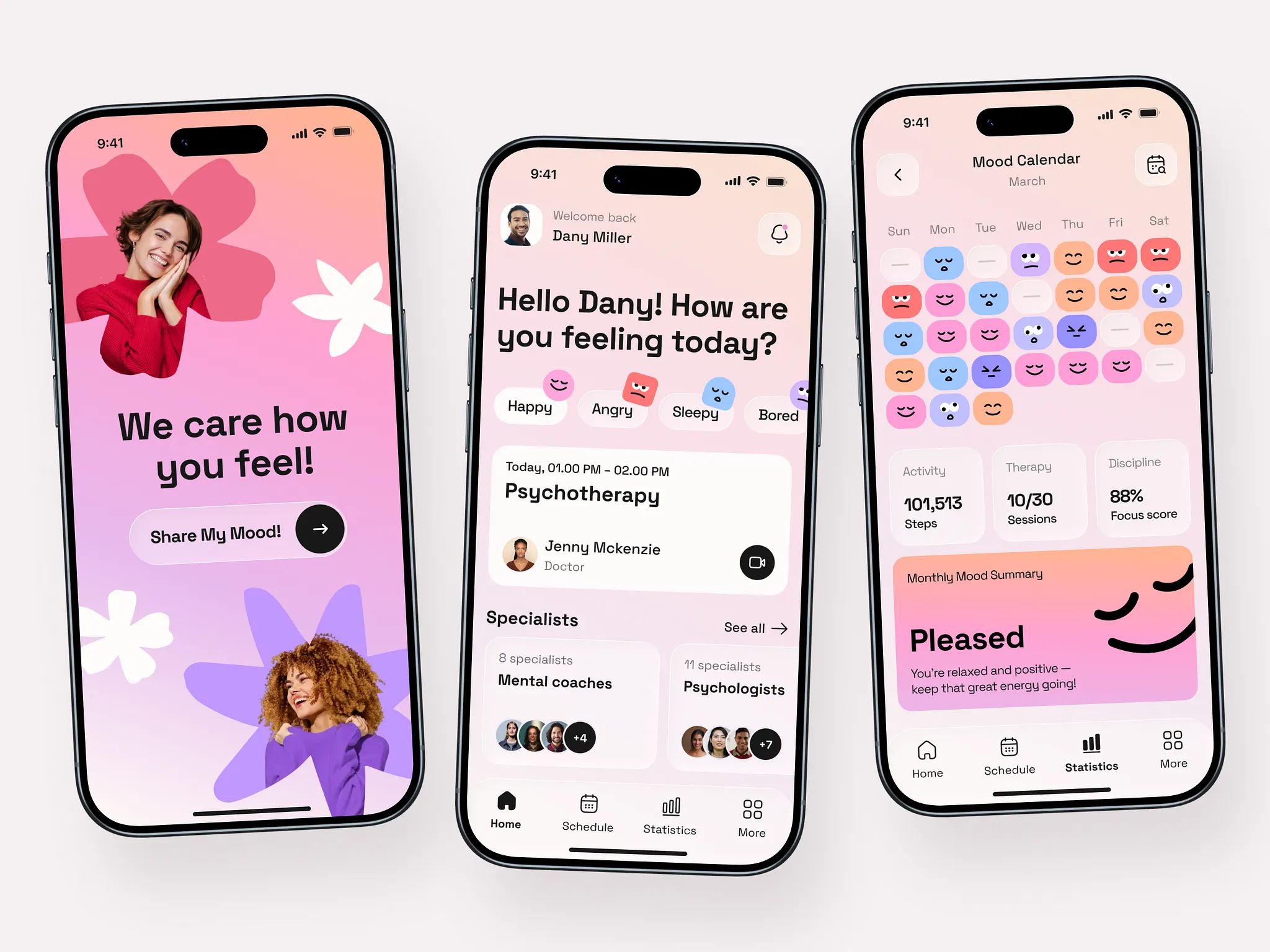
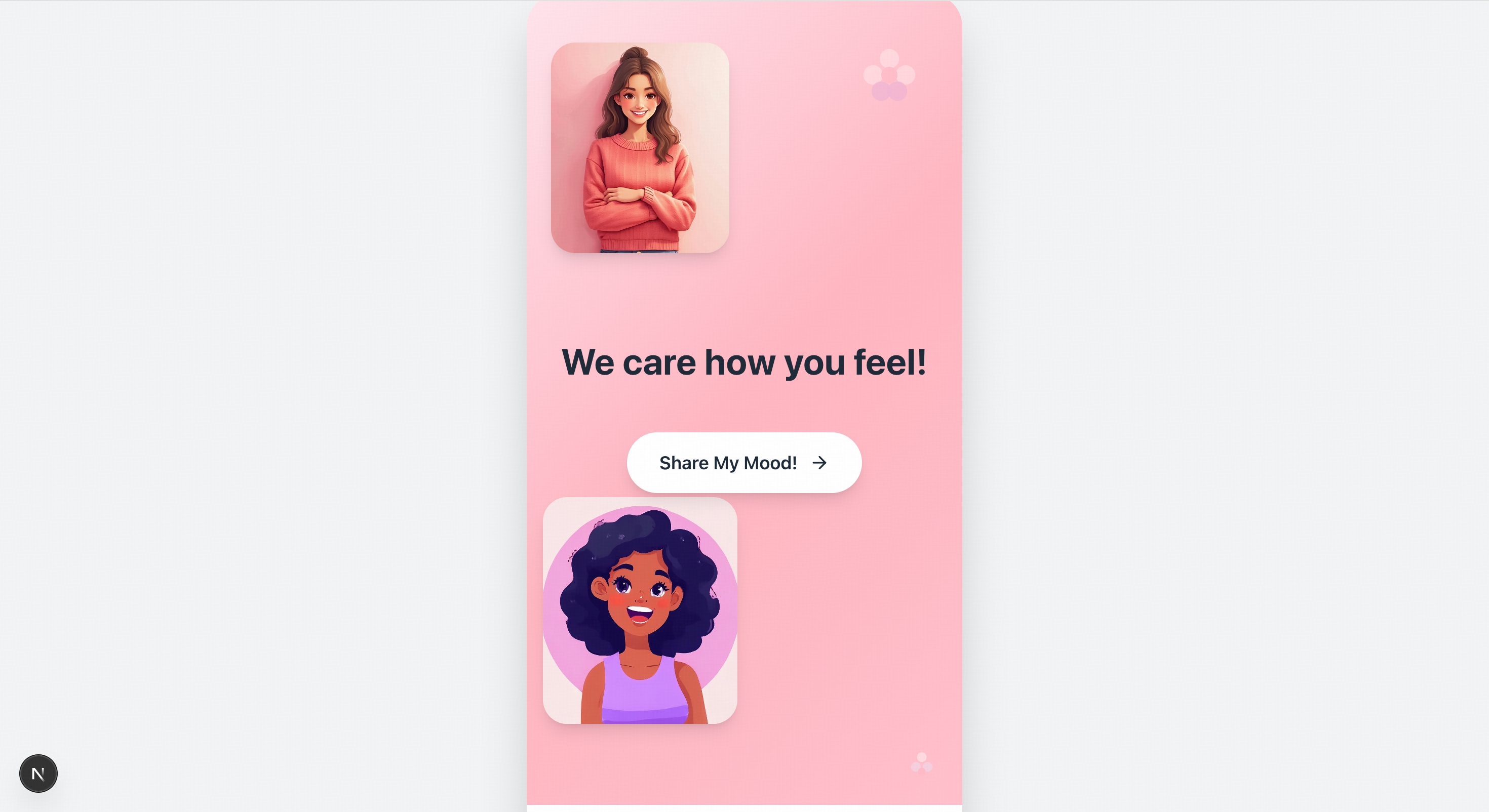
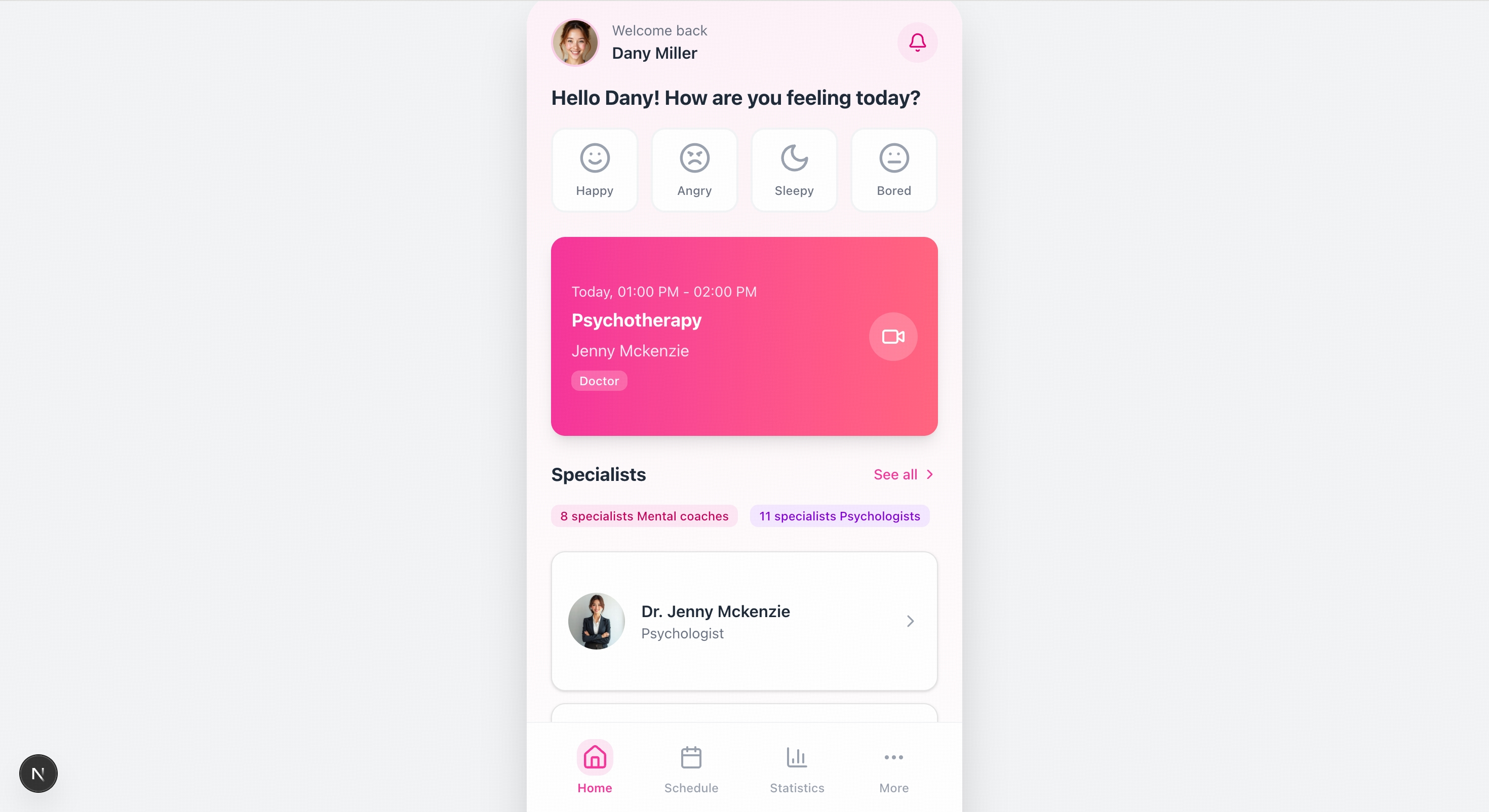
    发送设计稿或参考图，模型直接理解布局、配色、组件层级与交互逻辑，生成完整可运行的前端工程，原型图还原结构与功能，高保真设计稿追求像素级视觉一致性。
  </Accordion>

  <Accordion title="GUI 自主探索复刻">
    支持结合 Claude Code 等框架，自主浏览目标网站、梳理页面跳转关系、采集视觉素材与交互细节，并基于探索结果直接生成代码，实现从“看图复刻”到“自主探索复刻”的升级。
  </Accordion>

  <Accordion title="代码调试">
    支持将 Bug 页面截图输入，自动识别样式错位、组件重叠、颜色偏差等渲染异常，辅助定位前端问题并生成修复代码，提升调试效率。
  </Accordion>

  <Accordion title="OpenClaw">
    接入 GLM-5V-Turbo 后，OpenClaw 可以看懂网页布局、GUI 元素和图表信息，帮助 Agent 在真实环境中完成感知、规划与执行一体化的复杂任务。
  </Accordion>
</AccordionGroup>

## 使用资源

<CardGroup cols={2}>
  <Card title="体验中心" href="https://www.bigmodel.cn/trialcenter/modeltrial/visual?modelCode=glm-5v-turbo">
    快速测试模型在业务场景上的效果
  </Card>

  <Card title="接口文档" href="/api-reference/%E6%A8%A1%E5%9E%8B-api/%E5%AF%B9%E8%AF%9D%E8%A1%A5%E5%85%A8">
    API 调用方式
  </Card>
</CardGroup>

## 详细介绍

<Steps>
  <Step title="多模态 Coding 基座" titleSize="h3">
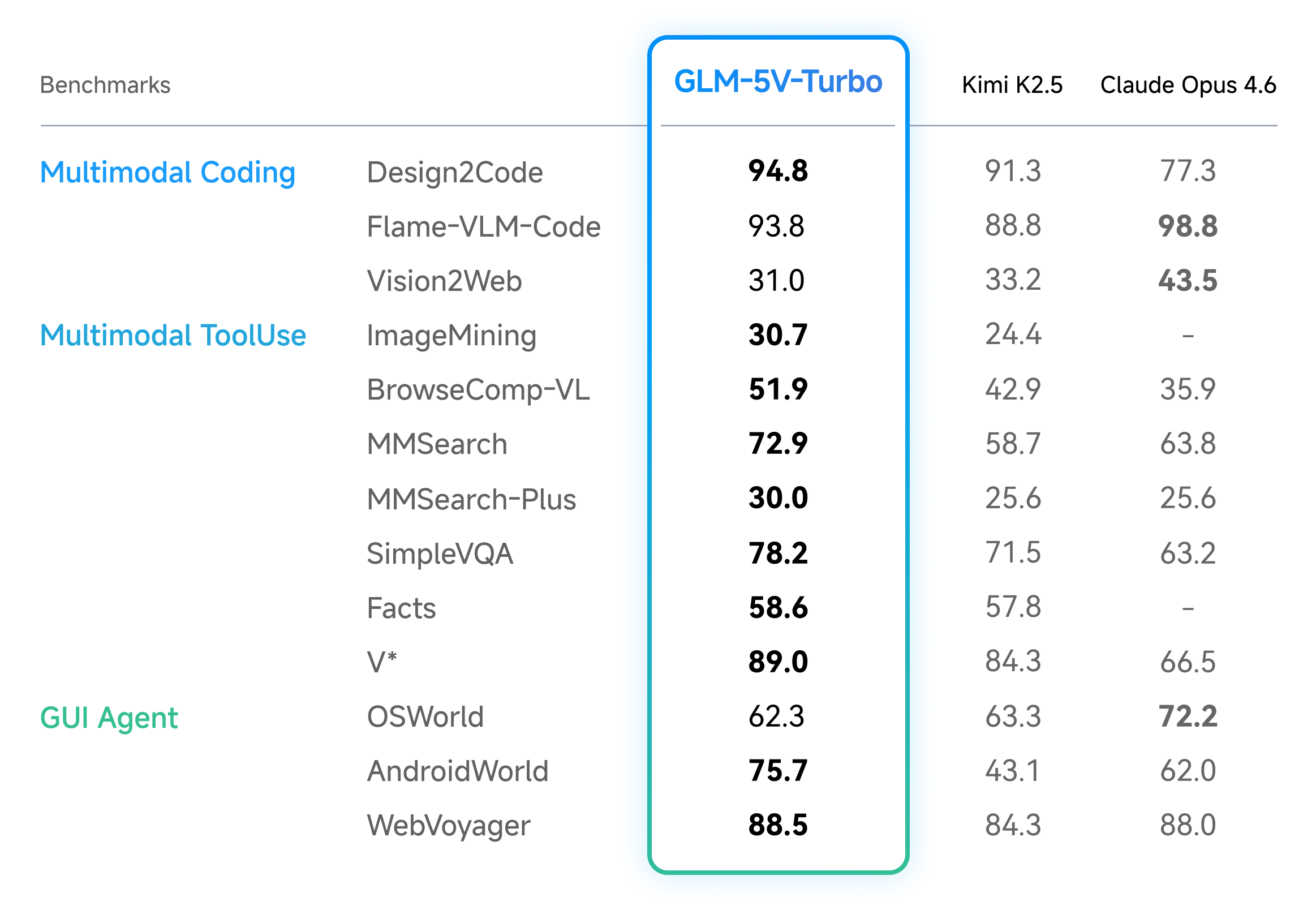
    在多模态 Coding 与 Agentic 任务，以及纯文本 Coding 两大维度的评测基准上，GLM-5V-Turbo 均以更小尺寸取得了优秀表现。

    <Tabs>
      <Tab title="多模态 Coding 与 Agentic 任务">
        GLM-5V-Turbo 在设计稿还原、视觉代码生成、多模态检索与问答、视觉探查等基准上均取得领先表现；在衡量真实 GUI 环境操控能力的 AndroidWorld、WebVoyager 等基准上同样表现突出。
        ![Description](https://cdn.bigmodel.cn/markdown/1775044860800img_v3_0210b_c42d0355-22af-4be7-8582-16fc6e7d0bfg.png?attname=img_v3_0210b_c42d0355-22af-4be7-8582-16fc6e7d0bfg.png)
      </Tab>

      <Tab title="纯文本 Coding 任务">
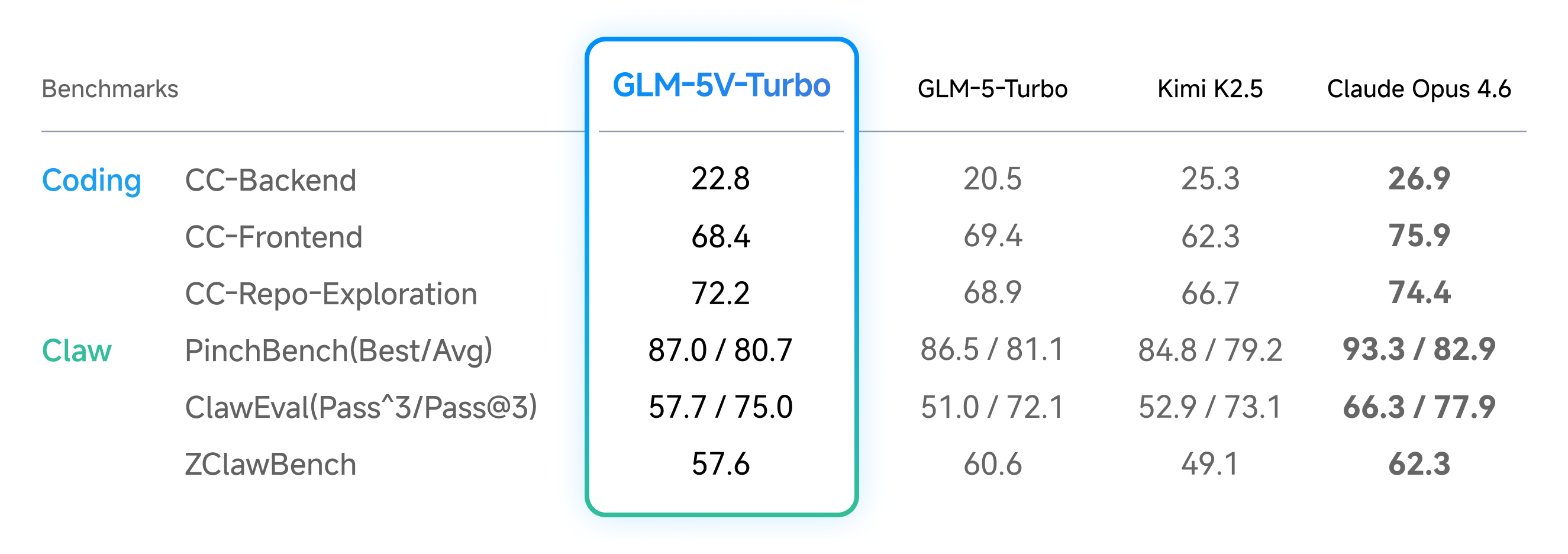
        GLM-5V-Turbo在 CC-Bench-V2 的 Backend、Frontend 和 Repo Exploration 三项核心基准测试中均保持稳定表现，这表明视觉能力的引入并未带来纯文本能力的退化。与此同时，模型在衡量龙虾 Agent 任务执行质量的 PinchBench、ClawEval 和 ZClawBench 上也取得了优异成绩，进一步验证了其在复杂任务执行场景中的综合能力。

        ![Description](https://cdn.bigmodel.cn/markdown/1774864152000img_v3_02109_6af1ad38-f794-43ec-9ac7-73a43628d7cg.png?attname=img_v3_02109_6af1ad38-f794-43ec-9ac7-73a43628d7cg.png)
      </Tab>
    </Tabs>
  </Step>

  <Step title="四个层面的系统性升级" stepNumber={2} titleSize="h3">
    GLM-5V-Turbo 能够兼顾视觉与 Coding 能力，并以更小的参数量取得性能领先，关键在于**模型架构、训练方法、数据构造、工具链**四个层面的系统性升级：

    * **原生多模态融合**：从预训练到后训练持续强化视觉与文本协同，结合新一代 CogViT 视觉编码器与推理友好的 MTP 结构，提升多模态理解与推理效率。
    * **30+ 任务协同强化学习**：在强化学习阶段同时优化 30+ 任务类型，同时覆盖 STEM、grounding、video、GUI Agent、coding Agent 等类型，带来更稳健的感知、推理与 Agentic 执行能力提升。
    * **Agentic数据与任务构造**：围绕 Agent 数据稀缺和验证困难问题，构建多层级、可控、可验证的数据体系，并在预训练阶段注入 Agentic 元能力，增强动作预测与执行表现。
    * **多模态工具链扩展**：新增画框、截图、读网页（含图片识别）等多模态 tools，将 Agent 能力从纯文本扩展到视觉交互，支持更完整的感知—规划—执行闭环。
  </Step>
</Steps>

## 官方 Skill

除视觉编程与龙虾任务外，GLM-5V-Turbo 在多模态搜索、深度研究、GUI Agent、感知 Grounding 等更广泛的 Agentic 场景中也取得了显著提升。为此，我们提供了一组官方 Skills。

<AccordionGroup>
  <Accordion title="图像 Captioning">
    自动分析图像内容并生成自然语言描述的能力；不仅能识别图像中的物体，还能理解物体间的关系、场景氛围及动作，将其转化为准确、流畅的文字说明
  </Accordion>

  <Accordion title="视觉 Grounding">
    根据自然语言描述，在图像中精准定位对应物体或区域的能力；建立了文本与视觉像素之间的对应关系，通常以边界框的形式标出目标位置，用于实现更具象化的交互体验或辅助细粒度的图像分析
  </Accordion>

  <Accordion title="基于文档的写作">
    根据用户提供的文档资料(如 PDF、Word 等)，理解并提取关键信息，进而生成特定格式文本的能力；可确保生成内容紧扣文档事实，常用于文档解读、报告生成、新闻稿撰写或方案策划等
  </Accordion>

  <Accordion title="简历筛选">
    阅读候选人简历，并将其与职位要求进行智能比对的能力；快速提取教育背景、工作经历、技能标签等关键要素，评估人岗匹配度并给出排序或建议，大幅提升招聘效率
  </Accordion>

  <Accordion title="提示词生成">
    根据参考图片/视频和意图描述，自动构建高质量、结构化Prompt的能力；通过理解图片/视频内容和特点、优化措辞、补充细节等，生成更易于被AI模型理解的指令，从而激发模型产出更精准、优质的图片/视频生成结果
  </Accordion>
</AccordionGroup>

此外，我们基于之前发布的专用模型 GLM-OCR 和 GLM-Image 制作了 5 个Skills，以实现对更多场景和任务的支持。

上述 Skill 已上线 [ClawHub](https://clawhub.ai/jaredforreal/glm-master-skill)、[Github](https://github.com/zai-org/GLM-skills/tree/main/skills/glm-master-skill)。

## 应用示例

<Tabs>
  <Tab title="前端复刻">
    <CardGroup cols={2}>
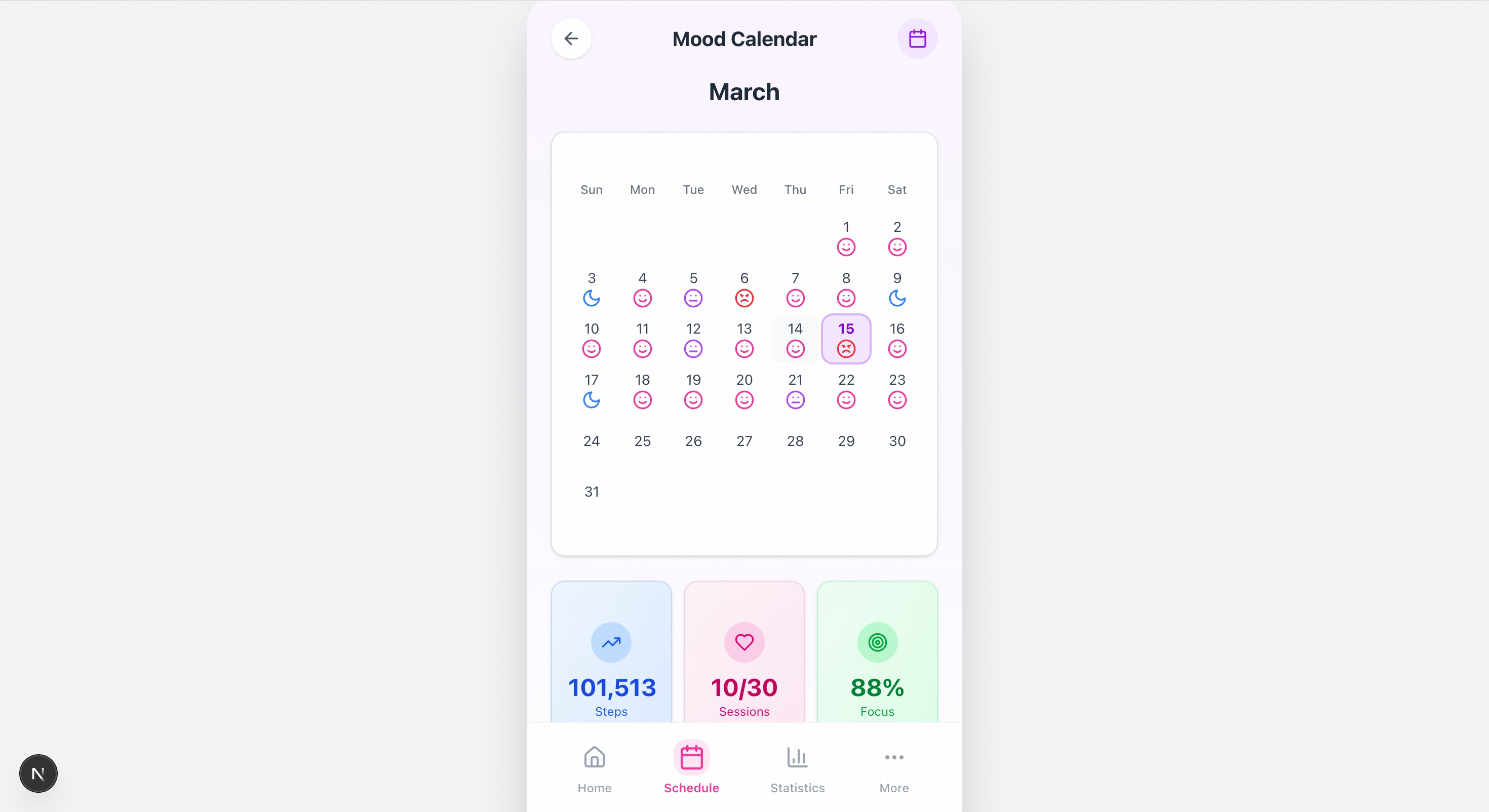
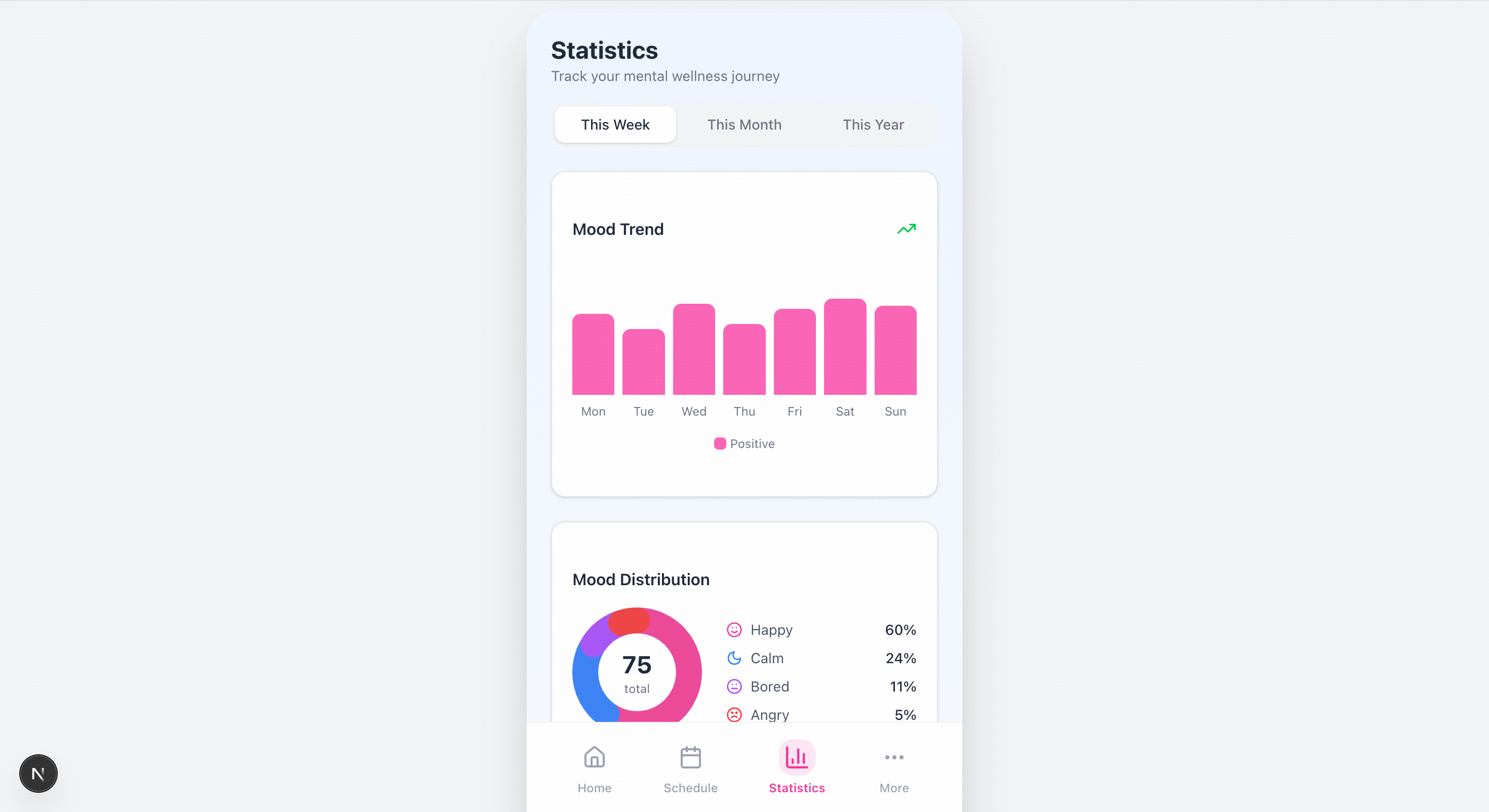
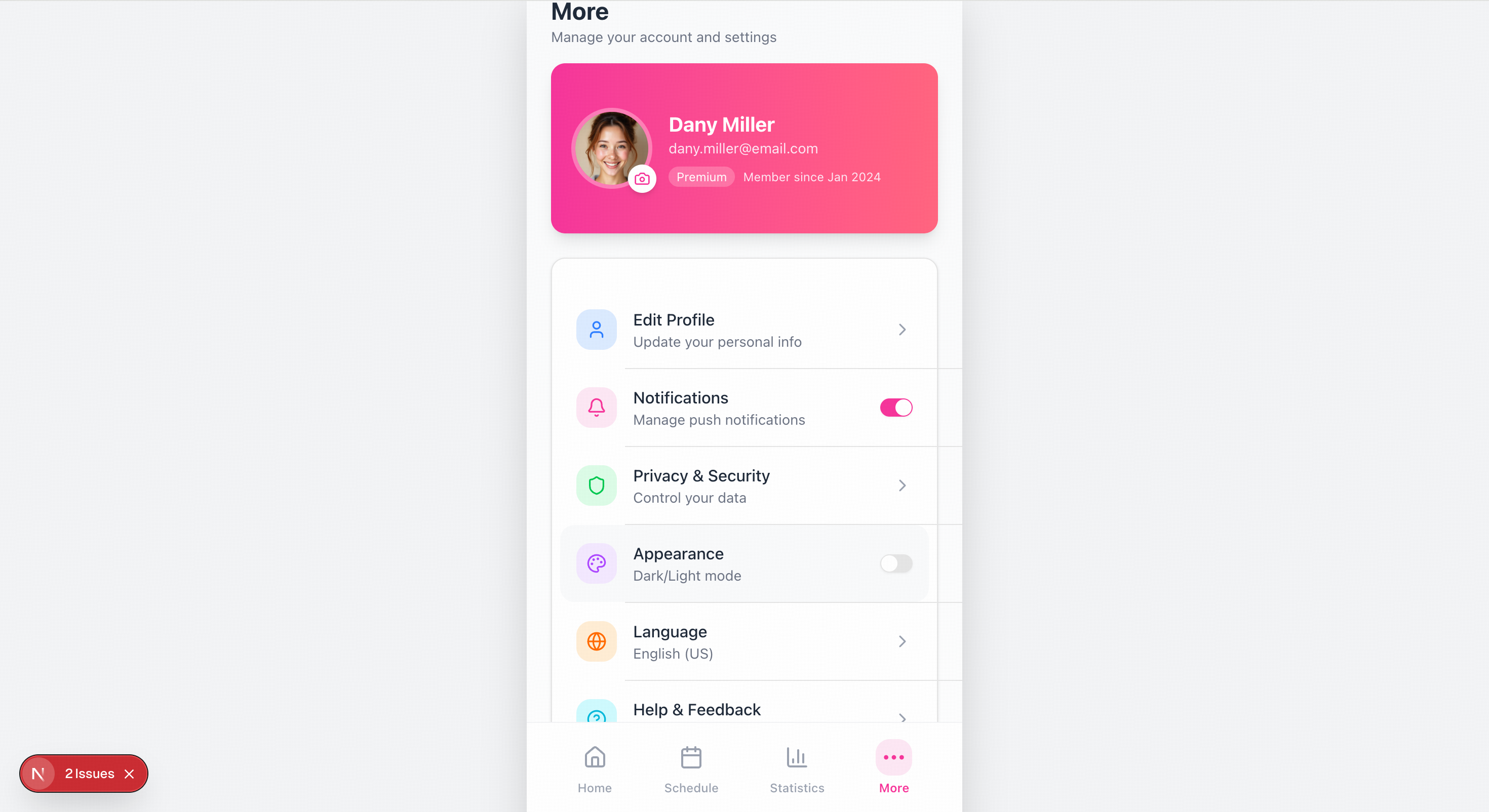
      <Card title="输入" icon={<svg style={{maskImage: "url(https://mintcdn.com/zhipu-ef7018ed/6jZAOYw-eXEZh1pv/resource/icon/arrow-down-right.svg?fit=max&auto=format&n=6jZAOYw-eXEZh1pv&q=85&s=088a58fa0b1a4048d5c6fab7841133c8)", WebkitMaskImage: "url(https://mintcdn.com/zhipu-ef7018ed/6jZAOYw-eXEZh1pv/resource/icon/arrow-down-right.svg?fit=max&auto=format&n=6jZAOYw-eXEZh1pv&q=85&s=088a58fa0b1a4048d5c6fab7841133c8)", maskRepeat: "no-repeat", maskPosition: "center center",}} className={"h-6 w-6 bg-primary dark:bg-primary-light !m-0 shrink-0"} />}>
        ![Description](https://cdn.bigmodel.cn/markdown/1774856146926image.png?attname=image.png)

        > 请根据图片里的设计稿 复刻出移动端的页面，左边为欢迎页，中间为首页图，你还需要mock出剩下两个页面。
      </Card>

      <Card title="输出" icon={<svg style={{maskImage: "url(https://mintcdn.com/zhipu-ef7018ed/Skp28ct-clfAIOZo/resource/icon/arrow-down-left.svg?fit=max&auto=format&n=Skp28ct-clfAIOZo&q=85&s=1ed65b58aa7a484b387f01be25d99278)", WebkitMaskImage: "url(https://mintcdn.com/zhipu-ef7018ed/Skp28ct-clfAIOZo/resource/icon/arrow-down-left.svg?fit=max&auto=format&n=Skp28ct-clfAIOZo&q=85&s=1ed65b58aa7a484b387f01be25d99278)", maskRepeat: "no-repeat", maskPosition: "center center",}} className={"h-6 w-6 bg-primary dark:bg-primary-light !m-0 shrink-0"} />}>
        ![Description](https://cdn.bigmodel.cn/markdown/1774856692508image.png?attname=image.png)
        ![Description](https://cdn.bigmodel.cn/markdown/1774856720373image.png?attname=image.png)
        ![Description](https://cdn.bigmodel.cn/markdown/1774856745613image.png?attname=image.png)
        ![Description](https://cdn.bigmodel.cn/markdown/1774857139202d744c7be15c6e13a5f651c26f93866f8.png?attname=d744c7be15c6e13a5f651c26f93866f8.png)
        ![Description](https://cdn.bigmodel.cn/markdown/1774856815088image.png?attname=image.png)
      </Card>
    </CardGroup>
  </Tab>

  <Tab title="网站生成">
    <CardGroup cols={2}>
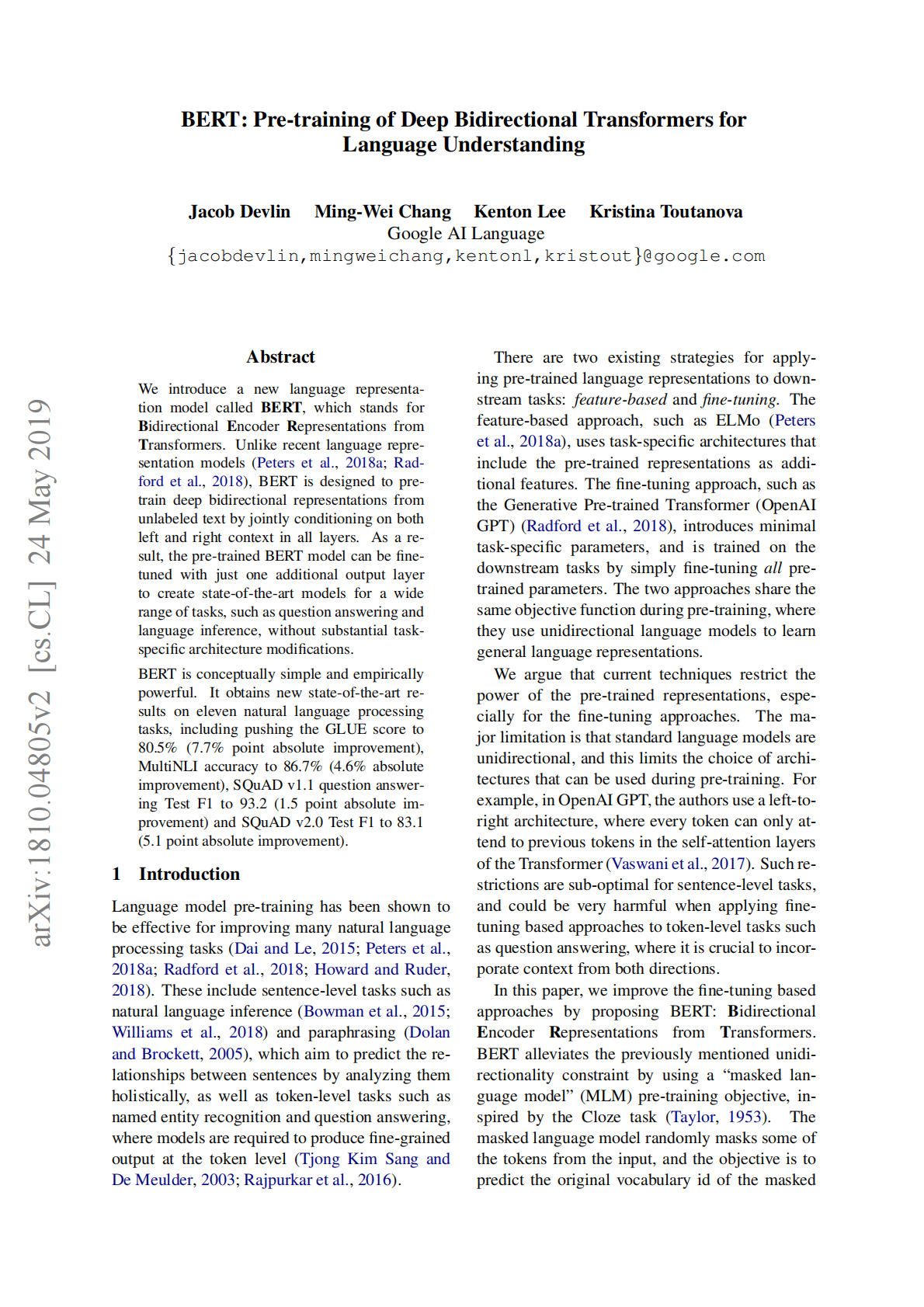
      <Card title="输入" icon={<svg style={{maskImage: "url(https://mintcdn.com/zhipu-ef7018ed/6jZAOYw-eXEZh1pv/resource/icon/arrow-down-right.svg?fit=max&auto=format&n=6jZAOYw-eXEZh1pv&q=85&s=088a58fa0b1a4048d5c6fab7841133c8)", WebkitMaskImage: "url(https://mintcdn.com/zhipu-ef7018ed/6jZAOYw-eXEZh1pv/resource/icon/arrow-down-right.svg?fit=max&auto=format&n=6jZAOYw-eXEZh1pv&q=85&s=088a58fa0b1a4048d5c6fab7841133c8)", maskRepeat: "no-repeat", maskPosition: "center center",}} className={"h-6 w-6 bg-primary dark:bg-primary-light !m-0 shrink-0"} />}>
        ![Description](https://cdn.bigmodel.cn/markdown/1774857357422795d3365-74a8-4cf9-944a-7fe904895f95_01.png?attname=795d3365-74a8-4cf9-944a-7fe904895f95_01.png)

        > 根据这个文章的内容做一个学术网站。
      </Card>

      <Card title="输出" icon={<svg style={{maskImage: "url(https://mintcdn.com/zhipu-ef7018ed/Skp28ct-clfAIOZo/resource/icon/arrow-down-left.svg?fit=max&auto=format&n=Skp28ct-clfAIOZo&q=85&s=1ed65b58aa7a484b387f01be25d99278)", WebkitMaskImage: "url(https://mintcdn.com/zhipu-ef7018ed/Skp28ct-clfAIOZo/resource/icon/arrow-down-left.svg?fit=max&auto=format&n=Skp28ct-clfAIOZo&q=85&s=1ed65b58aa7a484b387f01be25d99278)", maskRepeat: "no-repeat", maskPosition: "center center",}} className={"h-6 w-6 bg-primary dark:bg-primary-light !m-0 shrink-0"} />}>
        ![Description](https://cdn.bigmodel.cn/markdown/1774857049017image.png?attname=image.png)
      </Card>
    </CardGroup>
  </Tab>

  <Tab title="文档理解与写作">
    <CardGroup cols={2}>
      <Card title="输入" icon={<svg style={{maskImage: "url(https://mintcdn.com/zhipu-ef7018ed/6jZAOYw-eXEZh1pv/resource/icon/arrow-down-right.svg?fit=max&auto=format&n=6jZAOYw-eXEZh1pv&q=85&s=088a58fa0b1a4048d5c6fab7841133c8)", WebkitMaskImage: "url(https://mintcdn.com/zhipu-ef7018ed/6jZAOYw-eXEZh1pv/resource/icon/arrow-down-right.svg?fit=max&auto=format&n=6jZAOYw-eXEZh1pv&q=85&s=088a58fa0b1a4048d5c6fab7841133c8)", maskRepeat: "no-repeat", maskPosition: "center center",}} className={"h-6 w-6 bg-primary dark:bg-primary-light !m-0 shrink-0"} />}>
        ![Description](https://cdn.bigmodel.cn/markdown/1774857284507GLM-OCR-TR_01.png?attname=GLM-OCR-TR_01.png)

        > 阅读文档，撰写宣传文案；要求: 小红书风格，不少于500字，最后对未来发展趋势进行展望。
      </Card>

      <Card title="输出" icon={<svg style={{maskImage: "url(https://mintcdn.com/zhipu-ef7018ed/Skp28ct-clfAIOZo/resource/icon/arrow-down-left.svg?fit=max&auto=format&n=Skp28ct-clfAIOZo&q=85&s=1ed65b58aa7a484b387f01be25d99278)", WebkitMaskImage: "url(https://mintcdn.com/zhipu-ef7018ed/Skp28ct-clfAIOZo/resource/icon/arrow-down-left.svg?fit=max&auto=format&n=Skp28ct-clfAIOZo&q=85&s=1ed65b58aa7a484b387f01be25d99278)", maskRepeat: "no-repeat", maskPosition: "center center",}} className={"h-6 w-6 bg-primary dark:bg-primary-light !m-0 shrink-0"} />}>
        ```
        打工人狂喜！0.9B参数的文档理解神器GLM-OCR，直接把效率拉满🔥
        家人们谁懂啊！之前处理复杂文档、多语言表格、数学公式，要么用大模型慢到怀疑人生，要么用传统OCR识别得一塌糊涂，直到我挖到了GLM-OCR——这个0.9B参数的轻量多模态模型，直接把我的文档处理效率拉满，性能还吊打一堆大参数模型！
        核心优势：小身材，大能量💪
        GLM-OCR是智谱AI和清华大学联合打造的，只有0.9B参数，但性能真的绝了！在OmniDocBench v1.5上拿下94.6的高分，比很多几十亿参数的模型都强劲，文档解析、表格识别、公式识别、关键信息提取全场景覆盖，而且推理速度超快——平均推理加速50%，吞吐量直接拉满，处理文档再也不用等半天！
        它还有个黑科技：Multi-Token Prediction（MTP）机制，一次预测多个token，既提升推理速度，又保证输出结构稳定，再也不用担心识别出来的内容乱七八糟！
        实际场景：从复杂文档到公式，全搞定✅
        1. 复杂文档解析
        之前处理那种带多语言、手写体、特殊符号的餐厅菜单，老OCR要么把意大利语识别成乱码，要么漏掉价格细节，GLM-OCR直接精准还原，连“€5.10€”这种价格符号都没错，还能保留原文的换行、大小写，细节拉满！
        2. 表格识别
        那种临床摘要表格，列层级复杂、还有合并单元格，GLM-OCR直接还原表格结构，列分组、数值对应清清楚楚，直接转成机器可读的格式，做数据分析再也不用手动录入！
        3. 公式识别
        科研党狂喜！把论文里的数学公式图片丢进去，直接转成LaTeX格式，矩阵、行列式、多级下标都精准识别，再也不用手动敲公式，写论文效率直接翻倍！
        4. 关键信息提取
        处理报关单这种复杂表单，只要给个JSON格式的提示词，直接提取出船名、信用代码这些关键信息，输出严格符合格式，直接对接系统，自动化办公不是梦！
        部署友好：从本地到云端，随便选🛠️
        GLM-OCR太懂打工人了！支持本地部署、MaaS API，还有完整的SDK，不管你是要在公司服务器上跑，还是要用云服务，都能轻松搞定。而且它分轻量版和PP-DocLayoutV3版，轻量版适合资源受限的边缘设备，PP版适合大规模生产环境，还能用LLaMA-Factory微调，适配自己的业务场景，真的太贴心了！
        未来展望：文档理解的下一步🚀
        GLM-OCR已经这么强了，未来还会往这些方向进化：
        极致轻量化：进一步压缩模型体积，让手机、平板这类端侧设备也能流畅运行，随时随地处理文档；
        多模态融合升级：结合音频、视频等多模态信息，处理带讲解视频的课件、带语音备注的合同等复杂场景；
        全场景覆盖：支持更多小众语言、特殊格式，比如古籍、工程图纸，让文档理解无死角；
        生态深度集成：和Word、飞书、钉钉等办公软件打通，实现文档处理的自动化闭环，打工人彻底解放双手！
        总之，GLM-OCR真的是文档理解领域的宝藏模型，不管你是打工人、科研党还是开发者，都值得试试！真的绝了！👏
        ```
      </Card>
    </CardGroup>
  </Tab>

  <Tab title="视频对象追踪">
    <CardGroup cols={2}>
      <Card title="输入" icon={<svg style={{maskImage: "url(https://mintcdn.com/zhipu-ef7018ed/6jZAOYw-eXEZh1pv/resource/icon/arrow-down-right.svg?fit=max&auto=format&n=6jZAOYw-eXEZh1pv&q=85&s=088a58fa0b1a4048d5c6fab7841133c8)", WebkitMaskImage: "url(https://mintcdn.com/zhipu-ef7018ed/6jZAOYw-eXEZh1pv/resource/icon/arrow-down-right.svg?fit=max&auto=format&n=6jZAOYw-eXEZh1pv&q=85&s=088a58fa0b1a4048d5c6fab7841133c8)", maskRepeat: "no-repeat", maskPosition: "center center",}} className={"h-6 w-6 bg-primary dark:bg-primary-light !m-0 shrink-0"} />}>
        <video className="m-0 p-1" src="https://cdn.bigmodel.cn/static/glm-5v-turbo/glm-5v-turbo-example-1.mp4" controls />

        > 对视频中小马的对象追踪结果，以JSON格式输出。
      </Card>

      <Card title="输出" icon={<svg style={{maskImage: "url(https://mintcdn.com/zhipu-ef7018ed/Skp28ct-clfAIOZo/resource/icon/arrow-down-left.svg?fit=max&auto=format&n=Skp28ct-clfAIOZo&q=85&s=1ed65b58aa7a484b387f01be25d99278)", WebkitMaskImage: "url(https://mintcdn.com/zhipu-ef7018ed/Skp28ct-clfAIOZo/resource/icon/arrow-down-left.svg?fit=max&auto=format&n=Skp28ct-clfAIOZo&q=85&s=1ed65b58aa7a484b387f01be25d99278)", maskRepeat: "no-repeat", maskPosition: "center center",}} className={"h-6 w-6 bg-primary dark:bg-primary-light !m-0 shrink-0"} />}>
        <video className="m-0 p-1" src="https://cdn.bigmodel.cn/static/glm-5v-turbo/glm-5v-turbo-example-2.mp4" controls />

        ```
        {
            "0": [
                {
                    "label": "horse-0",
                    "bbox_2d": [574, 512, 641, 602]
                }
            ],
            "1": [
                {
                    "label": "horse-0",
                    "bbox_2d": [556, 469, 605, 585]
                }
            ],
            "2": [
                {
                    "label": "horse-0",
                    "bbox_2d": [532, 458, 579, 562]
                }
            ],
            "3": [
                {
                    "label": "horse-0",
                    "bbox_2d": [518, 497, 592, 637]
                }
            ],
            "4": [
                {
                    "label": "horse-0",
                    "bbox_2d": [534, 597, 614, 758]
                }
            ],
            "5": [
                {
                    "label": "horse-0",
                    "bbox_2d": [529, 627, 602, 779]
                }
            ],
            "6": [
                {
                    "label": "horse-0",
                    "bbox_2d": [509, 609, 582, 787]
                }
            ],
            "7": [
                {
                    "label": "horse-0",
                    "bbox_2d": [472, 593, 579, 809]
                }
            ],
            "8": [
                {
                    "label": "horse-0",
                    "bbox_2d": [450, 605, 592, 825]
                }
            ],
            "9": [
                {
                    "label": "horse-0",
                    "bbox_2d": [455, 600, 614, 838]
                }
            ],
            "10": [
                {
                    "label": "horse-0",
                    "bbox_2d": [448, 569, 659, 852]
                }
            ],
            "11": [
                {
                    "label": "horse-0",
                    "bbox_2d": [436, 562, 686, 862]
                }
            ],
            "12": [
                {
                    "label": "horse-0",
                    "bbox_2d": [419, 553, 709, 889]
                }
            ],
            "13": [
                {
                    "label": "horse-0",
                    "bbox_2d": [409, 554, 721, 924]
                }
            ],
            "14": [
                {
                    "label": "horse-0",
                    "bbox_2d": [398, 555, 705, 930]
                }
            ],
            "15": [
                {
                    "label": "horse-0",
                    "bbox_2d": [435, 531, 763, 920]
                }
            ],
            "16": [
                {
                    "label": "horse-0",
                    "bbox_2d": [480, 533, 779, 909]
                }
            ],
            "17": [
                {
                    "label": "horse-0",
                    "bbox_2d": [528, 574, 769, 900]
                }
            ]
        }
        ```
      </Card>
    </CardGroup>
  </Tab>
</Tabs>

## 调用示例

### 基础与流式

<Tabs>
  <Tab title="cURL">
    **基础调用**

    ```bash theme={null}
    curl -X POST \
      https://open.bigmodel.cn/api/paas/v4/chat/completions \
      -H "Authorization: Bearer your-api-key" \
      -H "Content-Type: application/json" \
      -d '{
        "model": "glm-5v-turbo",
        "messages": [
          {
            "role": "user",
            "content": [
              {
                "type": "image_url",
                "image_url": {
                  "url": "https://cloudcovert-1305175928.cos.ap-guangzhou.myqcloud.com/%E5%9B%BE%E7%89%87grounding.PNG"
                }
              },
              {
                "type": "text",
                "text": "Where is the second bottle of beer from the right on the table?  Provide coordinates in [[xmin,ymin,xmax,ymax]] format"
              }
            ]
          }
        ],
        "thinking": {
          "type":"enabled"
        }
      }'
    ```

    **流式调用**

    ```bash theme={null}
    curl -X POST \
      https://open.bigmodel.cn/api/paas/v4/chat/completions \
      -H "Authorization: Bearer your-api-key" \
      -H "Content-Type: application/json" \
      -d '{
        "model": "glm-5v-turbo",
        "messages": [
          {
            "role": "user",
            "content": [
              {
                "type": "image_url",
                "image_url": {
                  "url": "https://cloudcovert-1305175928.cos.ap-guangzhou.myqcloud.com/%E5%9B%BE%E7%89%87grounding.PNG"
                }
              },
              {
                "type": "text",
                "text": "Where is the second bottle of beer from the right on the table?  Provide coordinates in [[xmin,ymin,xmax,ymax]] format"
              }
            ]
          }
        ],
        "thinking": {
          "type":"enabled"
        },
        "stream": true
      }'
    ```
  </Tab>

  <Tab title="Python">
    **安装 SDK**

    ```bash theme={null}
    # 安装最新版本
    pip install zai-sdk
    # 或指定版本
    pip install zai-sdk==0.2.3
    ```

    **验证安装**

    ```python theme={null}
    import zai
    print(zai.__version__)
    ```

    **基础调用**

    ```python theme={null}
    from zai import ZhipuAiClient

    client = ZhipuAiClient(api_key="your-api-key")  # 填写您自己的 APIKey
    response = client.chat.completions.create(
    model="glm-5v-turbo",  # 填写需要调用的模型名称
    messages=[
    {
        "content": [
            {
                "type": "image_url",
                "image_url": {
                    "url": "https://cloudcovert-1305175928.cos.ap-guangzhou.myqcloud.com/%E5%9B%BE%E7%89%87grounding.PNG"
                }
            },
            {
                "type": "text",
                "text": "Where is the second bottle of beer from the right on the table?  Provide coordinates in [[xmin,ymin,xmax,ymax]] format"
            }
        ],
        "role": "user"
    }
    ],
    thinking={
    "type":"enabled"
    }
    )
    print(response.choices[0].message)
    ```

    **流式调用**

    ```python theme={null}
    from zai import ZhipuAiClient

    client = ZhipuAiClient(api_key="your-api-key")  # 填写您自己的 APIKey
    response = client.chat.completions.create(
    model="glm-5v-turbo",  # 填写需要调用的模型名称
    messages=[
    {
        "content": [
            {
                "type": "image_url",
                "image_url": {
                    "url": "https://cloudcovert-1305175928.cos.ap-guangzhou.myqcloud.com/%E5%9B%BE%E7%89%87grounding.PNG"
                }
            },
            {
                "type": "text",
                "text": "Where is the second bottle of beer from the right on the table?  Provide coordinates in [[xmin,ymin,xmax,ymax]] format"
            }
        ],
        "role": "user"
    }
    ],
    thinking={
    "type":"enabled"
    },
    stream=True
    )

    for chunk in response:
    if chunk.choices[0].delta.reasoning_content:
    print(chunk.choices[0].delta.reasoning_content, end='', flush=True)

    if chunk.choices[0].delta.content:
    print(chunk.choices[0].delta.content, end='', flush=True)
    ```
  </Tab>

  <Tab title="Java">
    **安装 SDK**

    **Maven**

    ```xml theme={null}
    <dependency>
        <groupId>ai.z.openapi</groupId>
        <artifactId>zai-sdk</artifactId>
        <version>0.3.5</version>
    </dependency>
    ```

    **Gradle (Groovy)**

    ```groovy theme={null}
    implementation 'ai.z.openapi:zai-sdk:0.3.5'
    ```

    **基础调用**

    ```java theme={null}
    import ai.z.openapi.ZhipuAiClient;
    import ai.z.openapi.service.model.*;
    import ai.z.openapi.core.Constants;
    import java.util.Arrays;

    public class GLM46VExample {
    public static void main(String[] args) {
    String apiKey = ""; // 请填写您自己的APIKey
    ZhipuAiClient client = ZhipuAiClient.builder().ofZHIPU()
        .apiKey(apiKey)
        .build();

    ChatCompletionCreateParams request = ChatCompletionCreateParams.builder()
        .model("glm-5v-turbo")
        .messages(Arrays.asList(
            ChatMessage.builder()
                .role(ChatMessageRole.USER.value())
                .content(Arrays.asList(
                    MessageContent.builder()
                        .type("text")
                        .text("描述下这张图片")
                        .build(),
                    MessageContent.builder()
                        .type("image_url")
                        .imageUrl(ImageUrl.builder()
                            .url("https://aigc-files.bigmodel.cn/api/cogview/20250723213827da171a419b9b4906_0.png")
                            .build())
                        .build()))
                .build()))
        .build();

    ChatCompletionResponse response = client.chat().createChatCompletion(request);

    if (response.isSuccess()) {
        Object reply = response.getData().getChoices().get(0).getMessage();
        System.out.println(reply);
    } else {
        System.err.println("错误: " + response.getMsg());
    }
    }
    }
    ```

    **流式调用**

    ```java theme={null}
    import ai.z.openapi.ZhipuAiClient;
    import ai.z.openapi.service.model.*;
    import ai.z.openapi.core.Constants;
    import java.util.Arrays;

    public class GLM46VStreamExample {
    public static void main(String[] args) {
    String apiKey = ""; // 请填写您自己的APIKey
    ZhipuAiClient client = ZhipuAiClient.builder().ofZHIPU()
        .apiKey(apiKey)
        .build();

    ChatCompletionCreateParams request = ChatCompletionCreateParams.builder()
        .model("glm-5v-turbo")
        .messages(Arrays.asList(
            ChatMessage.builder()
                .role(ChatMessageRole.USER.value())
                .content(Arrays.asList(
                    MessageContent.builder()
                        .type("text")
                        .text("Where is the second bottle of beer from the right on the table?  Provide coordinates in [[xmin,ymin,xmax,ymax]] format")
                        .build(),
                    MessageContent.builder()
                        .type("image_url")
                        .imageUrl(ImageUrl.builder()
                            .url("https://cloudcovert-1305175928.cos.ap-guangzhou.myqcloud.com/%E5%9B%BE%E7%89%87grounding.PNG")
                            .build())
                        .build()))
                .build()))
        .stream(true)
        .build();

    ChatCompletionResponse response = client.chat().createChatCompletion(request);

    if (response.isSuccess()) {
        response.getFlowable().subscribe(
            // Process streaming message data
            data -> {
                if (data.getChoices() != null && !data.getChoices().isEmpty()) {
                    Delta delta = data.getChoices().get(0).getDelta();
                    System.out.print(delta + "\n");
                }
            },
            // Process streaming response error
            error -> System.err.println("\nStream error: " + error.getMessage()),
            // Process streaming response completion event
            () -> System.out.println("\nStreaming response completed")
        );
    } else {
        System.err.println("Error: " + response.getMsg());
    }
    }
    }
    ```
  </Tab>

  <Tab title="Python(旧)">
    **更新 SDK 至 2.1.5.20250726**

    ```bash theme={null}
    # 安装最新版本
    pip install zhipuai

    # 或指定版本
    pip install zhipuai==2.1.5.20250726
    ```

    **基础调用**

    ```Python theme={null}
    from zhipuai import ZhipuAI

    client = ZhipuAI(api_key="your-api-key")  # 填写您自己的APIKey

    response = client.chat.completions.create(
    model="glm-5v-turbo",  # 填写需要调用的模型名称
    messages=[
    {
        "role": "user",
        "content": [
    {
        "type": "text",
        "text": "请帮我解决这个题目，给出详细过程和答案"
    },
    {
        "type": "image_url",
        "image_url": {
        "url": "传入图片的 url 地址"
    }
    }
        ]
    }
    ]
    )

    print(response.choices[0].message)
    ```

    **流式调用**

    ```python theme={null}
    from zhipuai import ZhipuAI

    client = ZhipuAI(api_key="your-api-key")  # 填写您自己的APIKey

    response = client.chat.completions.create(
    model="glm-5v-turbo",  # 填写需要调用的模型名称
    messages=[
    {
        "content": [
    {
        "type": "image_url",
        "image_url": {
        "url": "https://cloudcovert-1305175928.cos.ap-guangzhou.myqcloud.com/%E5%9B%BE%E7%89%87grounding.PNG"
    }
    },
    {
        "type": "text",
    "text": "Where is the second bottle of beer from the right on the table?  Provide coordinates in [[xmin,ymin,xmax,ymax]] format"
    }
        ],
        "role": "user"
    }
    ],
    thinking={
    "type":"enabled"
    },
    stream=True
    )

    for chunk in response:
    if chunk.choices[0].delta.reasoning_content:
    print(chunk.choices[0].delta.reasoning_content, end='', flush=True)

    if chunk.choices[0].delta.content:
    print(chunk.choices[0].delta.content, end='', flush=True)
    ```
  </Tab>
</Tabs>

### 多模态理解

> 不支持同时理解文件、视频和图像。

<Tabs>
  <Tab title="cURL">
    **图片理解**

    ```bash theme={null}
    curl -X POST \
      https://open.bigmodel.cn/api/paas/v4/chat/completions \
      -H "Authorization: Bearer your-api-key" \
      -H "Content-Type: application/json" \
      -d '{
        "model": "glm-5v-turbo",
        "messages": [
          {
            "role": "user",
            "content": [
              {
                "type": "image_url",
                "image_url": {
                  "url": "https://cdn.bigmodel.cn/static/logo/register.png"
                }
              },
              {
                "type": "image_url",
                "image_url": {
                  "url": "https://cdn.bigmodel.cn/static/logo/api-key.png"
                }
              },
              {
                "type": "text",
                "text": "What are the pics talk about?"
              }
            ]
          }
        ],
        "thinking": {
          "type": "enabled"
        }
      }'
    ```

    **视频理解**

    ```bash theme={null}
    curl -X POST \
      https://open.bigmodel.cn/api/paas/v4/chat/completions \
      -H "Authorization: Bearer your-api-key" \
      -H "Content-Type: application/json" \
      -d '{
        "model": "glm-5v-turbo",
        "messages": [
          {
            "role": "user",
            "content": [
              {
                "type": "video_url",
                "video_url": {
                  "url": "https://cdn.bigmodel.cn/agent-demos/lark/113123.mov"
                }
              },
              {
                "type": "text",
                "text": "What are the video show about?"
              }
            ]
          }
        ],
        "thinking": {
          "type": "enabled"
        }
      }'
    ```

    **文件理解**

    ```bash theme={null}
    curl -X POST \
      https://open.bigmodel.cn/api/paas/v4/chat/completions \
      -H "Authorization: Bearer your-api-key" \
      -H "Content-Type: application/json" \
      -d '{
        "model": "glm-5v-turbo",
        "messages": [
          {
            "role": "user",
            "content": [
              {
                "type": "file_url",
                "file_url": {
                  "url": "https://cdn.bigmodel.cn/static/demo/demo2.txt"
                }
              },
              {
                "type": "file_url",
                "file_url": {
                  "url": "https://cdn.bigmodel.cn/static/demo/demo1.pdf"
                }
              },
              {
                "type": "text",
                "text": "What are the files show about?"
              }
            ]
          }
        ],
        "thinking": {
          "type": "enabled"
        }
      }'
    ```
  </Tab>

  <Tab title="Python">
    **安装 SDK**

    ```bash theme={null}
    # 安装最新版本
    pip install zai-sdk
    # 或指定版本
    pip install zai-sdk==0.2.3
    ```

    **验证安装**

    ```python theme={null}
    import zai
    print(zai.__version__)
    ```

    **图片理解**

    ```python theme={null}
    from zai import ZhipuAiClient

    client = ZhipuAiClient(api_key="your-api-key")  # 填写您自己的APIKey
    response = client.chat.completions.create(
        model="glm-5v-turbo",
        messages=[
            {
                "role": "user",
                "content": [
                    {
                        "type": "image_url",
                        "image_url": {
                            "url": "https://cdn.bigmodel.cn/static/logo/register.png"
                        }
                    },
                    {
                        "type": "image_url",
                        "image_url": {
                            "url": "https://cdn.bigmodel.cn/static/logo/api-key.png"
                        }
                    },
                    {
                        "type": "text",
                        "text": "What are the pics talk about?"
                    }
                ]
            }
        ],
        thinking={
            "type": "enabled"
        }
    )
    print(response.choices[0].message)
    ```

    **传入 Base64 图片**

    ```python theme={null}
    from zai import ZhipuAiClient
    import base64

    client = ZhipuAiClient(api_key="your-api-key")  # 填写您自己的APIKey

    img_path = "your/path/xxx.png"
    with open(img_path, "rb") as img_file:
        img_base = base64.b64encode(img_file.read()).decode("utf-8")

    response = client.chat.completions.create(
        model="glm-5v-turbo",
        messages=[
            {
                "role": "user",
                "content": [
                    {
                        "type": "image_url",
                        "image_url": {
                            "url": img_base
                        }
                    },
                    {
                        "type": "text",
                        "text": "请描述这个图片"
                    }
                ]
            }
        ],
        thinking={
            "type": "enabled"
        }
    )
    print(response.choices[0].message)
    ```

    **视频理解**

    ```python theme={null}
    from zai import ZhipuAiClient

    client = ZhipuAiClient(api_key="your-api-key")  # 填写您自己的APIKey
    response = client.chat.completions.create(
        model="glm-5v-turbo",
        messages=[
            {
                "role": "user",
                "content": [
                    {
                        "type": "video_url",
                        "video_url": {
                            "url": "https://cdn.bigmodel.cn/agent-demos/lark/113123.mov"
                        }
                    },
                    {
                        "type": "text",
                        "text": "What are the video show about?"
                    }
                ]
            }
        ],
        thinking={
            "type": "enabled"
        }
    )
    print(response.choices[0].message)
    ```

    **文件理解**

    ```python theme={null}
    from zai import ZhipuAiClient

    client = ZhipuAiClient(api_key="your-api-key")  # 填写您自己的APIKey
    response = client.chat.completions.create(
        model="glm-5v-turbo",
        messages=[
            {
                "role": "user",
                "content": [
                    {
                        "type": "file_url",
                        "file_url": {
                            "url": "https://cdn.bigmodel.cn/static/demo/demo2.txt"
                        }
                    },
                    {
                        "type": "file_url",
                        "file_url": {
                            "url": "https://cdn.bigmodel.cn/static/demo/demo1.pdf"
                        }
                    },
                    {
                        "type": "text",
                        "text": "What are the files show about?"
                    }
                ]
            }
        ],
        thinking={
            "type":"enabled"
        }
    )
    print(response.choices[0].message)
    ```
  </Tab>

  <Tab title="Java">
    **安装 SDK**

    **Maven**

    ```xml theme={null}
    <dependency>
        <groupId>ai.z.openapi</groupId>
        <artifactId>zai-sdk</artifactId>
        <version>0.3.5</version>
    </dependency>
    ```

    **Gradle (Groovy)**

    ```groovy theme={null}
    implementation 'ai.z.openapi:zai-sdk:0.3.5'
    ```

    **图片理解**

    ```java theme={null}
    import ai.z.openapi.ZhipuAiClient;
    import ai.z.openapi.service.model.*;
    import java.util.Arrays;

    public class MultiModalImageExample {
        public static void main(String[] args) {
            String apiKey = "your-api-key"; // 请填写您自己的APIKey
            ZhipuAiClient client = ZhipuAiClient.builder().ofZHIPU()
                .apiKey(apiKey)
                .build();

            ChatCompletionCreateParams request = ChatCompletionCreateParams.builder()
                .model("glm-5v-turbo")
                .messages(Arrays.asList(
                    ChatMessage.builder()
                        .role(ChatMessageRole.USER.value())
                        .content(Arrays.asList(
                            MessageContent.builder()
                                .type("image_url")
                                .imageUrl(ImageUrl.builder()
                                    .url("https://cdn.bigmodel.cn/static/logo/register.png")
                                    .build())
                                .build(),
                            MessageContent.builder()
                                .type("image_url")
                                .imageUrl(ImageUrl.builder()
                                    .url("https://cdn.bigmodel.cn/static/logo/api-key.png")
                                    .build())
                                .build(),
                            MessageContent.builder()
                                .type("text")
                                .text("What are the pics talk about?")
                                .build()
                        ))
                        .build())
                ))
                .thinking(ChatThinking.builder()
                    .type("enabled")
                    .build())
                .build();

            ChatCompletionResponse response = client.chat().createChatCompletion(request);

            if (response.isSuccess()) {
                Object reply = response.getData().getChoices().get(0).getMessage();
                System.out.println(reply);
            } else {
                System.err.println("错误: " + response.getMsg());
            }
        }
    }
    ```

    **传入 Base64 图片**

    ```java theme={null}
    import ai.z.openapi.ZhipuAiClient;
    import ai.z.openapi.service.model.*;
    import java.io.File;
    import java.io.IOException;
    import java.nio.file.Files;
    import java.util.Arrays;
    import java.util.Base64;

    public class Base64ImageExample {
        public static void main(String[] args) throws IOException {
            String apiKey = "your-api-key"; // 请填写您自己的APIKey
            ZhipuAiClient client = ZhipuAiClient.builder().ofZHIPU().apiKey(apiKey).build();

            String file = ClassLoader.getSystemResource("your/path/xxx.png").getFile();
            byte[] bytes = Files.readAllBytes(new File(file).toPath());
            Base64.Encoder encoder = Base64.getEncoder();
            String base64 = encoder.encodeToString(bytes);

            ChatCompletionCreateParams request = ChatCompletionCreateParams.builder()
                .model("glm-5v-turbo")
                .messages(Arrays.asList(
                    ChatMessage.builder()
                        .role(ChatMessageRole.USER.value())
                        .content(Arrays.asList(
                            MessageContent.builder()
                                .type("image_url")
                                .imageUrl(ImageUrl.builder()
                                    .url(base64)
                                    .build())
                                .build(),
                            MessageContent.builder()
                                .type("text")
                                .text("What are the pics talk about?")
                                .build()))
                        .build()))
                .thinking(ChatThinking.builder().type("enabled").build())
                .build();

            ChatCompletionResponse response = client.chat().createChatCompletion(request);

            if (response.isSuccess()) {
                Object reply = response.getData().getChoices().get(0).getMessage();
                System.out.println(reply);
            } else {
                System.err.println("错误: " + response.getMsg());
            }
        }
    }
    ```

    **视频理解**

    ```java theme={null}
    import ai.z.openapi.ZhipuAiClient;
    import ai.z.openapi.service.model.*;
    import java.util.Arrays;

    public class MultiModalVideoExample {
        public static void main(String[] args) {
            String apiKey = "your-api-key"; // 请填写您自己的APIKey
            ZhipuAiClient client = ZhipuAiClient.builder().ofZHIPU()
                .apiKey(apiKey)
                .build();

            ChatCompletionCreateParams request = ChatCompletionCreateParams.builder()
                .model("glm-5v-turbo")
                .messages(Arrays.asList(
                    ChatMessage.builder()
                        .role(ChatMessageRole.USER.value())
                        .content(Arrays.asList(
                            MessageContent.builder()
                                .type("video_url")
                                .videoUrl(VideoUrl.builder()
                                    .url("https://cdn.bigmodel.cn/agent-demos/lark/113123.mov")
                                    .build())
                                .build(),
                            MessageContent.builder()
                                .type("text")
                                .text("What are the video show about?")
                                .build()
                        ))
                        .build())
                ))
                .thinking(ChatThinking.builder()
                    .type("enabled")
                    .build())
                .build();

            ChatCompletionResponse response = client.chat().createChatCompletion(request);

            if (response.isSuccess()) {
                Object reply = response.getData().getChoices().get(0).getMessage();
                System.out.println(reply);
            } else {
                System.err.println("错误: " + response.getMsg());
            }
        }
    }
    ```

    **文件理解**

    ```java theme={null}
    import ai.z.openapi.ZhipuAiClient;
    import ai.z.openapi.service.model.*;
    import java.util.Arrays;

    public class MultiModalFileExample {
        public static void main(String[] args) {
            String apiKey = "your-api-key"; // 请填写您自己的APIKey
            ZhipuAiClient client = ZhipuAiClient.builder().ofZHIPU()
                .apiKey(apiKey)
                .build();

            ChatCompletionCreateParams request = ChatCompletionCreateParams.builder()
                .model("glm-5v-turbo")
                .messages(Arrays.asList(
                    ChatMessage.builder()
                        .role(ChatMessageRole.USER.value())
                        .content(Arrays.asList(
                            MessageContent.builder()
                                .type("file_url")
                                .fileUrl(FileUrl.builder()
                                    .url("https://cdn.bigmodel.cn/static/demo/demo2.txt")
                                    .build())
                                .build(),
                            MessageContent.builder()
                                .type("file_url")
                                .fileUrl(FileUrl.builder()
                                    .url("https://cdn.bigmodel.cn/static/demo/demo1.pdf")
                                    .build())
                                .build(),
                            MessageContent.builder()
                                .type("text")
                                .text("What are the files show about?")
                                .build()
                        ))
                        .build())
                ))
                .thinking(ChatThinking.builder()
                    .type("enabled")
                    .build())
                .build();

            ChatCompletionResponse response = client.chat().createChatCompletion(request);

            if (response.isSuccess()) {
                Object reply = response.getData().getChoices().get(0).getMessage();
                System.out.println(reply);
            } else {
                System.err.println("错误: " + response.getMsg());
            }
        }
    }
    ```
  </Tab>
</Tabs>